EQ is the best medicine

If you own headphones you do not quite get on with, the cheapest thing you can do about it is EQ. Not a new DAC, not a new cable, not a new amplifier — an equaliser, which on most modern hardware costs nothing at all. I have said versions of this in a lot of reviews, and I keep saying it because it keeps being true: for most headphones and IEMs, frequency response is the thing you are actually reacting to, and frequency response is the one thing EQ changes directly.
The resistance to EQ in the hobby is odd. Some of it is a hangover from graphic equalisers on 1980s hi-fi separates, which were genuinely coarse and encouraged the smiley-face curve. Some of it is a belief that a headphone should be “pure” and that touching the signal is cheating. That argument does not survive contact with how headphones are actually built: every headphone has already been tuned, with damping felt, port geometry, pad choice and a front cavity volume, by an engineer making trade-offs and guesses about what people will like. EQ just means you get a say too.
What EQ can fix, and what it cannot
EQ changes level as a function of frequency. That is the whole of it. Which means:
It can fix tonal balance. Too much upper-bass bloom, a shouty 3 kHz, a sharp 6 kHz peak that makes cymbals hurt, rolled-off sub-bass on a sealed IEM. These are frequency response problems and EQ addresses them head on. This covers the overwhelming majority of complaints I read about headphones.
It can partly fix bass extension on a driver that can move enough air but has been tuned shy. A +5 dB low shelf on a headphone with a competent driver usually costs you nothing audible. On a small driver already working hard, the same shelf will raise distortion — you are asking for more excursion, and excursion is where distortion comes from.
It cannot fix distortion. If a driver is breaking up at 90 dB, cutting the offending region reduces how much you hear it, but you have not fixed the driver, you have just turned it down. This matters most on cheap TWS and on small dynamic drivers pushed hard.
It cannot fix a bad seal. This is the big one and it is worth being blunt about: if your IEM tips are not sealing, or your pads are leaking around glasses arms, no amount of low shelf will give you the bass back cleanly. The leak is a physical high-pass filter, it varies every time you put the headphone on, and EQ applied on top of a moving target just makes the problem less predictable. Fix the fit first. I wrote up a triple-flange eartip hack for exactly this reason, and the fit-to-fit consistency problem is the subject of a separate article on acoustic impedance.
It cannot change driver speed, soundstage or imaging in any direct way — although in practice a lot of what people describe as “congested” or “closed-in” turns out to be an upper-midrange or lower-treble balance problem, and does respond to EQ. Be sceptical of anyone, including me, who claims EQ improved something that is not a level-versus- frequency phenomenon.
The three filters you actually get
Whatever the software or dongle, you will nearly always be given the same three biquad types, usually labelled PK, LSQ and HSQ.
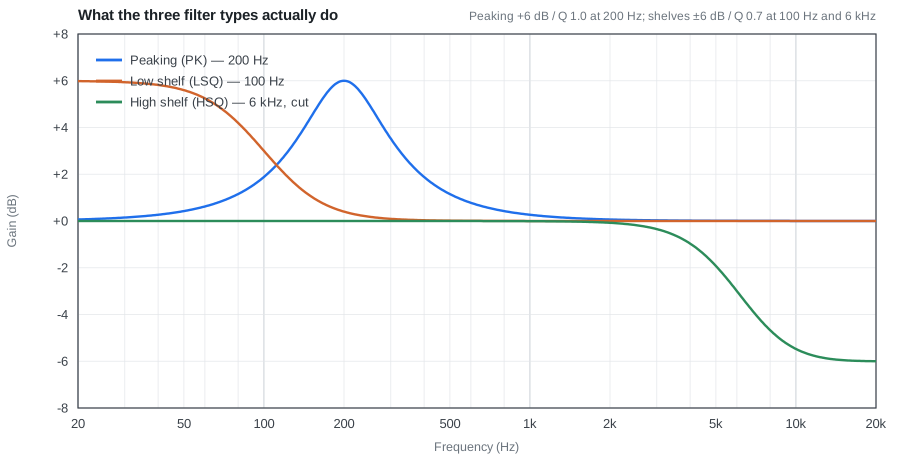
A peaking filter (PK) boosts or cuts a bump centred on one frequency and leaves everything far from it alone. This is the workhorse — the thing you use to take 4 dB out of a 6 kHz peak.
A low shelf (LSQ) lifts or drops everything below a corner frequency by a fixed amount. This is what you use to add bass, and it is almost always the right choice for bass rather than a wide peaking filter, because a shelf keeps lifting down to 20 Hz instead of tailing off.
A high shelf (HSQ) does the same at the top. Useful for taking the edge off a bright headphone in one filter instead of three.
Most dongles give you between five and ten filter slots. That is plenty. If you need fifteen filters you are almost certainly chasing measurement noise rather than fixing anything you can hear.
Q is width, not strength
Q is the parameter people get wrong most often, usually because the name gives you nothing. Q controls how wide the affected region is. It has nothing to do with how much boost or cut you get — that is the gain.
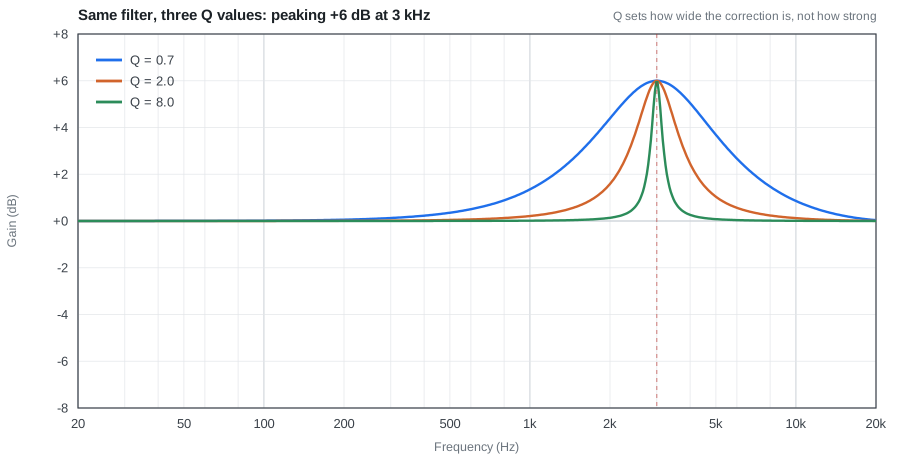
All three curves above are +6 dB at 3 kHz. At Q 0.7 the filter is still doing something at 1 kHz and at 8 kHz. At Q 8 it is a spike that barely touches 2.5 kHz. Same gain, completely different musical result.
The practical rule I use: low Q for tonality, high Q for problems. If you want the headphone to sound warmer or darker overall, use Q between 0.5 and 1.0 and one or two filters. If you are killing a specific resonant peak that you can see in a measurement and hear as a wince on hi-hats, use Q of 3 to 6 and put it exactly on the peak.
High-Q boosts are the one thing I would tell people to avoid. A narrow cut is forgiving — if you get the frequency slightly wrong you have merely removed a little energy from the wrong place. A narrow boost that is 200 Hz off centre sits next to the resonance rather than on it, and now you have two problems.
Preamp, and why your EQ presets need it
Digital audio has a hard ceiling at 0 dBFS. There is nothing above it. If you apply +6 dB of boost to a track that was already mastered close to full scale — and most modern masters are — the result clips, and digital clipping sounds genuinely nasty, not like tape saturation.
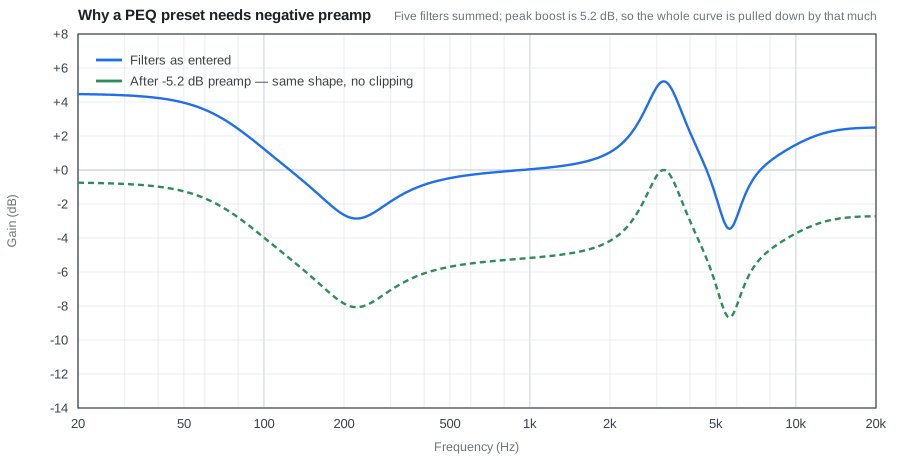
The fix is trivial and every decent EQ tool does it: find the highest point of the summed curve and apply that much negative gain to everything before the filters. In the example above the filters peak at +5.2 dB, so the preamp is set to −5.2 dB. The shape is identical, the whole thing is just quieter, and nothing clips. You turn the volume up to compensate, which is what the volume control is for.
This is why an EQ preset that seems to make things sound worse sometimes just needs its preamp checked. If a preset you copied off a forum has boosts in it and no preamp figure, add one yourself — the sum of your positive gains, rounded up, is a safe starting point.
The related trap is doing it the other way round: some people cut everything instead of boosting, to avoid needing preamp at all. That works, and it is mathematically the same thing, but you have to remember you have thrown away several dB of output. On a hard-to-drive planar off a phone dongle, that can be the difference between loud enough and not.
Where to apply it
There are three places, and the choice matters more than most people expect.
In the player software. Roon, Equalizer APO with Peace on Windows, Wavelet on Android, the built-in EQ in Qobuz or Poweramp. This is the easiest place to experiment because you can change a filter and hear the result immediately. The problem is lock-in and inconsistency: your Roon filters do nothing when you open PlexAmp, and you end up either duplicating settings across four apps or quietly deciding you only listen through one of them.
In a system-wide DSP. Equalizer APO on Windows and a miniDSP box for speakers both sit below the application, so everything gets the same treatment. Better, but tied to one machine or one room.
On the device itself. A DSP USB-C dongle or cable with the filters written into its flash. Once written, the EQ follows the headphone everywhere — phone, laptop, anything with a USB-C port — and no software on the host needs to know anything about it. This is the approach I have ended up preferring, and it is why I built devicePEQ, which pushes filters straight into these dongles from a browser without needing each manufacturer’s companion app.
The catch with on-device EQ is that the hardware limits you: a given dongle might support only five filters, might cap gain at ±12 dB, might only accept certain Q values, and its preamp behaviour is not always documented. Worth checking before you buy one specifically for EQ.
Actually arriving at a set of filters
The honest answer is that you have two routes and both are fine.
Start from a measurement and a target. Find your headphone on a measurement database, compare it against a target curve you like, and generate filters — AutoEQ and the squig.link tools will do this automatically. This gets you 80% of the way in about a minute.
Two caveats matter. First, the measurement is of a unit on a coupler, not your unit on your head. Second, and more importantly, above roughly 4–5 kHz the coupler measurement stops corresponding to what happens in your ear canal in any reliable way, because that region is dominated by your own pinna and canal geometry. I would let an auto-generated preset do what it likes below 4 kHz and treat everything above that as a suggestion to be checked by ear. Chasing a target curve at 8 kHz filter-by-filter is the single most common way to end up with an EQ preset that measures beautifully and sounds worse than stock.
Or just fix what bothers you. Put on a track you know intimately, decide in words what is wrong — “too much thickness around the vocal”, “cymbals are splashy” — and make one wide filter to address it. Live with it for a few days. Then make one more. Three deliberate filters that you understand will beat twenty generated ones you do not.
Whichever route, level-match when you compare. A preset that raises overall loudness by 2 dB will sound better than stock regardless of whether it actually is better, and this catches everyone, including me.
Who should not bother
If your headphone already sounds right to you, do not EQ it. There is no prize for having a preset.
If you have not yet solved fit and seal, EQ is premature — you will be tuning around a variable. Get consistent insertion or a pad that seals against your glasses first.
And if you listen mostly at low volume, be aware that our sensitivity to bass and treble falls off as level drops, so a preset built at 80 dB will sound thin at 60 dB. Some people keep two presets for this. That is not silly.
The short version
EQ is not a compromise you make because you could not afford the better headphone. It is the one adjustment in the entire chain that reliably changes what you hear, it is free on most hardware, and it is reversible. Learn what the three filter types do, learn that Q is width, remember the preamp, fix your seal first, and be sceptical above 5 kHz. That is genuinely most of it.