Edifier M90
A Compact Active Desktop Speaker with HDMI eARC, LDAC, and EQ Tuning
Edifier have been competing in the powered desktop speaker market for decades, and the M90 is possibly their most ambitious desktop release: HDMI eARC, Bluetooth 6.0 with LDAC, a companion app with custom EQ, and 100W RMS from four Class-D channels in a cabinet small enough for even a small work-from-home desk. The specification sheet alone makes it an interesting speaker, and I was keen to find out whether the listening experience lived up to what was promised.
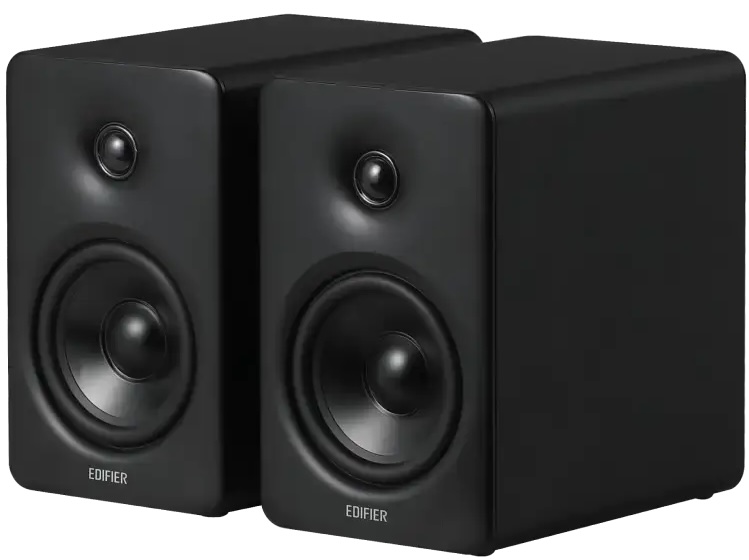
I would like to thank Edifier for providing the M90 for the purposes of this review.
If you are interested in finding more information about the M90, you can find it at the official Edifier product page, and on Amazon.
The Edifier M90 typically retails for $369.99.
I have been listening to the M90 and comparing it against an unusually wide cross-section of desktop and bookshelf speakers over six weeks — everything from the compact Kanto ORA4 and FiiO SA1 at the tiny end of the scale, to the much larger FiiO SP5 and Argon Forke A5 Mk2 and then even with much some larger passive standmounts. Overall it has been a fun few weeks swapping around different speakers trying to give myself enough time to really compare and appreciate these speakers.
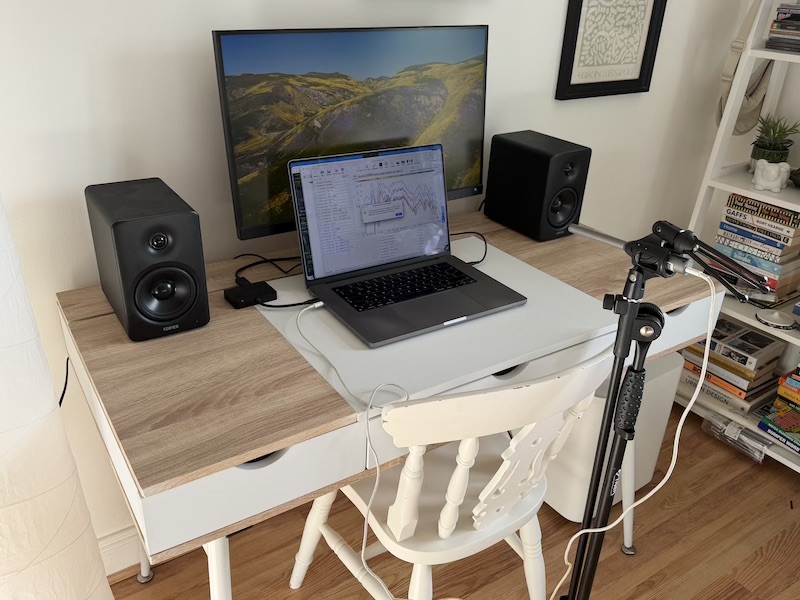
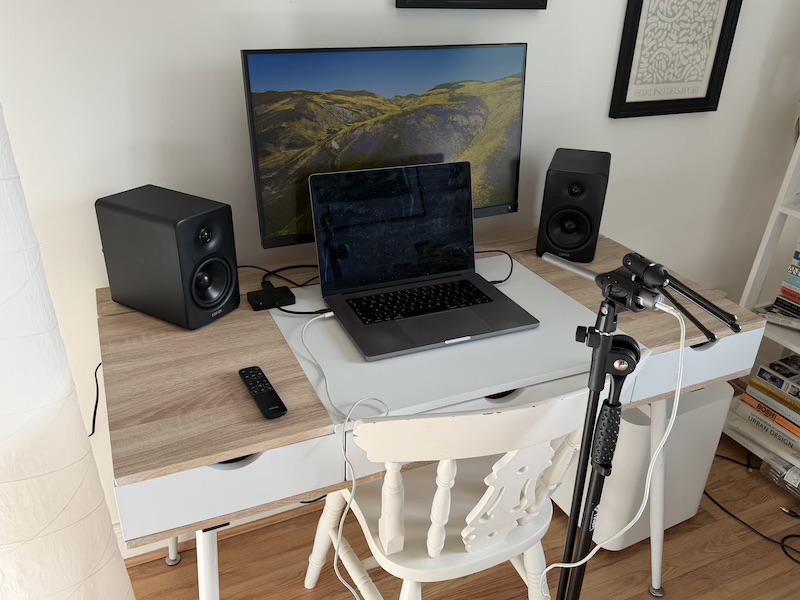
The first week was spent listening with the M90 default preset running solo, without a subwoofer. The second week introduced a Fosi Audio SW1 via the M90’s dedicated sub output to explore how it might work in a larger setup given it some sub-bass potential, and ultimately I started to gather some measurements and tuned the M90 to my specific room setup.
One feeling that emerged early and confirmed itself throughout the review period is that this the M90 has a ‘goldilocks’ combination of size, features, and sound for a speaker in this price range.
But before I get too much into the details, let’s take a look at what arrived in the box.
Unboxing and Build Quality
The M90 arrives inside a plain outer shipment box, but opening up you get a nice retail box:
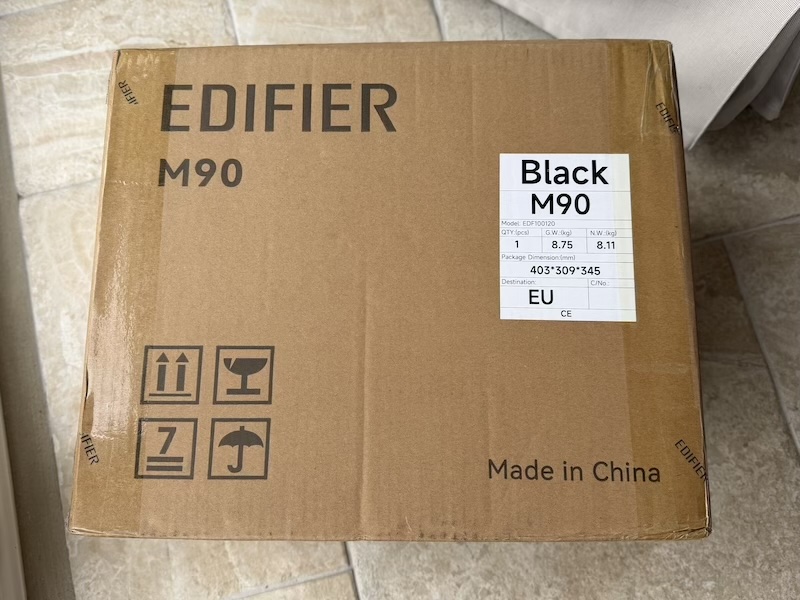 |
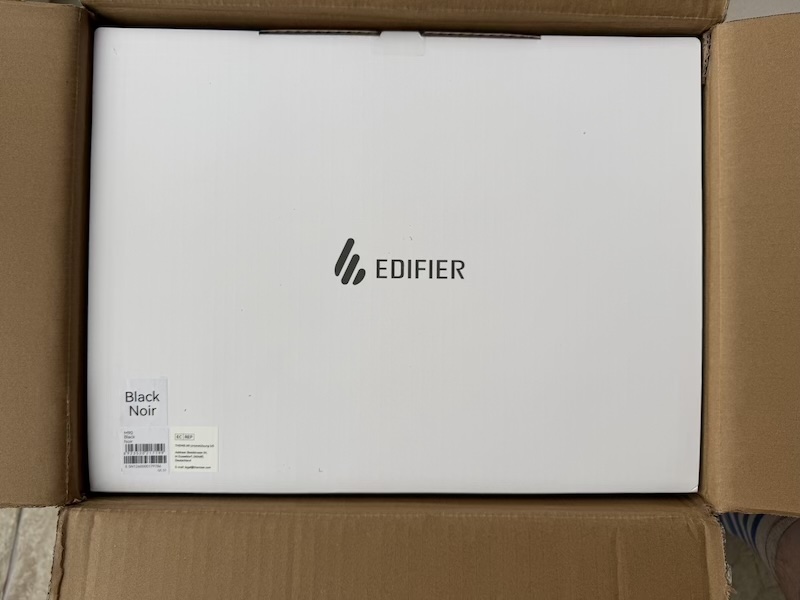 |
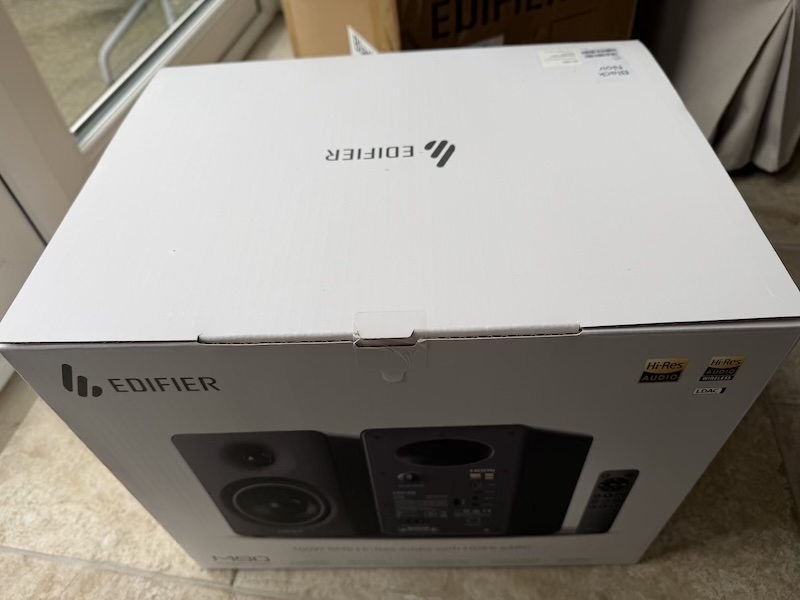
The retail box itself is clean and well-presented, carrying clear Edifier branding and enough detail on the packaging to signal that this is a product from the more serious end of the range.
Opening the box reveals the two speakers nestled in individual protective covers, with the accessories organised into separate little boxes on top, a layered packaging approach that felt genuinely premium and delivered both speakers in immaculate condition.
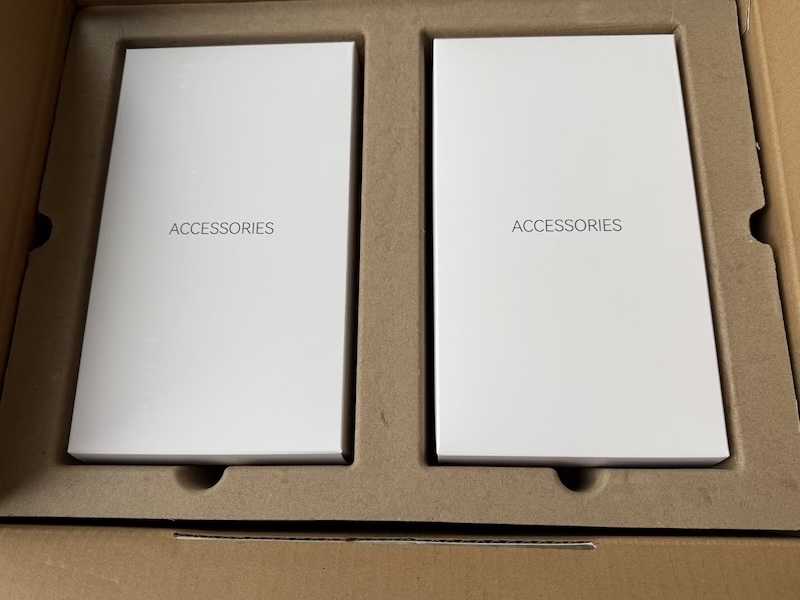 |
 |
Removing both speakers from the box, you can see they are protected very well:

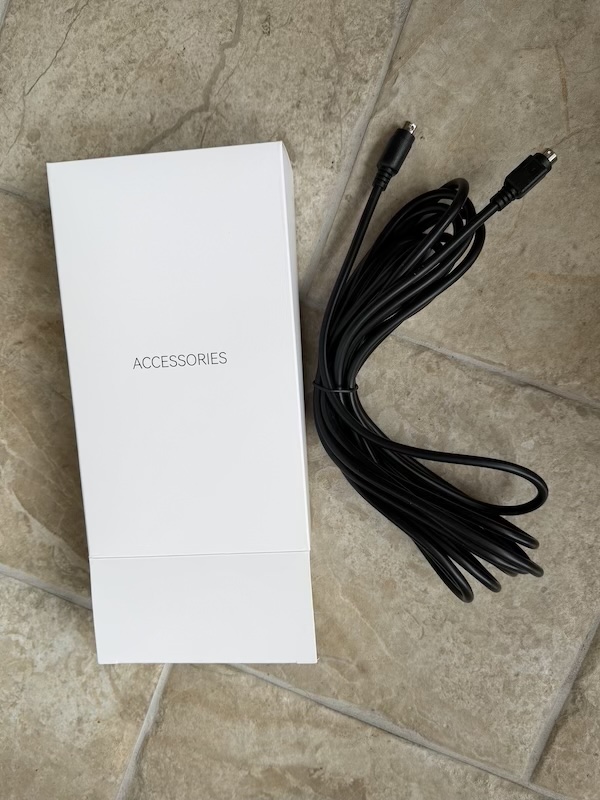
The accessories are divided between two boxes. The first holds the long interconnect cable for the speaker pair:
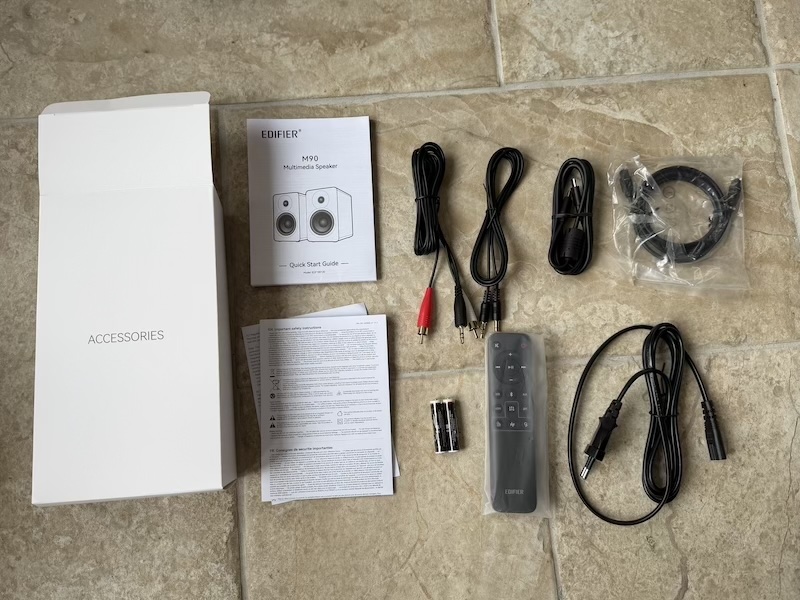
And the second contains everything else — power cable, connection cables, and the 2.4GHz remote control:
With both speakers removed from their protective covers and placed on the floor, the build quality is immediately
apparent.
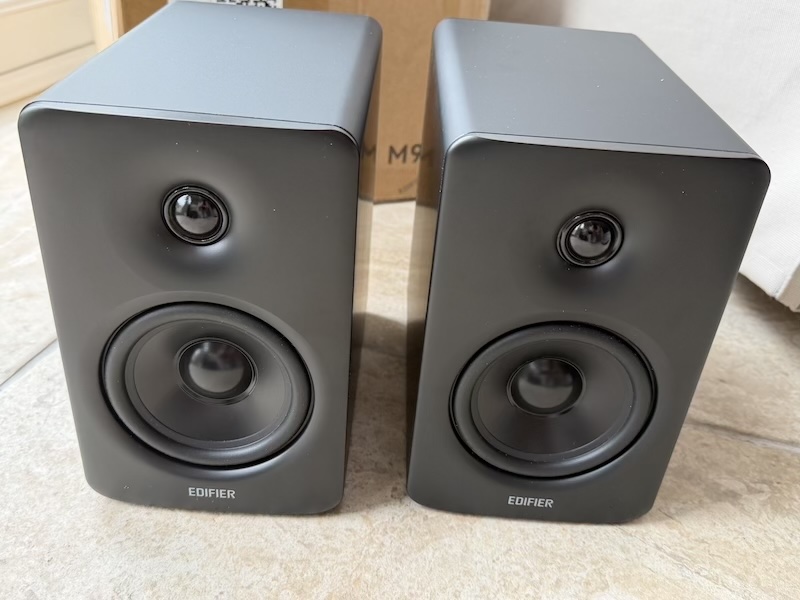
The cabinet finish is solid and clean, with a matte texture that resists fingerprints well. The M90 is slightly larger and heavier than the most compact desktop alternatives — at 133mm × 212mm × 225mm per speaker and a combined pair weight of 6.05kg, these are not featherweights — but the dimensions remain genuinely desk-friendly, and the extra mass translates directly into cabinet rigidity and a satisfying sense of build quality that matches the price.
Features and Connectivity
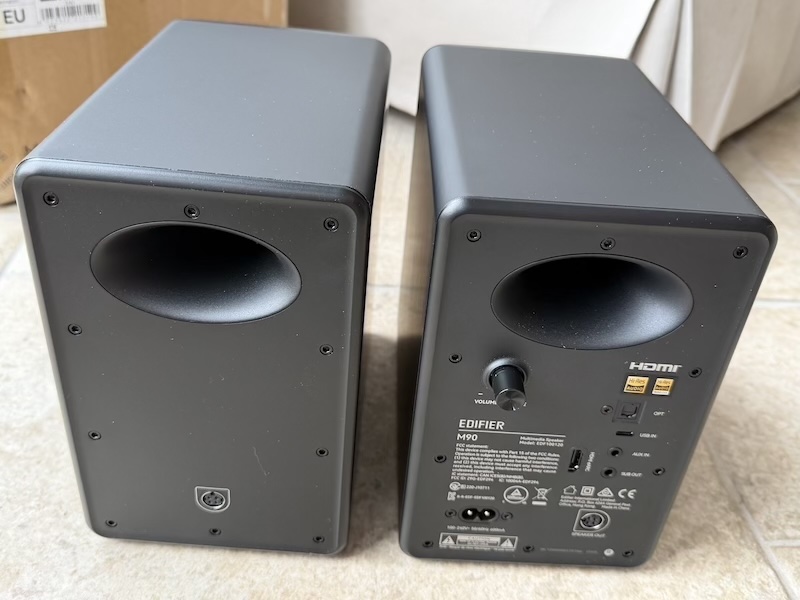
The rear panel is where the M90’s feature ambitions become clear, and it is genuinely impressive for a compact active speaker at this price.
 |
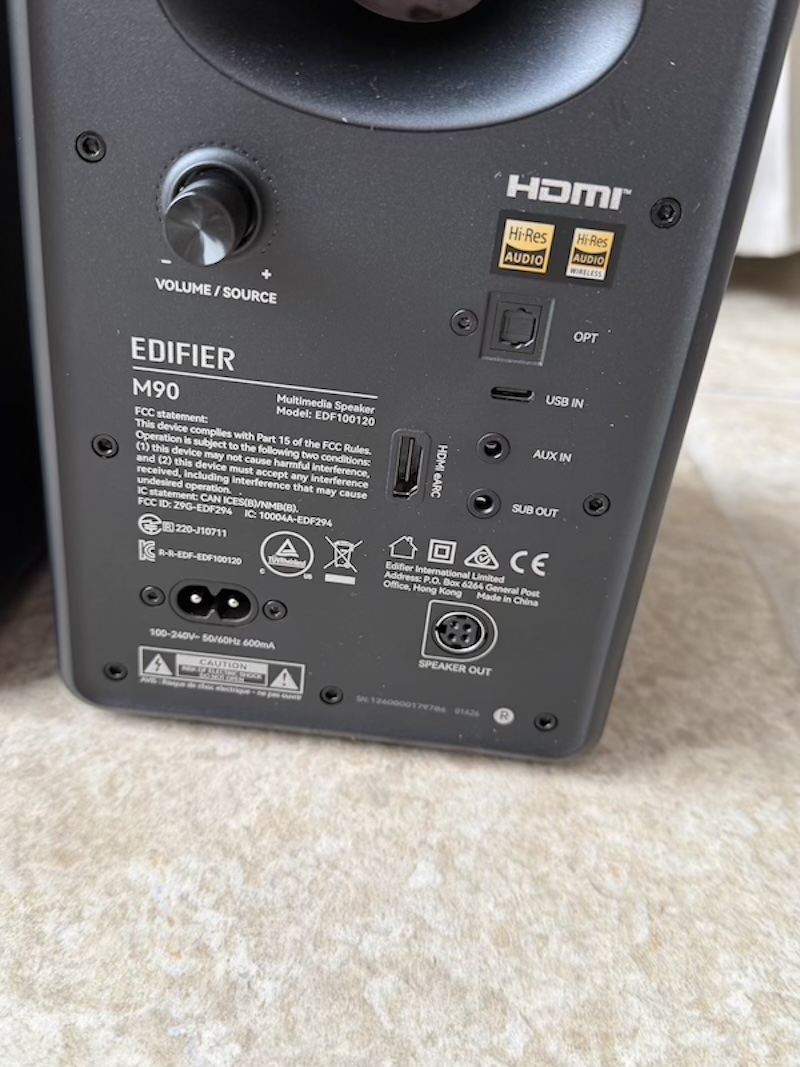 |
The M90 carries HDMI eARC, optical, USB-C, AUX, and Bluetooth — a connectivity suite that covers virtually every source scenario from television to laptop to smartphone. The HDMI eARC input is unusual at this price and opens up a use case that most compact desktop speakers cannot offer: the M90 works as a capable two-channel soundbar replacement, with HDMI CEC enabling power, volume, and mute control directly from a TV remote when HDMI eARC is the active input. The sub output at the rear rounds out the connection options with a dedicated RCA for adding an external subwoofer.
Auto Power Behaviour and Physical Controls
One operational detail worth understanding before you buy: the M90’s automatic wake-from-standby behaviour differs depending on which input you are using. Via Bluetooth and HDMI, the M90 detects an incoming signal and returns to active playback in under a second — the seamless, invisible behaviour you want from a speaker you use throughout the working day. Via optical, USB-C, and AUX, the M90 will power down after a signal-absent timeout, but it requires a manual wake from either the remote or the app before it will play again. For users who rely on optical or USB-C as their primary input and expect the speaker to come to life automatically when they press play on their laptop, this might be a friction point. The workaround is straightforward, keep the remote nearby, but it is worth knowing about in advance.
On the same ergonomic note: the physical controls, including the power button and the volume knob, are located on the rear of the active speaker. In a typical desktop placement, this means reaching around the cabinet for adjustments, which quickly trains you to rely on the remote for everything. I feel this is probably the one feature I would have liked to see as I got used to front volume controls when reviewing the Kanto ORA4 and UKI recently.
Remote Control
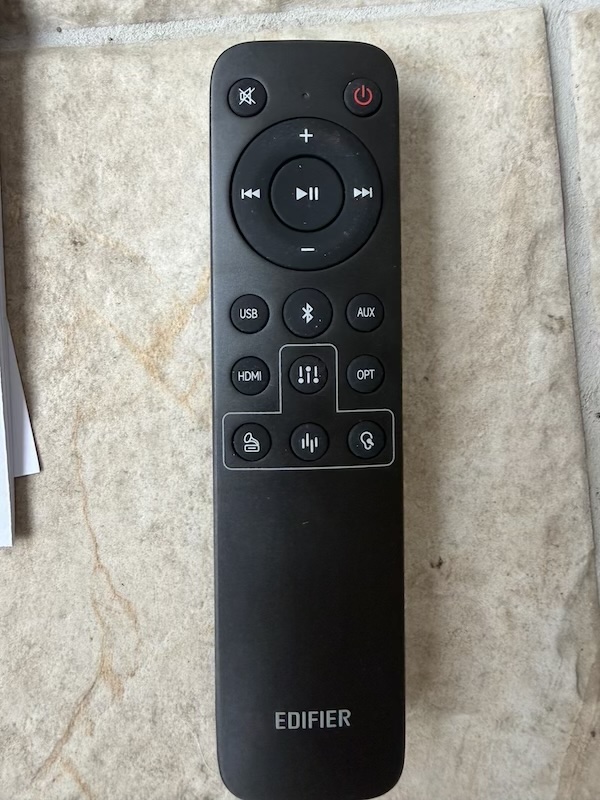
The 2.4GHz omnidirectional remote is a very decent piece of hardware and one of the M90’s more thoughtful inclusions but as I mentioned in the previous section it is more vital with the M90 than with other small desktop speakers that I have reviewed recently.
 |
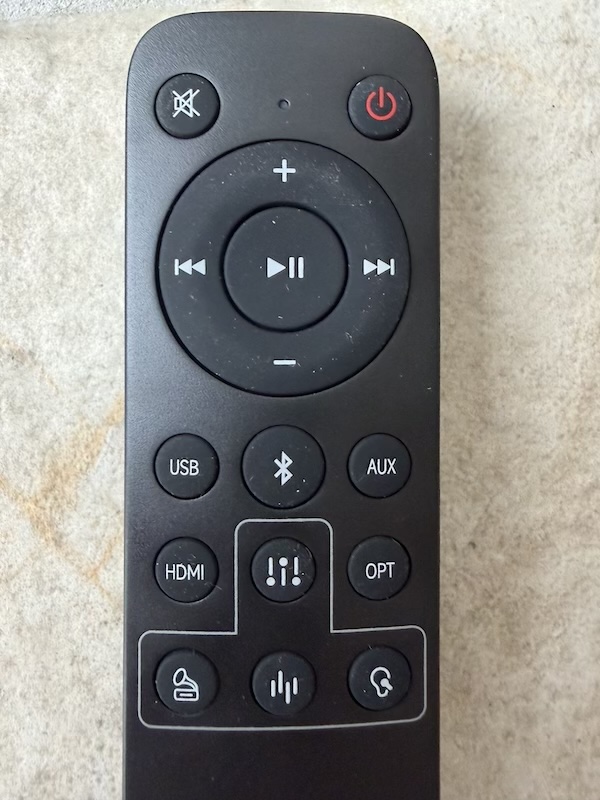 |
The remote covers power, volume, input source switching, and mute — and it provides dedicated buttons for switching
between the three onboard EQ preset slots. Here are the details of the EQ preset buttons from the Manual:
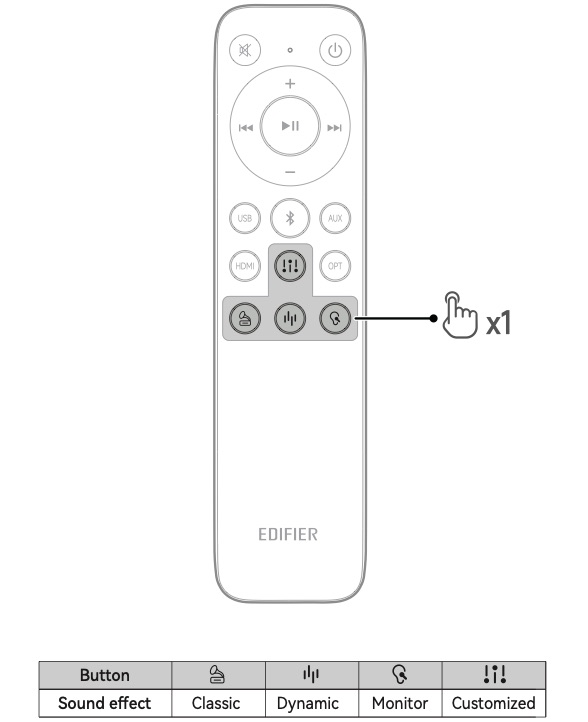
This last detail is particularly well-considered: being able to cycle between a custom-tuned EQ profile and a flat or alternative preset without opening an app is exactly the kind of hardware shortcut that reflects a product designed by people who actually use their own speakers day to day.
Edifier ConneX App
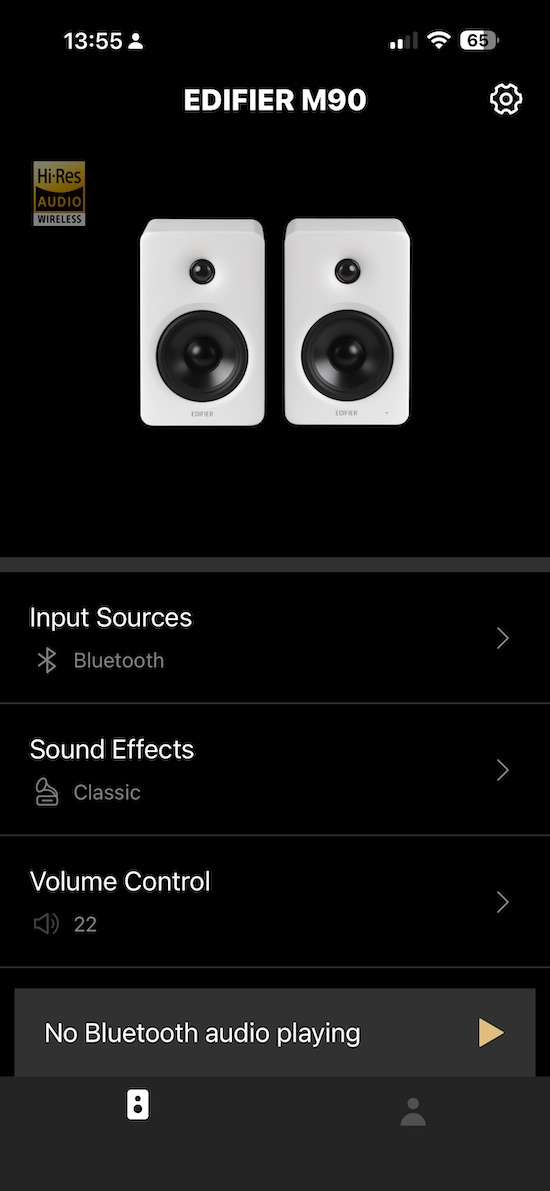
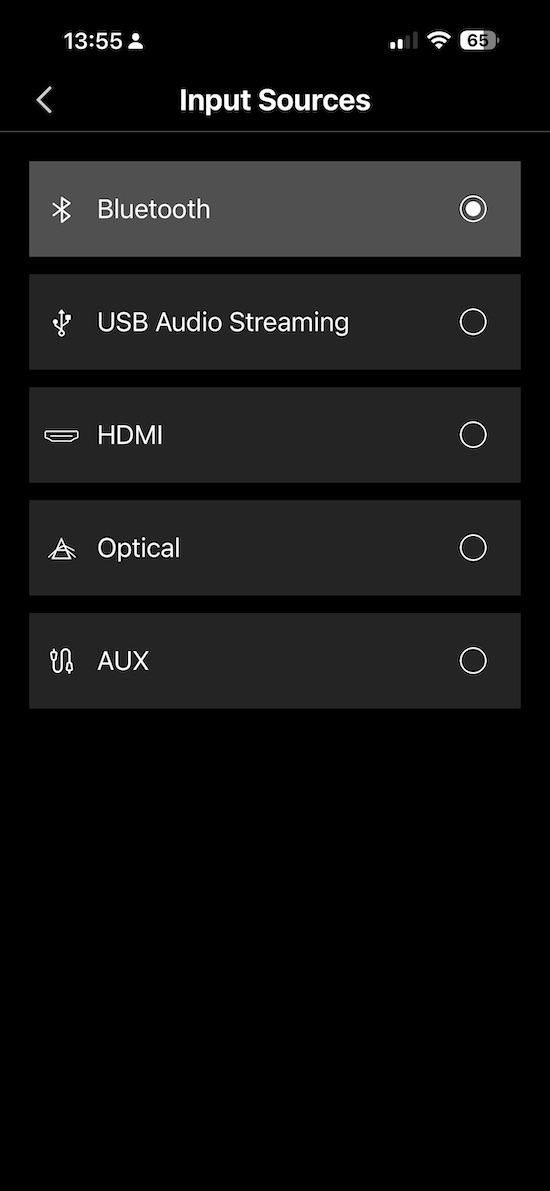
The Edifier ConneX app connects to the M90 via Bluetooth and provides access to the full feature set: input selection, EQ presets, custom EQ editing, Bluetooth multipoint management, and firmware updates. The home screen gives a clear overview of the current state, and navigation is fast and logically laid out.
 |
 |
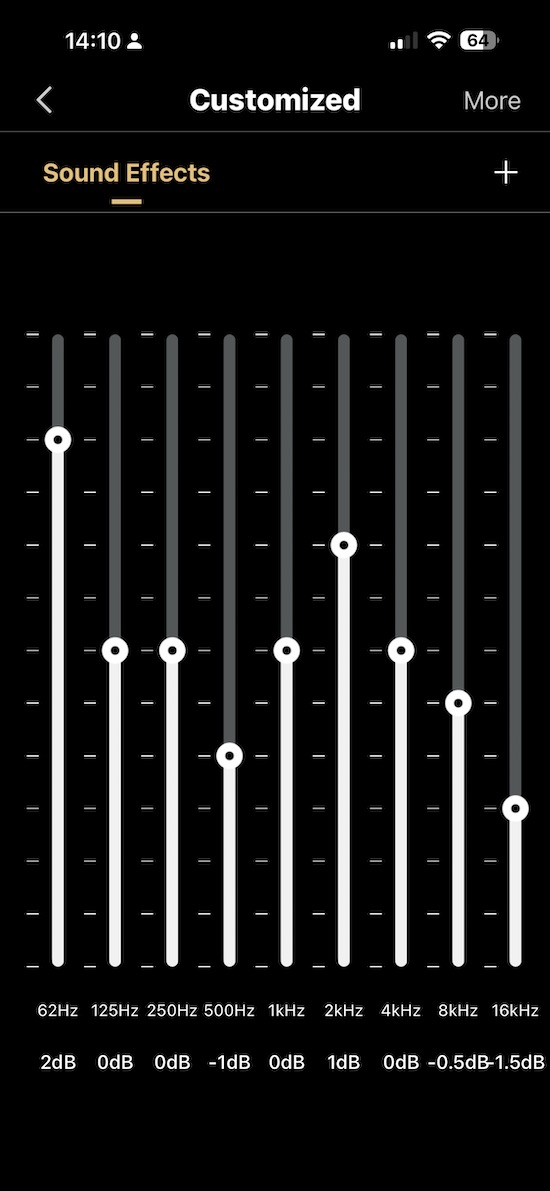
The EQ section is where the app becomes genuinely powerful. Three presets can be configured and saved independently — flat, custom, and a third option of your choosing — and each is immediately accessible via the remote hardware buttons. The custom EQ screen provides a 9-band interface covering 62Hz to 16kHz, with enough range to make meaningful tonal corrections across both the low-end and the upper frequencies.
 |
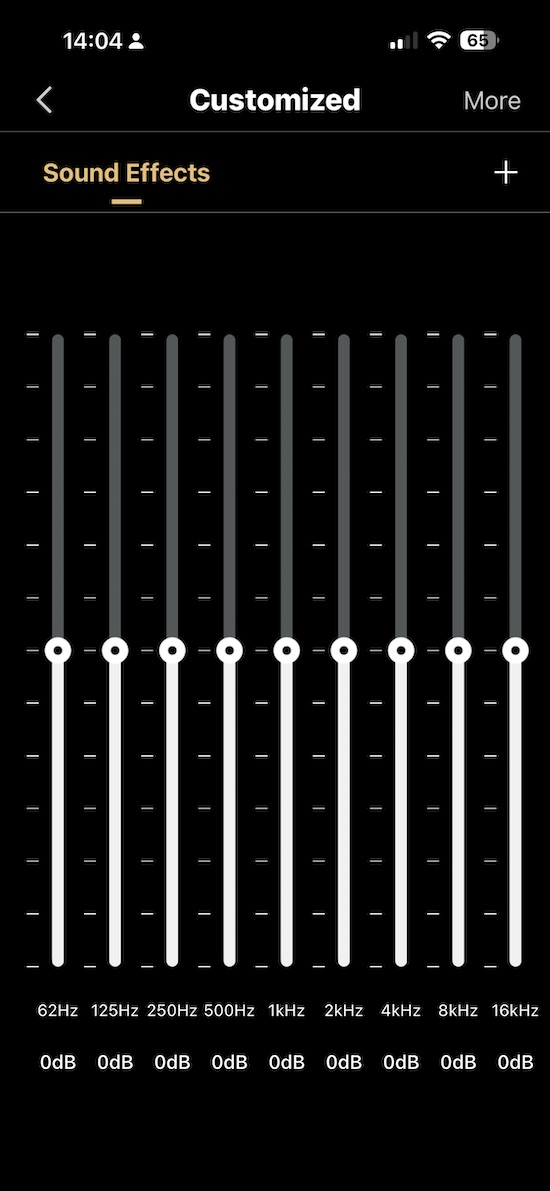 |
I personally would love if Edifier provided a full PEQ as FiiO have provided with their recent desktop speakers the SP5 and the SA1 that I have also reviewed, but for most people I feel this custom EQ is enough.
 |
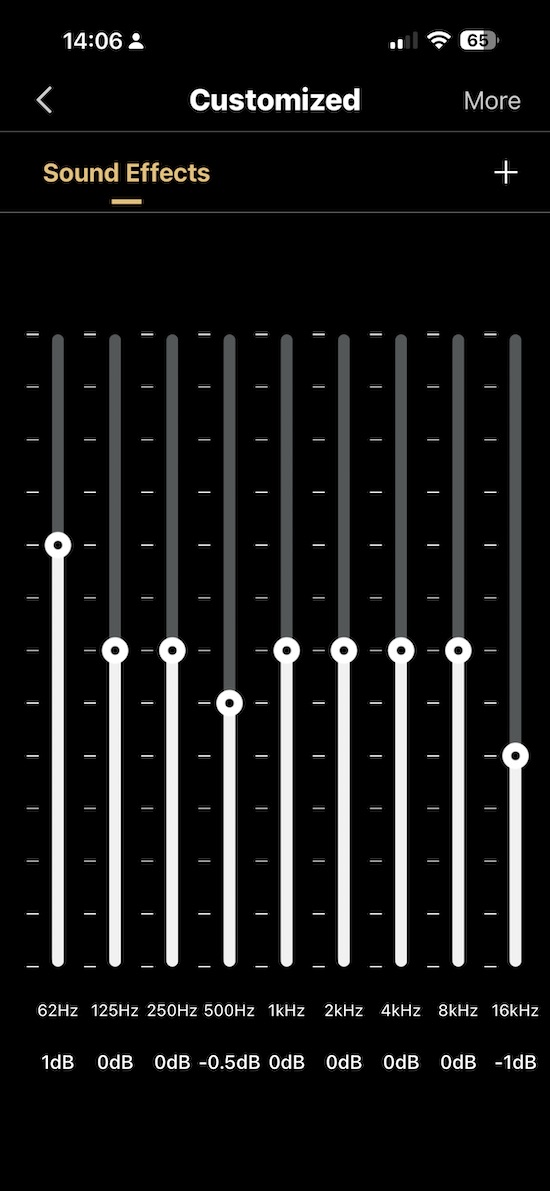 |
I used this to dial in the room effect that nudges the M90’s default voicing toward a more neutral presentation. The measurements section later documents exactly what that tuning looks like for my in-room measurements and what it achieves. The ability to do this within the speaker’s own ecosystem, save the result to a preset, and recall it instantly via the remote is in my opinion an excellent feature of any active speaker but one that you don’t see, so credit to Edifier for making custom EQ easy to config and switch too.
Bluetooth 6.0 and LDAC
Bluetooth 6.0 with LDAC support sits well above what most speakers in this price range offer. LDAC transmits at up to 990kbps, which brings Bluetooth audio quality genuinely close to a wired digital connection on compatible Android devices — an audible difference on high-resolution source material, and not the marginal improvement that earlier Bluetooth codec upgrades often turned out to be in practice.
Bluetooth multipoint is also supported and managed through the app, enabling seamless switching between two simultaneously connected devices — useful when working from a laptop while keeping a phone connected for calls. One trade-off worth knowing: enabling multipoint disables LDAC due to Bluetooth bandwidth limitations, so the two features are mutually exclusive. For most desktop use where LDAC quality is the priority, keeping multipoint off is the right call; for mixed-device households where switching convenience matters more, multipoint is the better choice.
Sound Impressions
Critical listening was conducted on my WFH desk setup with the M90 driven across all five inputs at various points during the six-week review period. The Edifier ConneX custom EQ was applied after the first few days of listening and maintained throughout; the measurements section documents the specific tuning. A Fosi Audio SW1 subwoofer was introduced via the dedicated sub output in the second week. Listening at nearfield volumes that were kept in the 70–85dB SPL range typical of desktop use, with the M90 slightly toed in toward the listening position throughout.
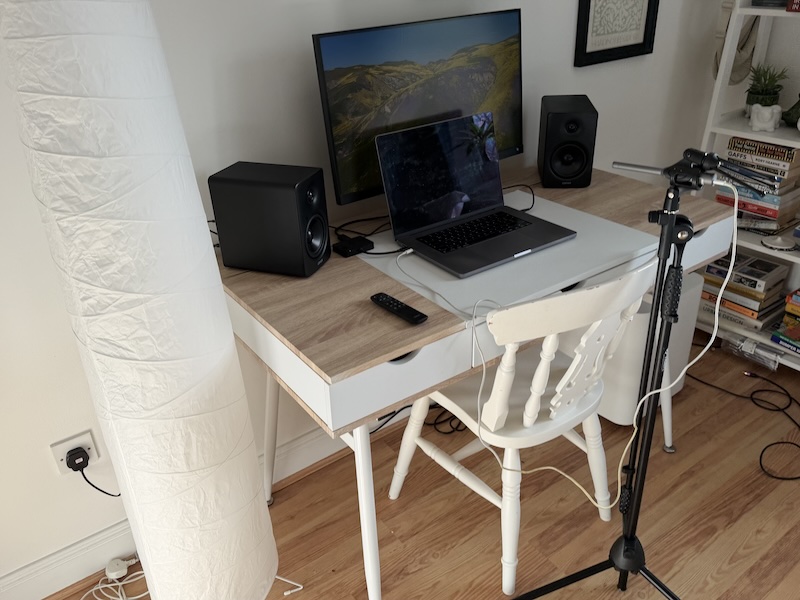
The M90’s overall character is warm-neutral with a confident low-end presence that consistently punches above its cabinet dimensions. It has been tuned to sound fuller and more satisfying at desk-level volumes, which is exactly the right priority for its intended use case — and with the custom EQ applied to correct the default tilt, it becomes a genuinely neutral and resolving listen for the vast majority of music, even without the subwoofer added.
Bass
The bass performance is arguably the M90’s most impressive attribute given its compact cabinet. With the custom EQ applied, the M90 delivers a convincing and well-controlled low end down to approximately 50–60Hz in-room, with natural decay and mid-bass authority that most 4" driver speakers at this price simply cannot match. The 4" long-throw aluminium drivers and DSP-managed Class-D amplification work together to extract every usable decibel of bass from the ported cabinet, and it shows. A DSP limiter is active at the lowest frequencies — this protects the drivers at higher volumes and is visible in the early measurement passes as a managed roll-off rather than a driver-limited collapse — but in practice it operates well below typical desktop listening levels and was never a factor during normal listening sessions.
That said, deep sub-bass below 50Hz is where the cabinet’s physics eventually assert themselves. Tracks that place significant energy in the sub-40Hz region expose the M90’s low-end ceiling as a gradual thinning rather than any harshness or distortion — but it is audible on material that leans hard on the bottom octave. Jennifer Warnes’ “Way Down Deep” is a reliable sub-bass extension reference, and through the M90 solo the deepest bass notes lose the weight and physical presence that a larger speaker would deliver. Adding the Fosi Audio SW1 via the sub output addressed this entirely.
Steely Dan’s “Aja” illustrated the improvement clearly — the kick drum texture and bass guitar articulation that the M90 handles convincingly on its own became noticeably more authoritative and physically present with the sub filling in below 60Hz. For most genres — midrange and treble-focused music in particular — the M90 is entirely capable as a standalone; for bass-heavy listening, the sub output is genuinely functional rather than decorative.
Midrange
The midrange through the M90 is rich and well-bodied, with excellent tonal density and harmonic richness that makes both voices and acoustic instruments sound convincingly real. Lower-mid warmth is present without becoming bloom, and the transition between the mid-bass and the upper midrange is handled cleanly — a consequence of the bi-amplified driver configuration, which keeps the aluminium woofer and silk dome tweeter operating within their respective optimal ranges without crossover-region muddiness. Upper-mid energy is controlled and natural, avoiding the kind of presence-region brightness that causes fatigue over extended sessions.
Joni Mitchell’s “A Case of You” is a reliable vocal body and micro-detail reference; the M90 renders the intimacy of the recording with genuine conviction, the note weight of the guitar and the textural detail in the vocal both coming through without either element dominating. The midrange is one of the M90’s consistent strengths across the full six weeks of listening, and it translates well across every genre I used as a reference.
Treble
Treble performance is smooth, extended, and free from the glassiness or etch that can affect budget tweeters. The 1" silk dome extends comfortably into the upper frequencies, rendering cymbal shimmer and upper-harmonic guitar detail with confidence and without sounding strained or artificially bright. Air and sparkle are present without excess — the M90’s treble is the kind you notice not because it draws attention to itself, but because nothing in the upper frequencies sounds rounded off or missing.
The Eagles’ “Hotel California” in the acoustic version is a useful test for guitar pick attack and cymbal decay; through the M90 both are rendered cleanly and naturally, with trailing cymbal decay resolved without smearing. Sibilance was not a concern at any point during the review period — the silk dome tweeter simply does not have the character that causes that problem.
Soundstage and Imaging
For a compact active desktop speaker, the M90’s soundstage is genuinely impressive — wider than the physical cabinet size suggests, with a stable centre image and convincing depth layering on well-recorded material. The bi-amplified design contributes to this by keeping each driver’s output clean and coherent, producing a spatial presentation that is satisfyingly three-dimensional at close listening distances.
Supertramp’s “Crime of the Century” is an expansive test for width, reverb tail resolution, and instrument placement; the recording’s characteristic sense of space comes through the M90 with clear channel separation and a convincing depth perspective. Close critical comparison with dedicated near-field monitors reveals that pin-point imaging precision is not quite within reach — but for a speaker in this category and at this price, the soundstage is one of its genuine pleasures. Notably, the M90 maintains its treble clarity and tonal balance even when listening from slightly off-axis, which creates a considerably larger sweet spot than a compact stereo pair would typically offer — a practical advantage both at a shared desk and in the TV-paired living room scenario.
Comparisons
The M90 was tested alongside a wide range of speakers during this review period, from compact desktop alternatives to full-size passive standmounts, to establish clearly where it fits in the broader market.
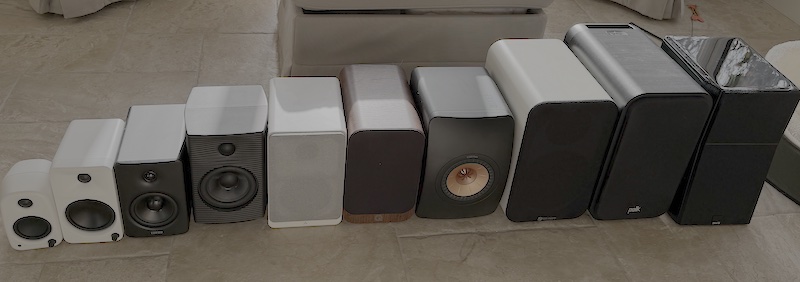
The image above shows the M90 in context alongside the Kanto UKI, Kanto ORA4, FiiO SP5, Argon Forte MK2, QAcoustics 3020i, KEF LS50 Meta, Fosi Audio SP601, Polk ES20, and SVS Ultra Evolution Bookshelf — hopefully a useful illustration of where the M90 sits physically but also why I feel this “goldilocks” description is apt. It occupies the right size for a desk without trying to be something it is not.
Edifier M90 vs Kanto ORA4
The Kanto ORA4 is the most directly competitive comparison — both sit at a similar price point, both are compact bi-amplified powered desktop speakers, and both were tested in the same listening environment over the same six-week period. The ORA4 is the slightly smaller and lighter of the two, taking up less desk space and offering a more minimal aesthetic that many users will prefer for a clean desk setup. In sound, the ORA4 leans more clearly toward a reference-neutral character — flat and honest without the M90’s additional low-end warmth. The M90 counters with a feature set that the ORA4 cannot match: HDMI eARC, a companion app with custom 9-band EQ, three remote-accessible EQ presets, Bluetooth 6.0 with LDAC, and auto-wake behaviour on Bluetooth and HDMI.
At $369.99 versus the ORA4’s $449, the M90 also undercuts its Kanto rival on price — which makes the value case even harder to argue against for users who will actually use those features. Users who specifically want the most compact possible footprint, the cleanest minimal aesthetic, or the purest reference neutral presentation without any configuration may still find the ORA4 the better fit. But for most work-from-home scenarios, the M90 offers more, for less.
Edifier M90 vs Kanto UKI
The Kanto UKI sits below both the ORA4 and the M90 in price, with a smaller 3" woofer and a reduced feature set. The M90’s larger drivers, greater power output, and onboard EQ capability give it a clear advantage in both sound and flexibility — the UKI sounds noticeably leaner in the bass and less dynamically capable at comparable playback levels. The UKI’s headphone jack on the side panel is a genuine convenience feature that neither the ORA4 nor the M90 offer, and for users who switch regularly between speakers and headphones without a dedicated headphone amplifier it has real value. But as a primary desktop speaker for serious music listening, the M90 is in a different class.
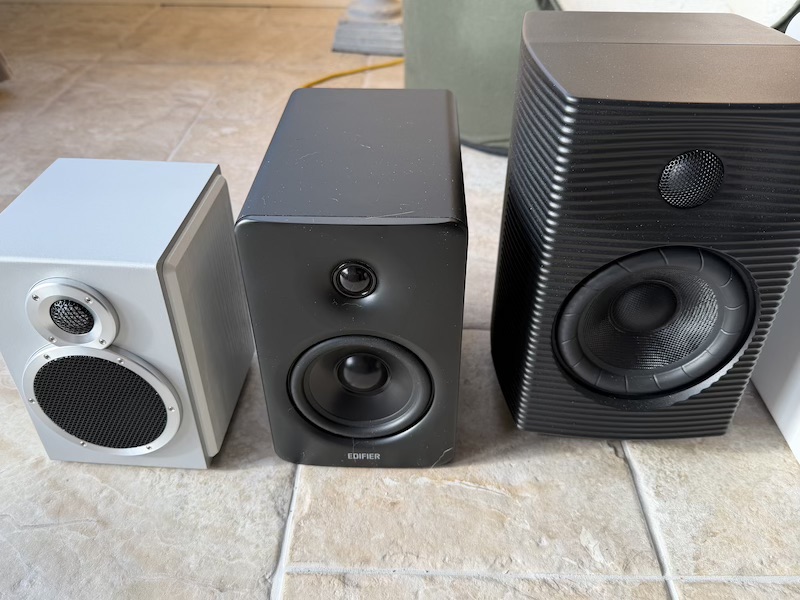
Edifier M90 vs FiiO SP5
On the other end of the size scale, lets look at the SP5 in comparison:
 |
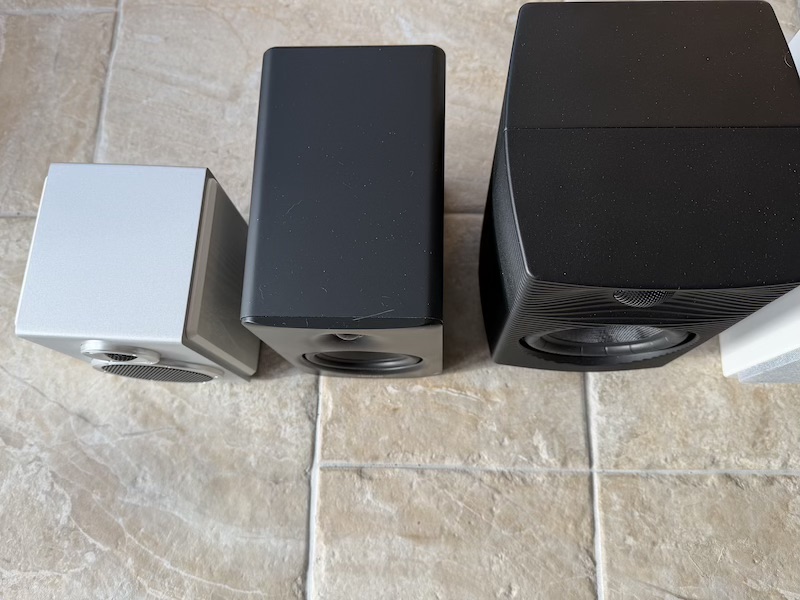 |
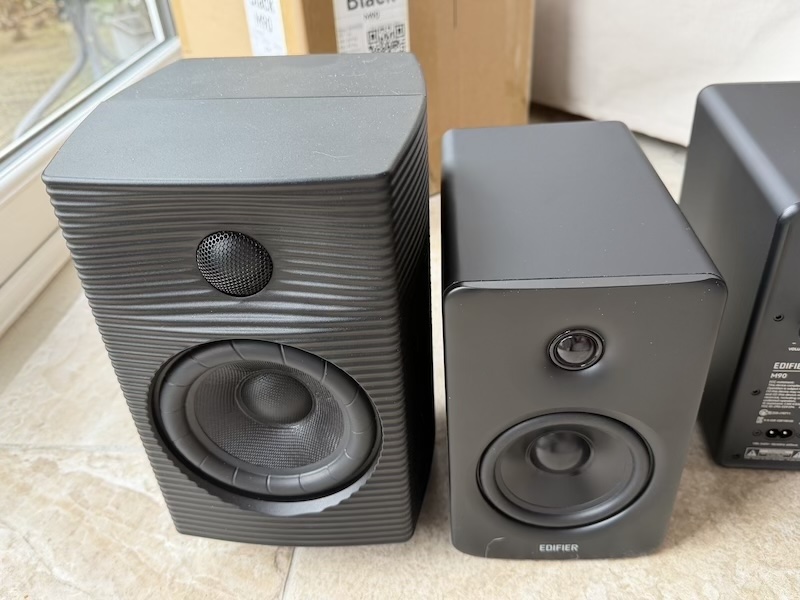
The FiiO SP5 is physically larger, heavier, and more expensive than the M90, and the comparison illustrates the central trade-off in the desktop speaker market.
 |
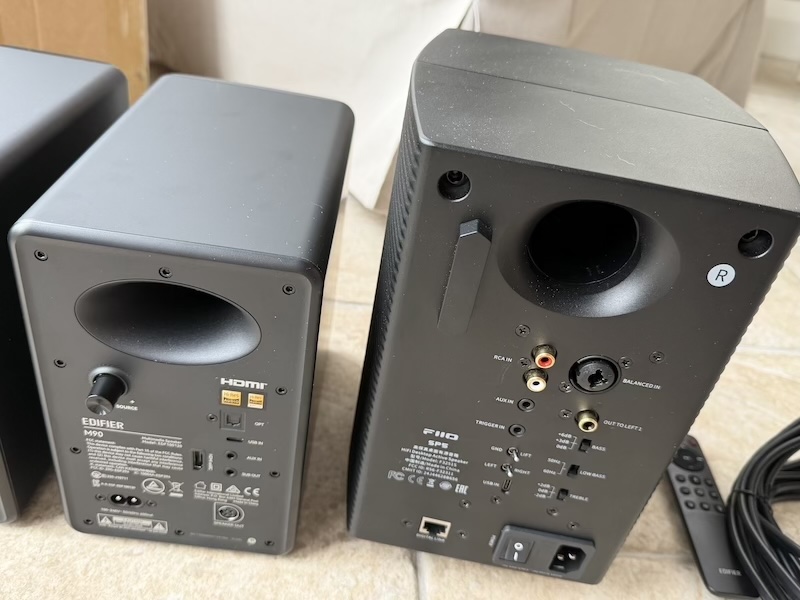 |
The SP5’s 5.25" woofers deliver greater sub-bass authority and more physical low-end weight than the M90 can match without a subwoofer, and its balanced XLR and ¼-inch inputs make it a genuine studio monitor-adjacent option for users who need direct integration with audio interfaces.
The M90 is not really designed for that use case, and for a proper recording or mixing environment the SP5 is the more appropriate tool. But for the desk-listening and TV-pairing scenarios that most users actually have, however, the M90’s HDMI eARC, companion app, and significantly more compact footprint give it meaningfully better real-world versatility at a muh lower asking price.
Specifications and Measurements
| Specification | Detail |
|---|---|
| Drivers | 4" long-throw aluminium mid-bass drivers, 1" silk dome tweeters |
| Amplification | Dual Class-D bi-amplified (4 channels total) |
| Total Output (RMS) | 100W (mid-bass 35W × 2 + treble 15W × 2) |
| Frequency Response | 50Hz – 40kHz |
| Signal-to-Noise Ratio | ≥ 85dB (A) |
| Digital Processing | 24-bit/96kHz end-to-end |
| Audio Inputs | HDMI eARC, Optical, USB-C, AUX, Bluetooth |
| Bluetooth | V6.0 — LDAC, SBC |
| Sub Output | Yes (dedicated RCA) |
| Dimensions (Active) | 133mm × 212mm × 225mm |
| Dimensions (Passive) | 133mm × 212mm × 210mm |
| Net Weight | 6.05kg (pair) |
A brief note on the 100W RMS headline: this figure is the sum of all four amplifier channels (35W × 2 for the mid-bass drivers, 15W × 2 for the tweeters), which is standard practice for bi-amplified designs but not the same as a single 100W amplifier channel driving a full-range driver. Understood in context it is an accurate figure; it just should not be compared directly against single-channel power ratings from competing products.
All measurements below were taken with a Umik-1 measurement microphone at the listening position in my WFH setup.
 |
 |
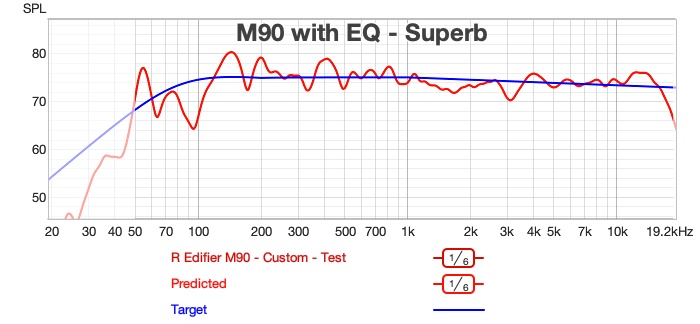
The first graph shows the M90’s in-room response with the simple custom EQ applied.
The result is a surprisingly capable bass extension to around 50Hz, with a well-controlled mid-bass region and an even treble presentation. Visible at the low-frequency end is the DSP limiter’s managed roll-off — this is the protection circuit doing its job at the limits of the driver’s linear range, and it engages well below typical listening levels during normal desktop use.
The second graph shows the effect of the custom EQ relative to the flat/neutral setting — illustrating how a modest EQ correction tilts the response toward a more neutral in-room balance compared to the M90’s default voicing.
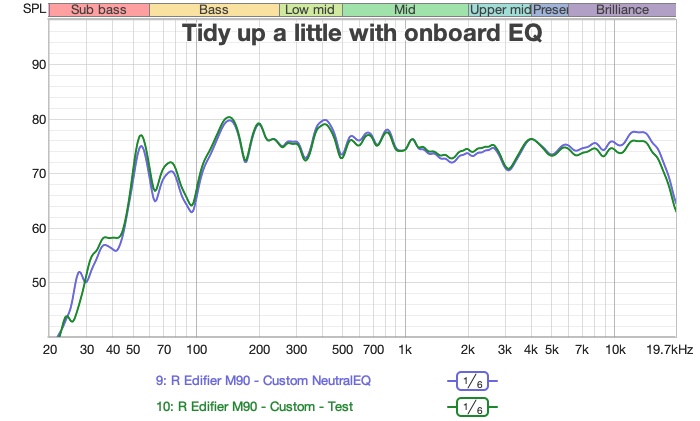
Note: Obviously, there is no attempt of room correction in the above measurements so you can see the room modes especially in the sub-bass.
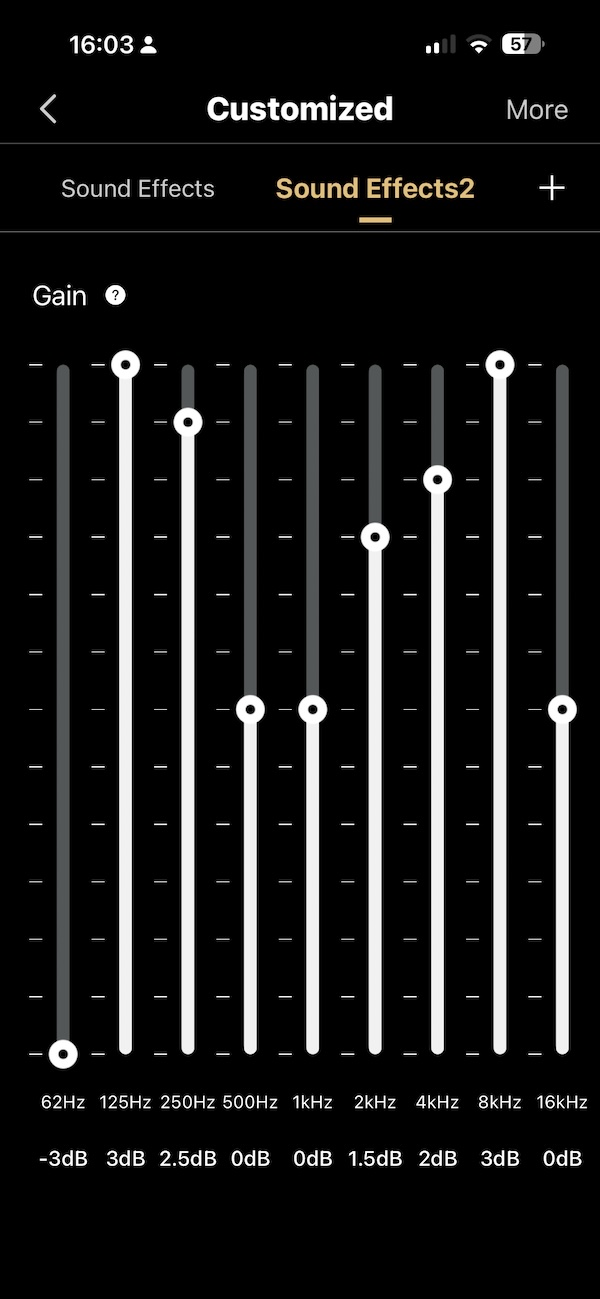
The simple EQ target applied to achieve the above in-room result is shown here — a useful reference if you want to start from a similar baseline for your own WFH desk placement but obviously everyone room will be different.
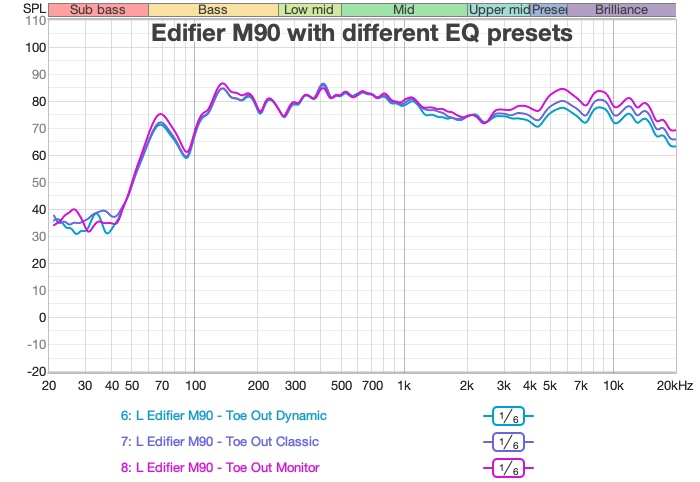
The app’s built-in EQ presets are overlaid here, showing the range of tonal adjustments available straight from the Edifier ConneX app without any custom configuration. The spread between presets is reasonable with mostly a tweaking in that treble response visible:
The following comparison between M90 on its own and M90 with the Fosi SW1 subwoofer illustrates the sub’s contribution clearly when you play at much louder listening levels 80dB-85dB, the SW1 fills in the 30–60Hz range convincingly, adding genuine low-end weight and allowing the M90’s drivers to operate with less demand at the bottom of their range.
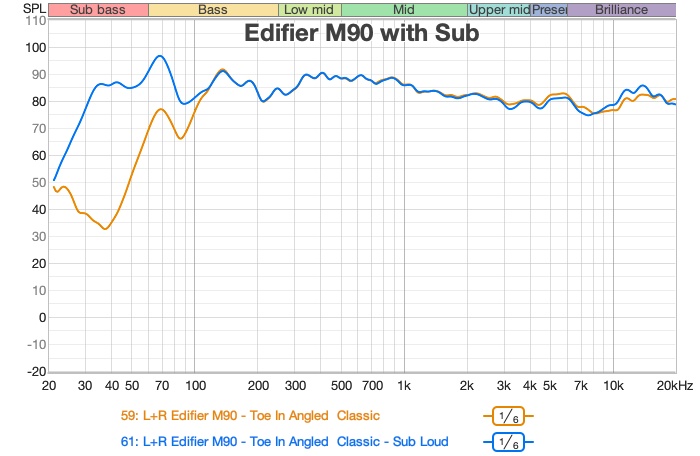
Note: I measured the above with a flat EQ rather than the custom EQ in the previously measurements as well as measuring a much louder levels.
Beyond my work from home desk setup, I also tested the M90 in a few other placements, including a less conventional placement — on top of a bookshelf, angled downward toward the listening position — to explore the placement flexibility that the compact cabinet and onboard DSP afford.
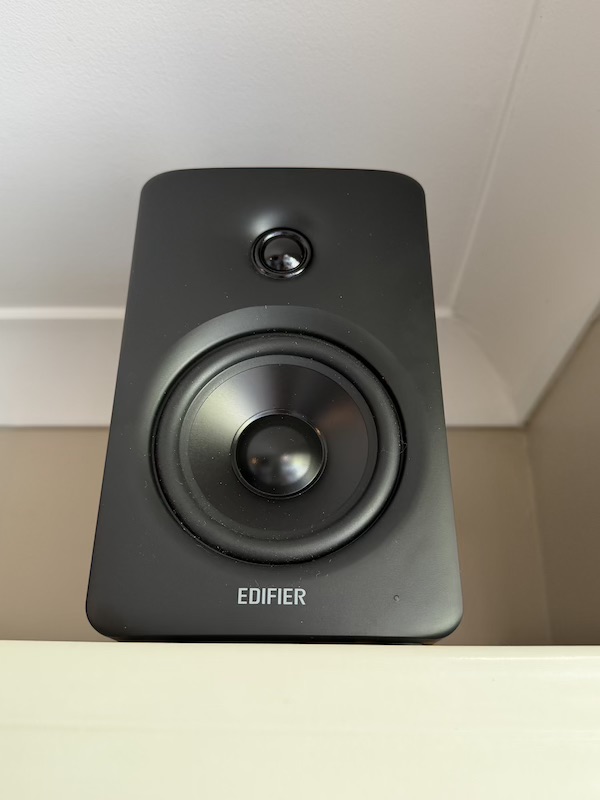
Even in this awkward configuration, the M90 produced satisfying output. The combination of the cabinet design, the DSP-managed amplification, and the onboard EQ meant a listenable and enjoyable result could be dialled in from a placement that would challenge most speakers significantly. This adaptability is one of the M90’s underappreciated qualities — it works on a desk, it works as a two-channel soundbar replacement via HDMI eARC, and it can be tucked into unconventional spots around a room without sacrificing usability or requiring a separate room correction system.
Rating Explanation
The M90 earns a five-star pragmatic rating by delivering a feature set that is genuinely unusual at its price point and backing it up with a sound quality that holds its own against more expensive and physically larger alternatives. HDMI eARC in a compact powered desktop speaker is rare. Bluetooth 6.0 with LDAC is rare. A companion app with custom EQ that can be saved to presets and recalled instantly via a hardware remote is rare.
The M90 offers all three, alongside optical, USB-C, AUX, and a dedicated sub output, in a cabinet that fits comfortably on most desks — at $369.99, which undercuts several of its nearest competitors. The in-room bass extension achievable with the custom EQ, the quality of the midrange, and the smooth treble character all reflect a well-executed acoustic design that does genuine justice to the specification ambitions.
The genuine limitations are specific and worth naming honestly. Auto wake-from-standby is restricted to Bluetooth and HDMI inputs only. The physical controls on the rear of the active speaker make the remote effectively mandatory for normal use, which is fine in practice but less ergonomic than a front-panel arrangement. The 100W RMS headline, while technically accurate for a bi-amplified design, invites comparison with single-amplifier products rated at 100W that deliver more raw SPL headroom from a single channel. And for users with professional recording requirements, the absence of balanced XLR or ¼-inch inputs means the M90 is not a studio monitor replacement in any meaningful sense. Set your expectations correctly and none of these are dealbreakers.
For the work-from-home listener who wants exceptional connectivity, onboard EQ with remote preset access, and solid sound quality in a compact package — and who might also want to use the same speaker as a TV soundbar replacement via HDMI eARC — the M90 is very difficult to beat at this price.
Conclusion
The M90 is the right size for a desk, better connected than almost anything else at this price, and more capable as a standalone listening system than its compact cabinet has any right to suggest. Six weeks of daily use confirmed that Edifier have made the right trade-offs: the feature set is genuinely comprehensive, the sound is warm-neutral and consistently enjoyable across a wide variety of music, and the combination of custom EQ, remote preset switching, HDMI eARC, and Bluetooth 6.0 with LDAC makes the M90 adaptable in ways that its closest competitors simply are not.
If you want a compact powered speaker that handles your laptop, your TV, your phone, and a subwoofer with equal competence — and that lets you tune the sound precisely without a separate DSP box — the Edifier M90 is the one to buy.