Topping E50 II
The Current Best — and Possibly the Only — DAC You Will Ever Need
The DX5 II was, and still is, the best and most pragmatic headphone DAC-amplifier I have reviewed. It had the clean sound, the measurements, the power, the features and the looks that together made it an easy recommendation. So when I spotted that the E50 II was available — the standalone DAC sibling at $199, sharing much of the same engineering inside — I reached out to Topping for a review unit to find out whether they could pull off the same tricks in a DAC alone. And mostly, Topping have delivered again, so let’s get into the details.
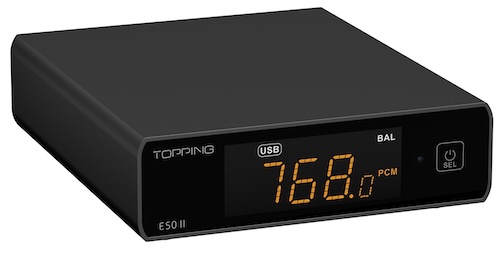
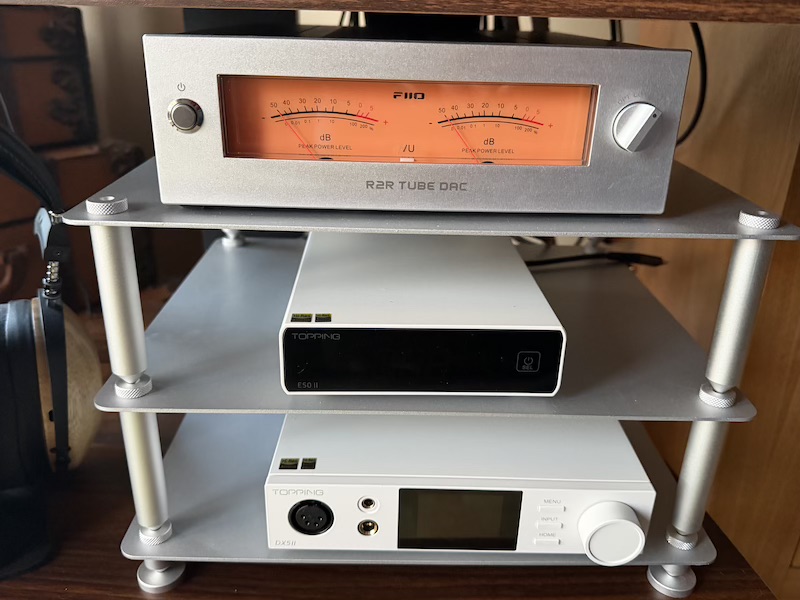
I have had the E50 II sitting in my signal chain across many reviews over the past three months, and it does exactly what the best DACs do: it gets out of the way and provides the cleanest possible analog output from a wide range of digital inputs. It does this so quietly and so well that I mostly forgot to finish this specific review — it simply sat there in the stack, doing its job perfectly, while I got on with evaluating everything else.
This is not a flashy DAC that adds ‘colourisation’ to the audio the way something like the FiiO Warmer R2R does — instead, where rivals like the SMSL DACs I have reviewed keep things fairly straightforward, Topping have focused on advanced, app-centric features like PEQ. The E50 II feels like an easy upgrade from those, with that kind of control being key. It comes in three finishes — black, silver, and white — and is currently on sale for $169.15, which at that price makes it a fantastic bargain.
I would like to thank Topping for providing the E50 II for the purposes of this review.
If you are interested in finding more information about this product, you can find it at the Topping E50 II product page.
The official user manual is available here: E50 II User Manual (PDF).
The E50 II typically retails for $199, though at the time of writing it is on sale for $169.15.
In that time it has fed powered studio monitors and external headphone amplifiers — including the Schiit Midgard — and featured in many of my other reviews as the uber-clean DAC sitting in the audio stack used to evaluate everything else. The Topping Tune app is arguably its headline feature, but the real appeal is the combination of capabilities packed into such a small box.
But before I get into the features, let’s see what is in the box.
Unboxing and Packaging
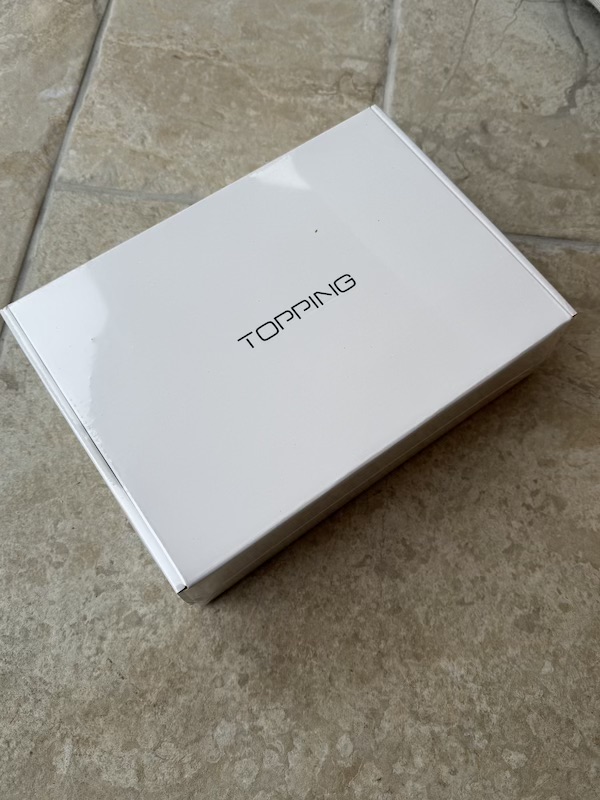
The E50 II arrives in a compact, clean box that reflects Topping’s increasingly confident product presentation — understated white packaging front and back:
 |
 |
Opening the lid reveals the unit nestled securely in shaped foam, with accessories tucked neatly beside it:
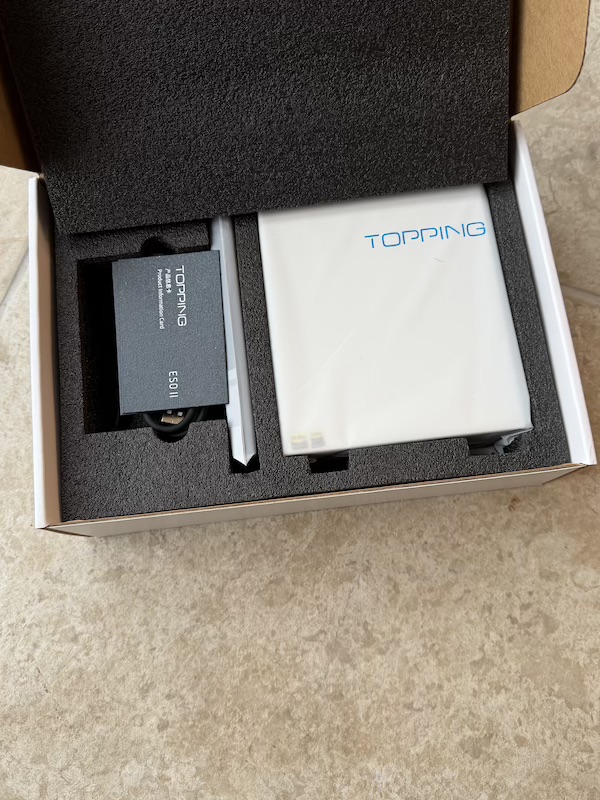
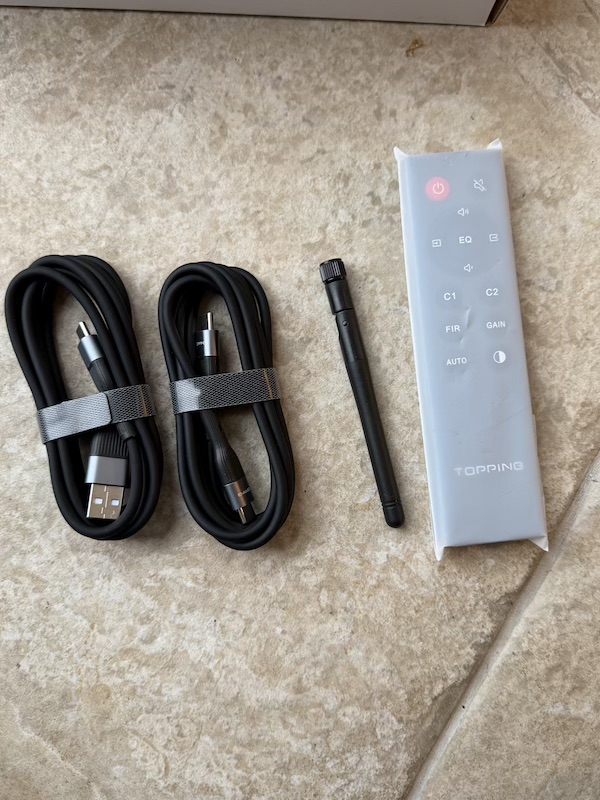
In the box: the E50 II desktop DAC, an infrared remote control, a USB A-to-C cable, a USB C-to-C cable, a Bluetooth antenna, a product information card, and an app information card with QR codes for the Topping Tune app and the online manual.
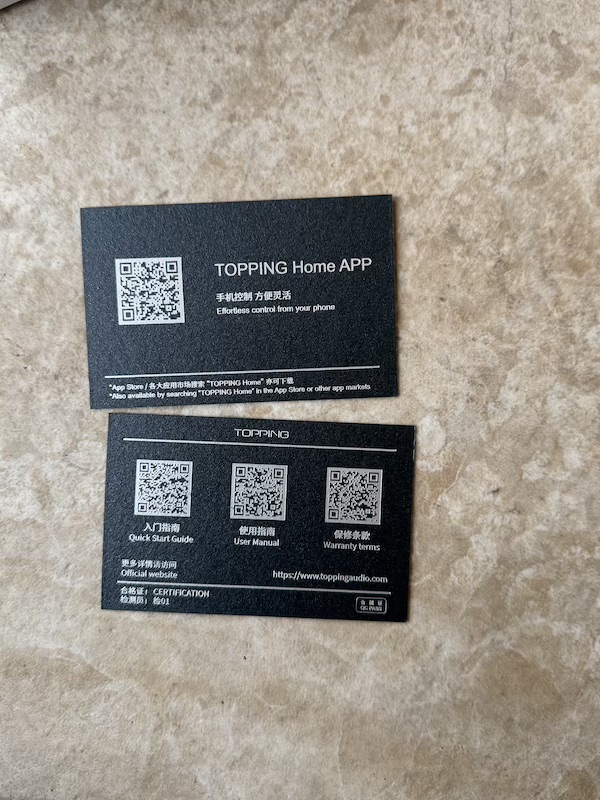
The accessory package is generous for the price. Both USB cable types are covered, and the Bluetooth antenna is included and straightforward to attach, but the real extra here is the bundled infrared remote — still genuinely rare on a DAC at this price, and as I will come back to, it unlocks most of the unit’s day-to-day control without ever reaching for your phone.
Build Quality
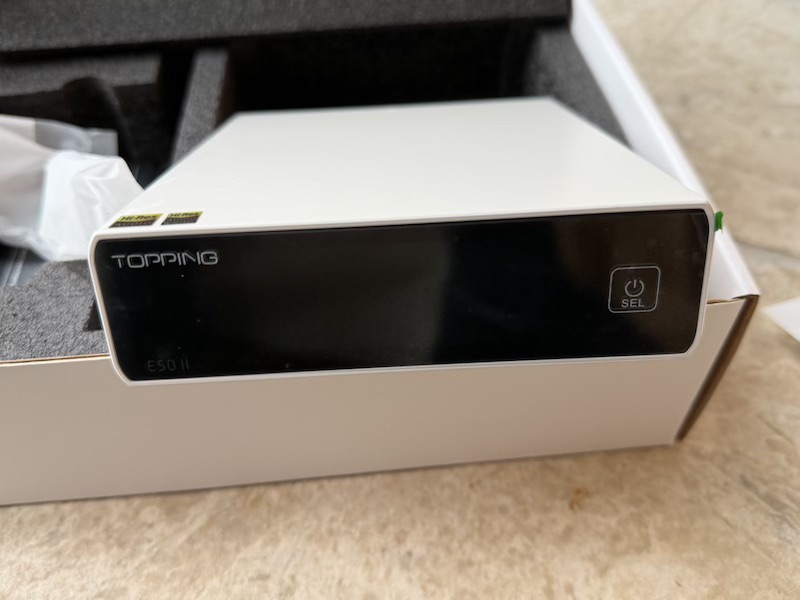
The E50 II carries the clean, purposeful look Topping has been refining across its recent lineup. Available in black, silver, or white — all three keeping a black front panel — it weighs 465g and measures 155 × 129 × 41mm, so it fits easily on a desk. The front panel is minimal: a clear LED display with four brightness settings, plus a multi-function touch button for input switching and standby. Automatic brightness mode is useful, matching the Middle brightness level during use and turning the screen off after 30 seconds of inactivity.
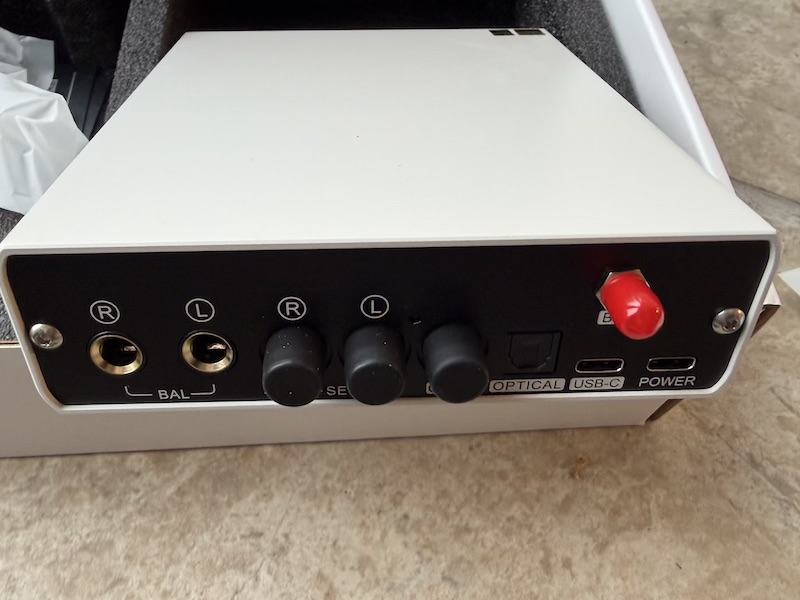
Turn it around, and you get Balanced TRS outputs, single-ended RCA outputs, coaxial input, optical input (which doubles as an ADAT port), USB-C, the Bluetooth antenna connector, and the DC power socket are all neatly arranged and clearly labelled.
 |
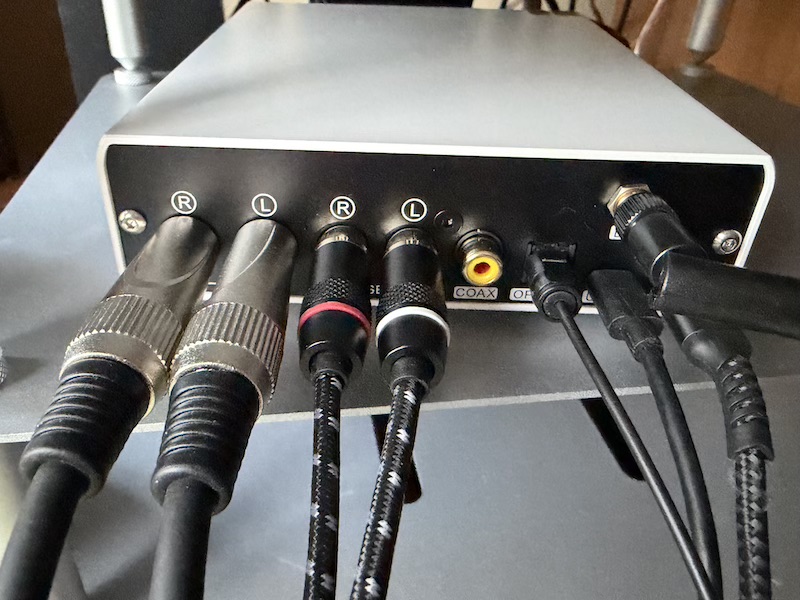 |
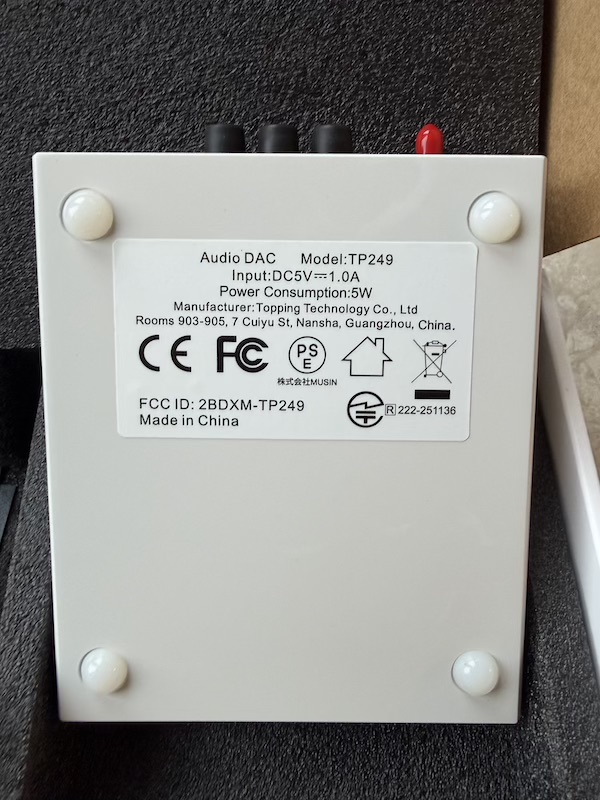
The back panel is busy for such a small DAC, but the connectors are spaced well enough for a real desk setup as in my picture on the right above. The underside is cleanly finished, with rubber feet providing grip.
Features and Performance
The Topping Tune App
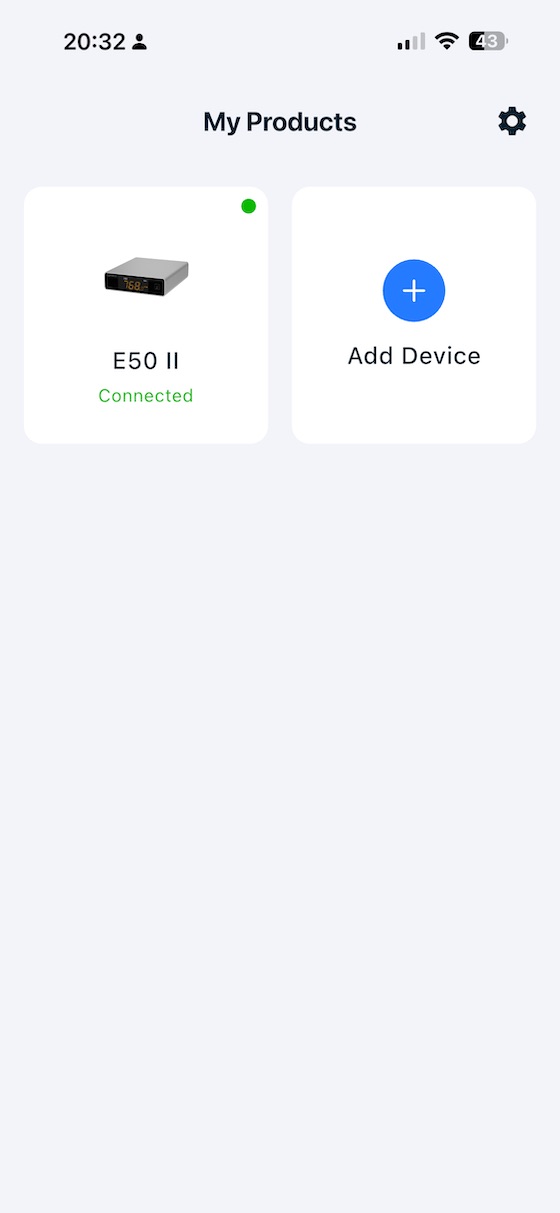
The Topping Tune mobile app is central to what makes the E50 II stand apart, unlike the DX5 II which has a lovely screen you interact with that exposed most of the internal functionality, with the E50 II, while you don’t have to use the “Tune” App, if you want to get the most from the E50 II you should:
 |
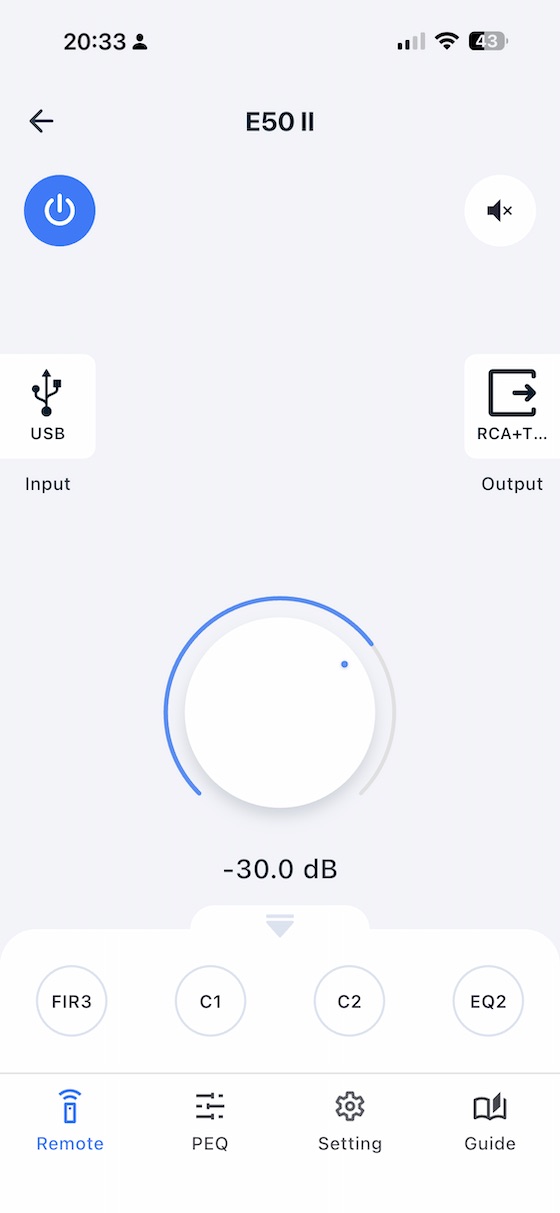 |
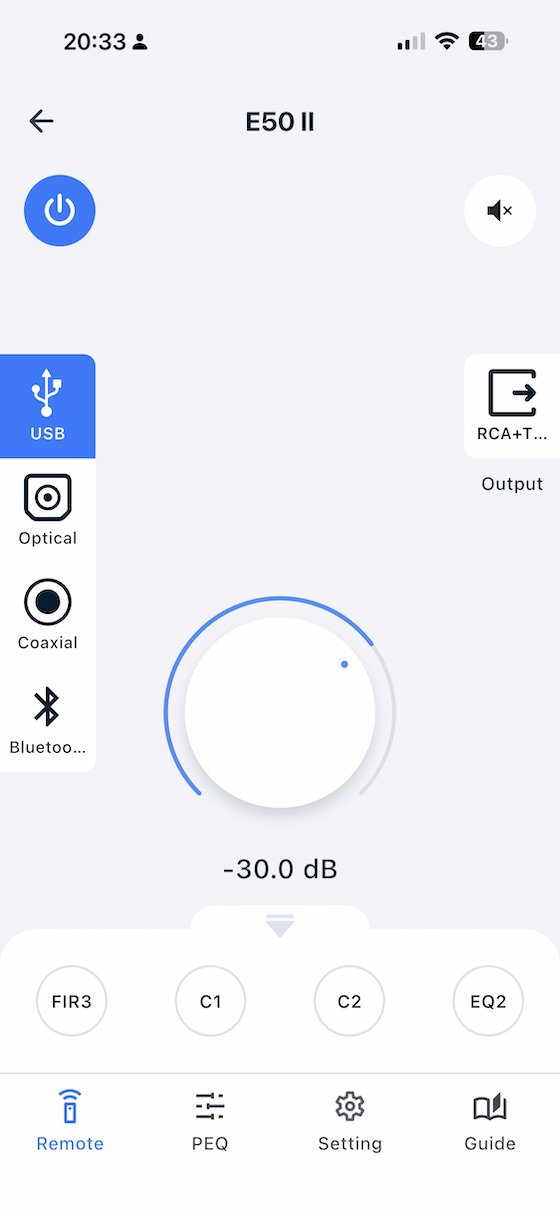
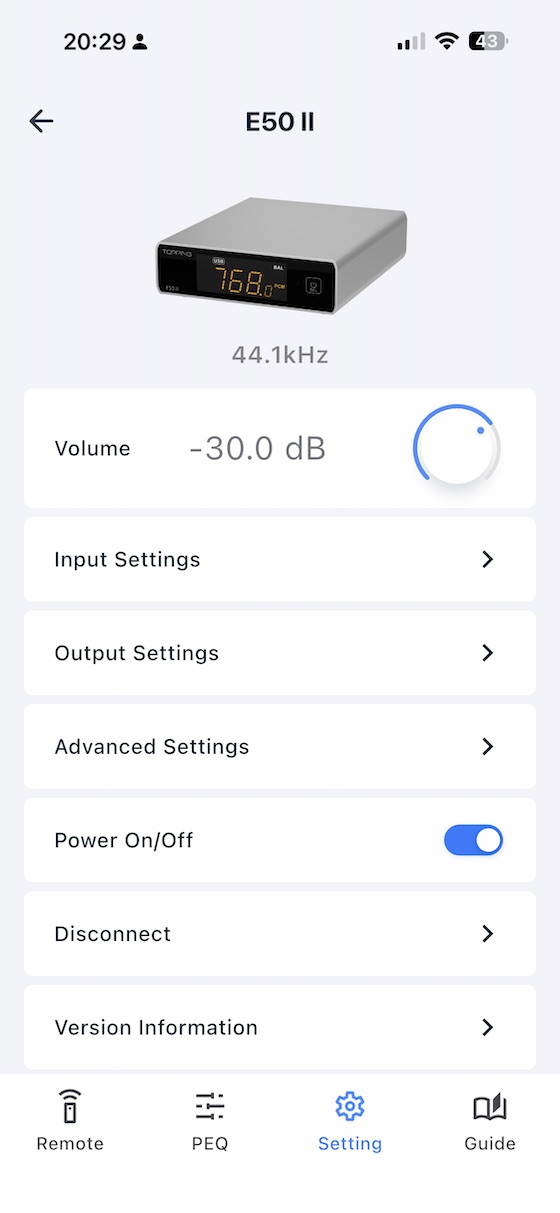
From the home screen you can select and manage connected devices, monitor the active input, and adjust volume directly from your phone:
 |
 |
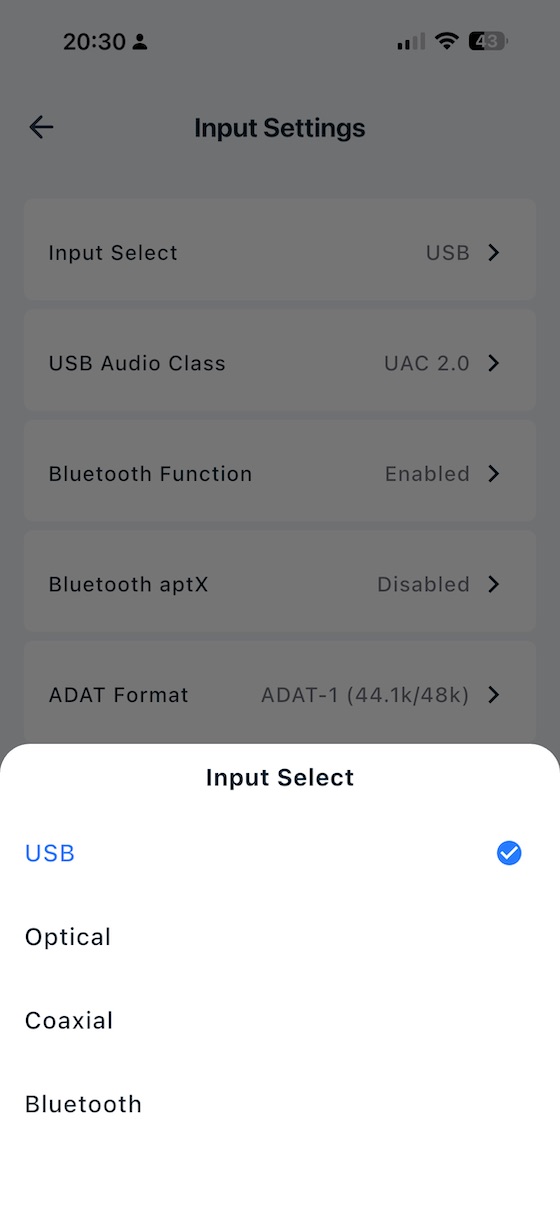
Input selection is clean and direct:
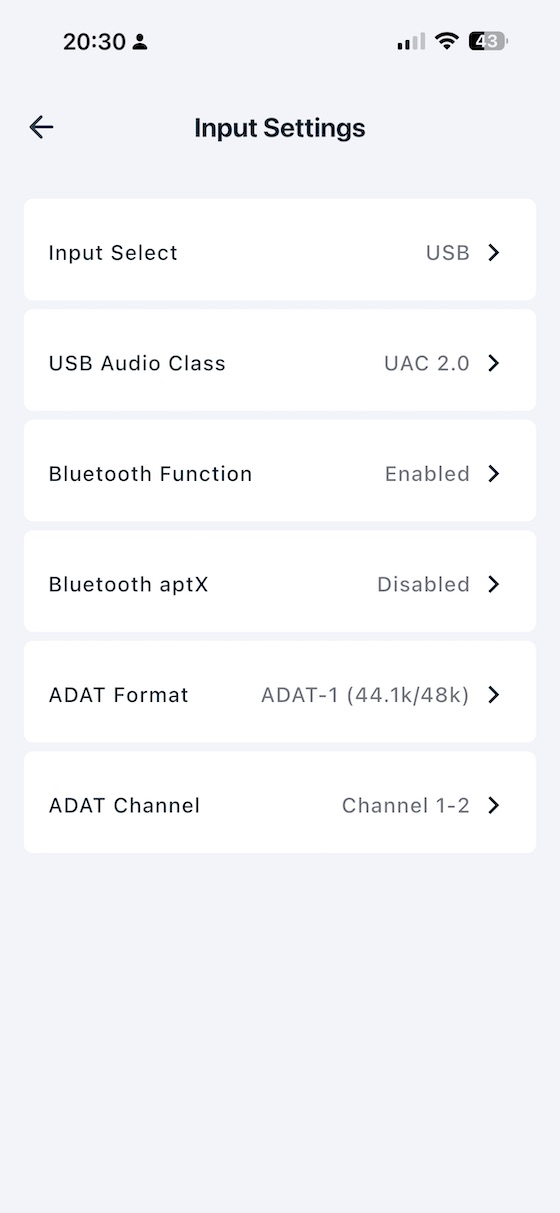
The specific Input and Output options:
 |
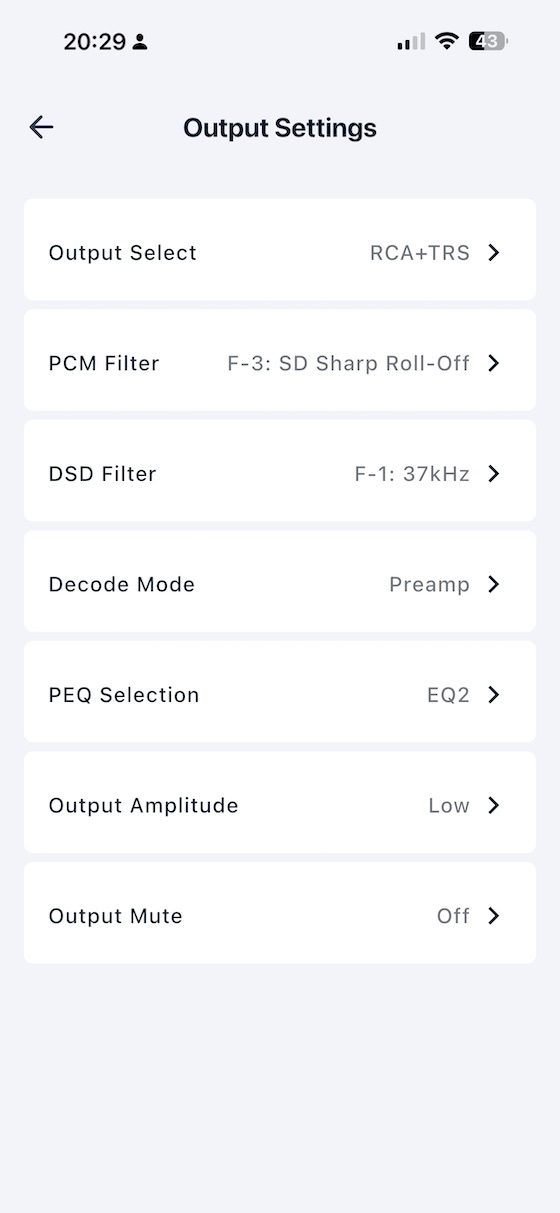 |
Decoding, Filters, and Format Support
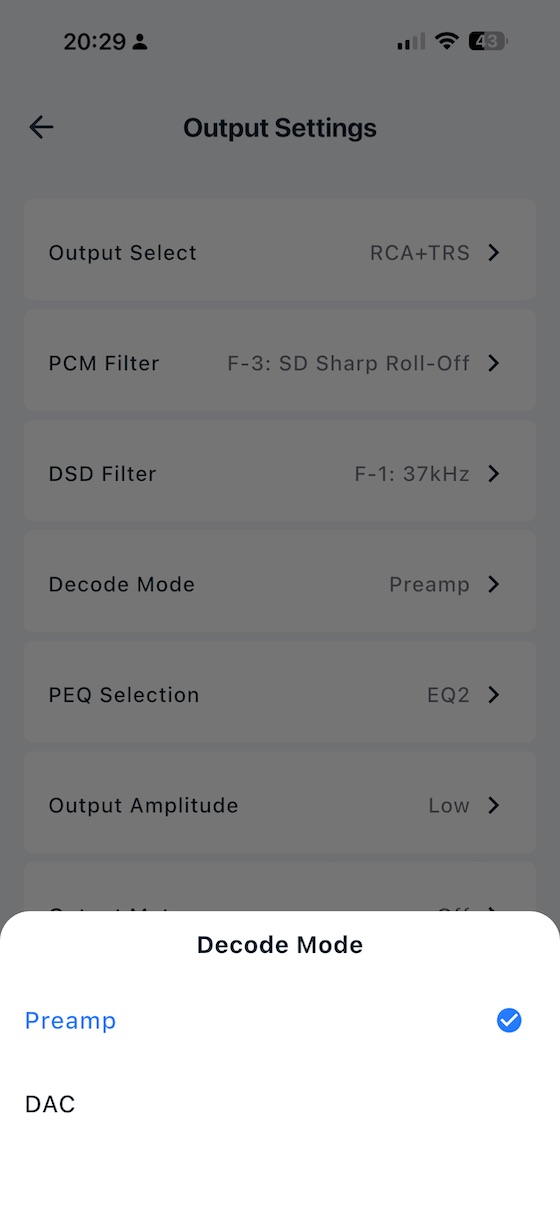
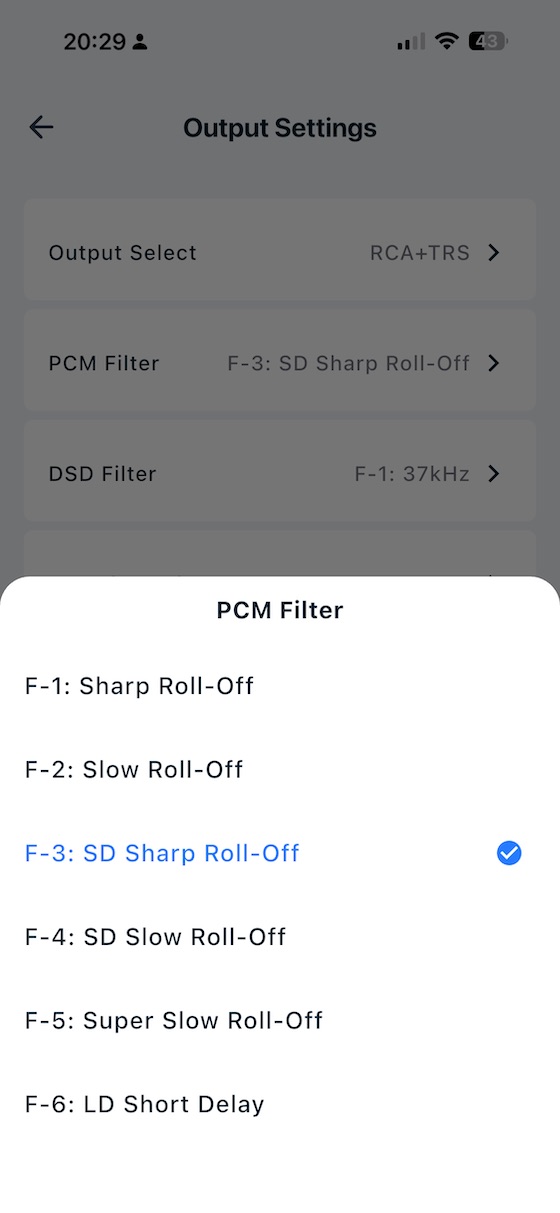
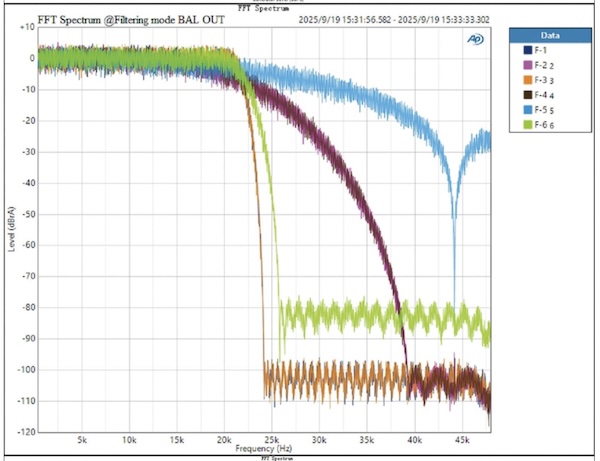
The decode mode screen gives you direct control over how the E50 II handles incoming signals, and the separate PCM and DSD filter pages add useful fine-tuning. You can choose between different reconstruction filter shapes, from minimum phase to linear phase options with different roll-off behaviour. The audible differences are small, but it is useful to have the control in the app rather than buried in a front-panel menu.
 |
 |
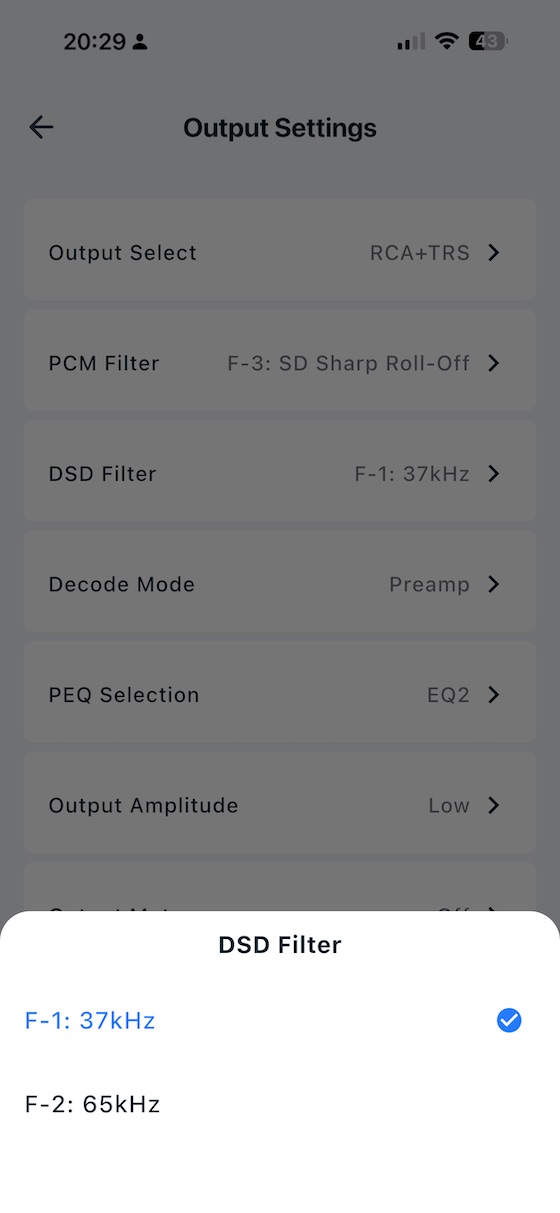
There is even DSD filter support:
TopSync Jitter Elimination
The coaxial and optical inputs use an FPGA+PLL-based TopSync circuit, enhanced with JitterNull technology, to suppress jitter. In the commonly used jitter measurement tests, the E50 II reaches as low as −160dB, which is excellent for a DAC at this price.
On the power side, the E50 II runs from a 5V USB-C supply — separate from the audio data USB-C input — with extensive internal filtering and regulation. The power supply rejection ratio is excellent, meaning mains noise does not reach the audio stages even when powered from a computer or a basic USB charger.
ADAT Support
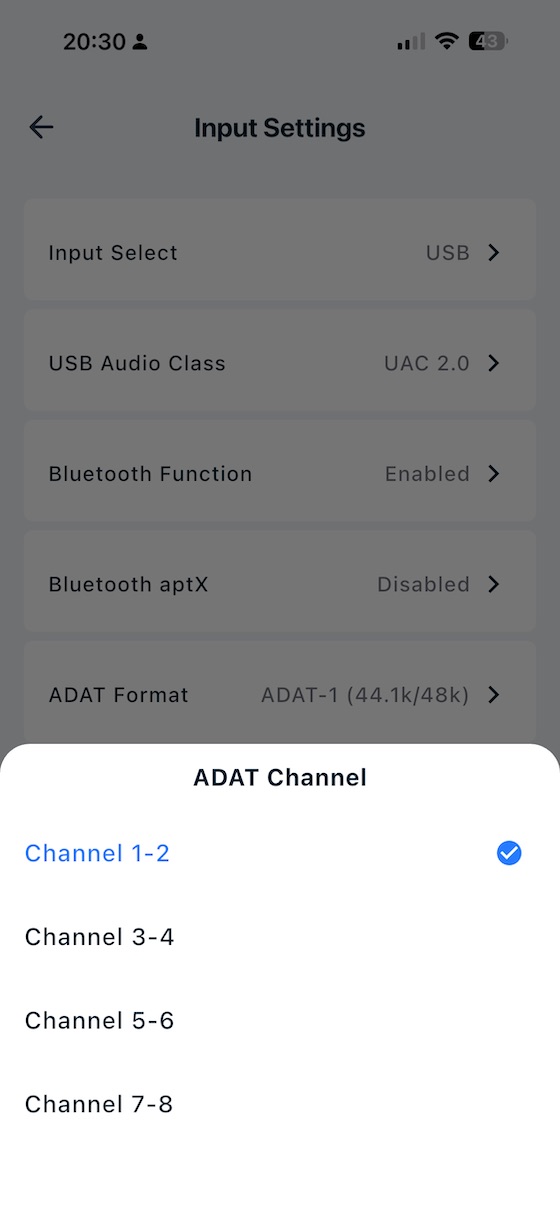
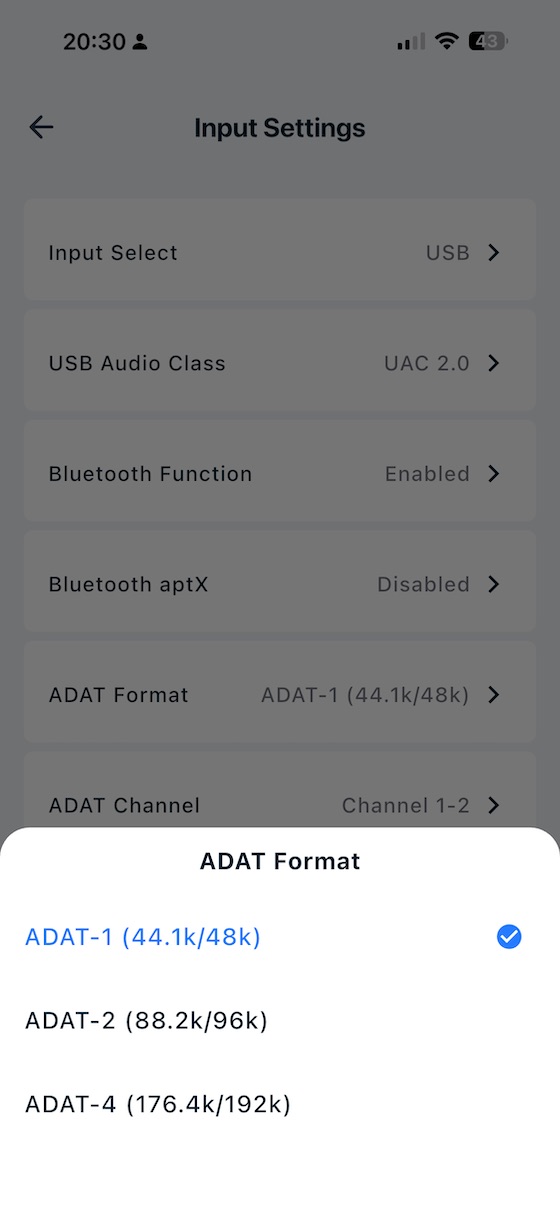
The ADAT capability on the optical input is a fairly unique feature at this price point. The E50 II automatically recognises whether it is receiving an S/PDIF or ADAT signal and supports ADAT at 44.1kHz–192kHz. The app also gives you control over ADAT channel selection and format, which makes the E50 II more useful in studio-style setups than most $199 DACs.
 |
 |
Parametric EQ
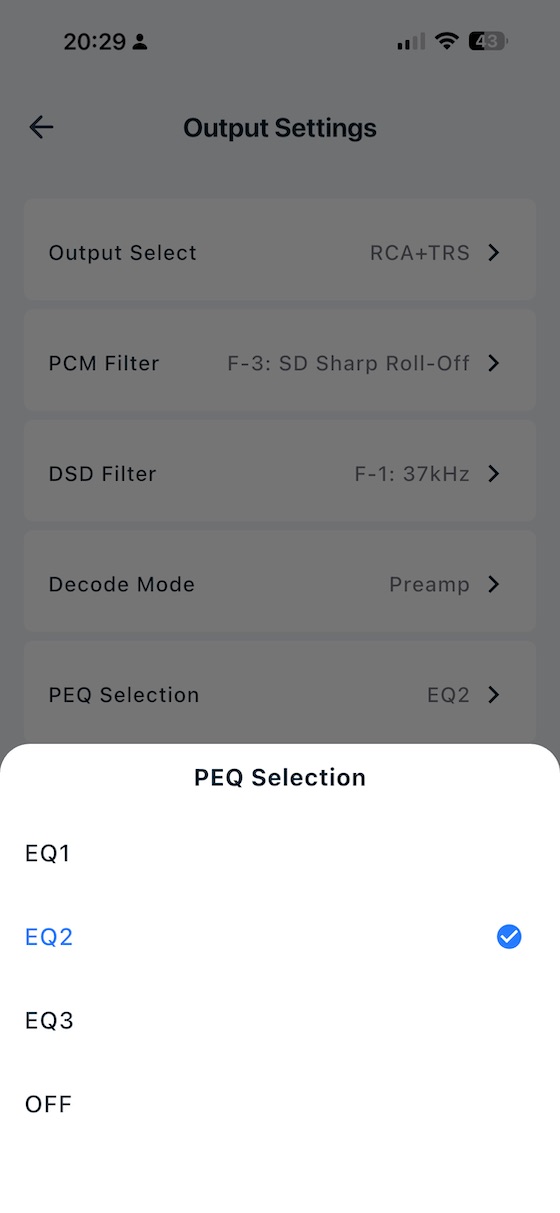
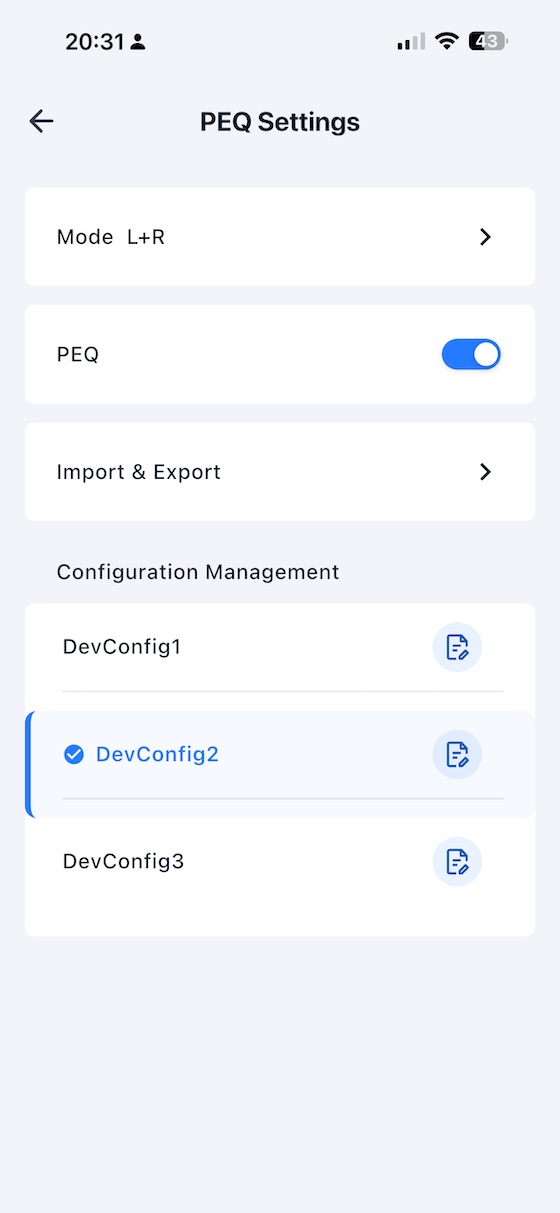
The ten-band parametric EQ is one of the E50 II’s most useful features. Each band gives you control over frequency, gain, and Q factor, with independent adjustment for left and right channels. Because the EQ works at the DAC level rather than inside a playback app, it applies across sources: Spotify, Tidal, a media server, or a Bluetooth stream all pass through the same filter chain. The E50 II stores three EQ configurations on-device, and all three remain available without a phone connection. You can select EQ1, EQ2, EQ3, or EQ off directly from the remote or setup menu.
 |
 |
And I really like the level of configuration available with each filter band:
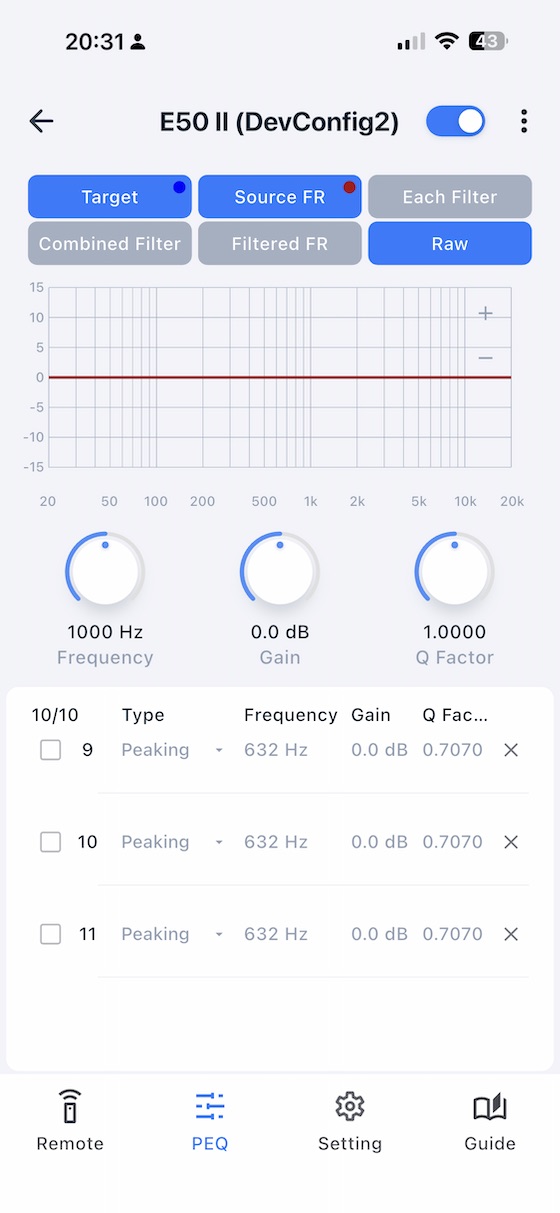
For headphone tuning, basic room compensation, or even some basic speaker correction, having PEQ at the DAC level is much more practical than relying on EQ inside one playback app. PEQ support varies by input: USB delivers the full range up to 192kHz/32-bit, optical and coaxial S/PDIF up to 192kHz/24-bit, ADAT up to 192kHz, and Bluetooth up to 96kHz/24-bit. The balanced and single-ended outputs can also be used simultaneously, which is useful when feeding both a subwoofer and a pair of monitors from the same DAC.
Setup Menu Navigation
The setup menu is accessible from standby: press and hold the remote’s power button or the front panel touch button for three seconds. Once inside, a short press of the touch button cycles to the next setting, a double-tap changes the parameter value, and a long press saves and exits (a bright spot appears on the display to confirm the save, after which a short press powers the unit back on). The remote provides equivalent navigation. This front-panel-only path means every setting is reachable without a phone — useful if you are configuring the unit in a rack or away from your mobile device.
Settings and Advanced Controls
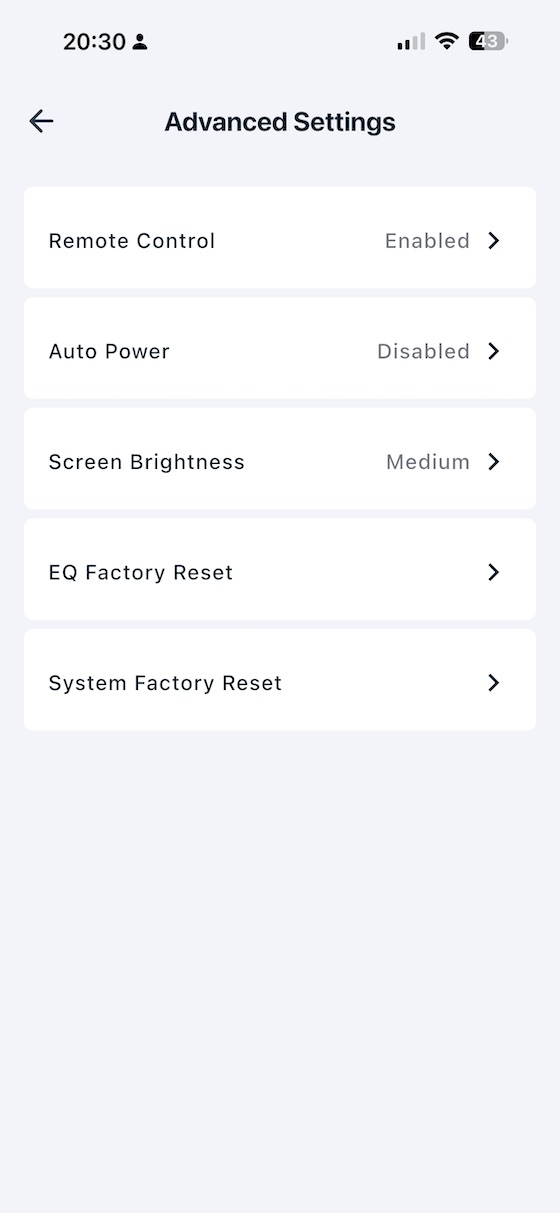
The settings and advanced screens are where the app starts to feel genuinely useful. Display brightness, output coupling mode, preamp versus fixed line-out switching, and gain configuration are all accessible without navigating cryptic front-panel menus. The C1 and C2 remote buttons add another useful touch: press and hold either for three seconds to save your current configuration, then recall it with a single press. For listeners who switch between a headphone amplifier and powered monitors, this removes a lot of friction.
Output Selection
The remote control’s Output switch button lets you cycle between three output modes: SE (RCA single-ended only), BAL ( TRS balanced only), or SE+BAL (both outputs simultaneously). The simultaneous mode is particularly useful when feeding a subwoofer from the RCA outputs while running balanced to a pair of monitors — a common studio-adjacent setup that the E50 II handles without any additional switching hardware.
Standby and Auto On/Off
Standby is accessible by long-pressing the front panel touch button or pressing the standby button on the remote; a short press wakes the unit. The Auto on/off feature — disabled by default — takes this further: when enabled, the E50 II enters standby within one minute of losing a valid input signal, and wakes again when a signal is detected. For setups where the DAC is left powered but the source is switched off, this is a useful power-saving option.
Volume Control and Decoding Modes
Volume is adjusted with the Volume Up and Down buttons on the remote — short presses step through levels, long presses scroll quickly (use care to protect your hearing). In Preamp mode (m-p), volume is fully adjustable and the display shows the current level. In DAC mode (m-d), volume is fixed at 0dB and the volume buttons have no effect — this is the correct mode when feeding a preamplifier or integrated amplifier that handles its own volume control, as it removes one gain stage from the chain entirely.
Mute
A dedicated mute button on the remote control silences the output instantly. Pressing mute again, or adjusting the volume, exits mute mode. The mute state is indicated on the display, so there is no ambiguity about whether the unit is muted or simply receiving a silent signal.
USB Audio Class and Device Compatibility
On USB connectivity, the E50 II defaults to UAC 2.0 and is plug-and-play on macOS and modern Linux systems, requiring no driver. Windows users should install Topping’s Thesycon driver to ensure bit-accurate transfer and full sample-rate flexibility. A UAC 1.0 mode is also available in the setup menu for devices that do not support UAC 2.0 — including the Nintendo Switch and PlayStation consoles — making the E50 II usable as a USB DAC with gaming hardware that would otherwise be incompatible.
Bluetooth Codec Control
The Bluetooth implementation uses Qualcomm’s QCC5125 chip and supports LDAC, aptX Adaptive, aptX HD, aptX, AAC, and SBC — reaching up to 96kHz/24-bit over LDAC. A dedicated Bluetooth APTX toggle in the setup menu allows aptX Adaptive to be disabled if you prefer to force a different codec negotiation. Bluetooth will not match wired digital inputs for transparency, but the implementation is competent and convenient for casual wireless listening. One gap: MQA decoding is not supported, which will matter to TIDAL MQA subscribers but very few others given the format’s shrinking relevance.
Factory Reset
The E50 II provides two distinct factory reset procedures, both performed from standby using the remote control. The first restores all unit settings (excluding PEQ configurations) by pressing Volume Down, Volume Up, and Mute in sequence. The second resets only the PEQ data to factory defaults by pressing Volume Up, Volume Down, and EQ in sequence. Having separate resets for settings and EQ is a thoughtful touch — it means you can wipe a misconfigured EQ without losing your carefully saved input, output, and gain preferences.
Sound Impressions
All listening was done with the E50 II in fixed line-out mode, feeding powered monitors and an external headphone amplifier — primarily the Schiit Midgard — over balanced TRS connections. Source material ranged from 16-bit/44.1kHz FLAC through to DSD128 files and high-resolution PCM streams via USB, with Bluetooth LDAC used for wireless listening comparisons.
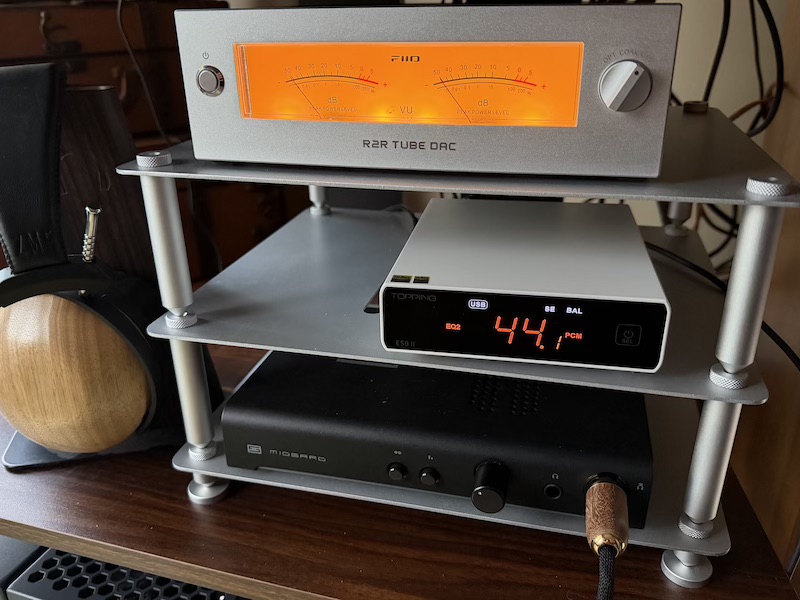
The E50 II sounds like a good modern DAC should: clean, quiet, and difficult to accuse of having a strong character of its own. Through the Schiit Midgard and powered monitors, bass stayed controlled, vocals had no obvious added warmth or edge, and the treble did not pick up the grain or glare that cheaper DAC stages can sometimes add. That is not a dramatic description, but it is the point. This is a DAC I would choose when I want the amplifier, headphones, speakers, or EQ profile to shape the system, not the converter.
The biggest difference I heard against weaker DAC stages was composure rather than tone. Donald Fagen’s The Nightfly and Dire Straits’ Brothers in Arms both kept their low-end timing and vocal separation intact, while Nils Lofgren’s live Keith Don’t Go had clean guitar attack without turning brittle. With well-recorded material, imaging was stable and centre focus was strong. I would not claim the E50 II transforms a system, but it gives the rest of the chain a clean signal and then mostly gets out of the way.
Comparisons
FiiO Warmer R2R
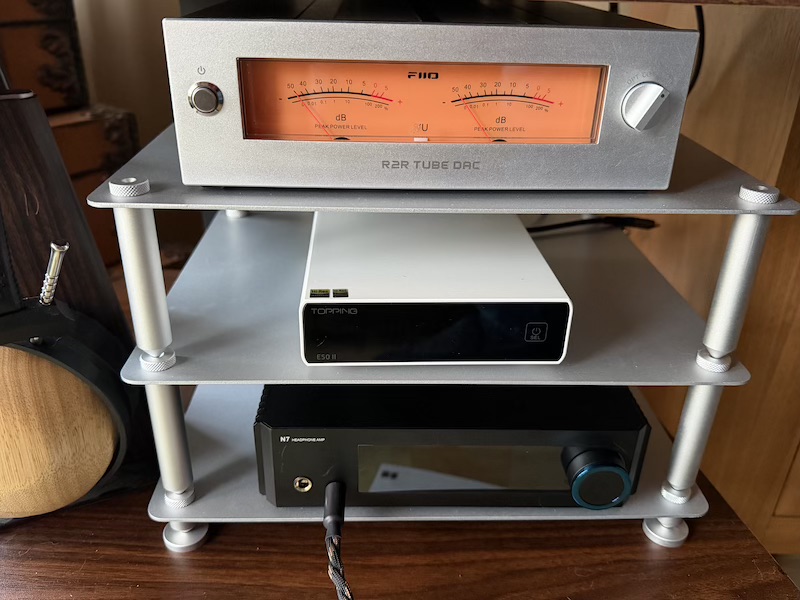
The FiiO Warmer R2R is the philosophical opposite of the E50 II in almost every respect. Where the Topping is compact, minimalist, and relentlessly neutral, the Warmer is a statement piece — retro aesthetics, VU meters, tube-inflected tonality, and an NOS mode that introduces the harmonic colouration many R2R enthusiasts specifically seek. Placed side by side, the design contrast alone tells you everything about who each product is made for.
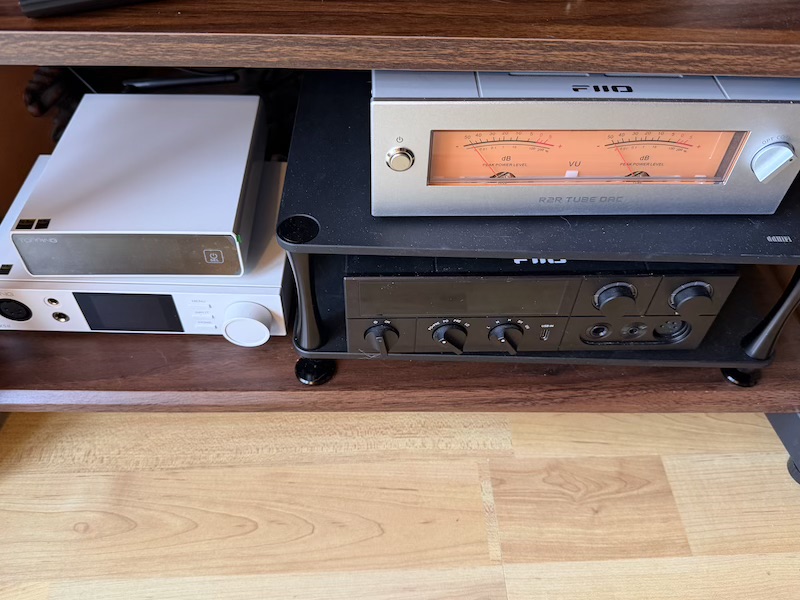
That said, the Warmer in OS mode narrows the sonic gap considerably and can sound quite neutral. The comparison is less about which DAC is better and more about what you want the DAC to do. If you want the converter to stay out of the way, the E50 II is the safer choice. If you want visible character, retro design, and some tube/R2R flavour, the Warmer is built for that.
SMSL D6S
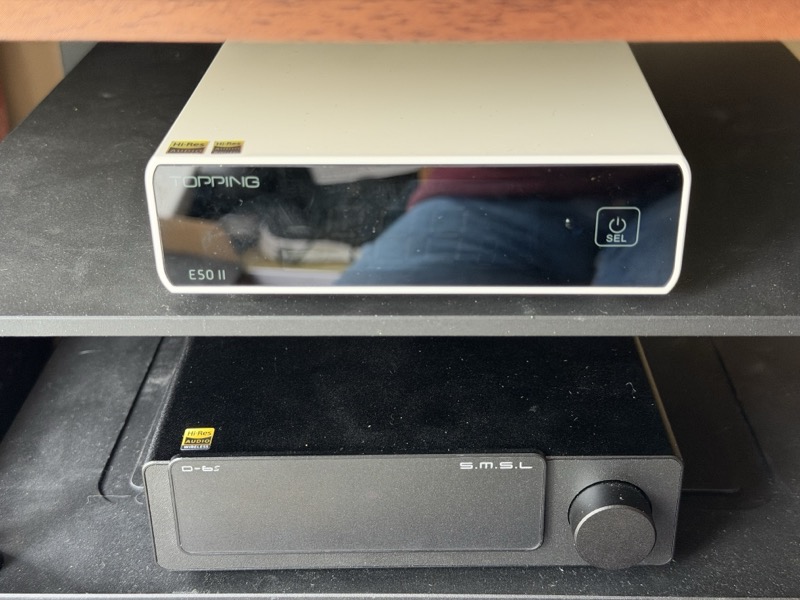
The SMSL D6S is the most direct hardware rival in the same price bracket — another sub-$200 balanced DAC with strong measurements and a similar desktop form factor. The E50 II sits noticeably smaller and lighter, which is either an advantage or a limitation depending on your setup. The front panel comparison makes the size difference clear:
The rear panel tells the most important part of the story. The SMSL D6S offers full XLR balanced outputs — three-pin connectors rather than the TRS balanced format the E50 II uses — along with its own digital input layout:
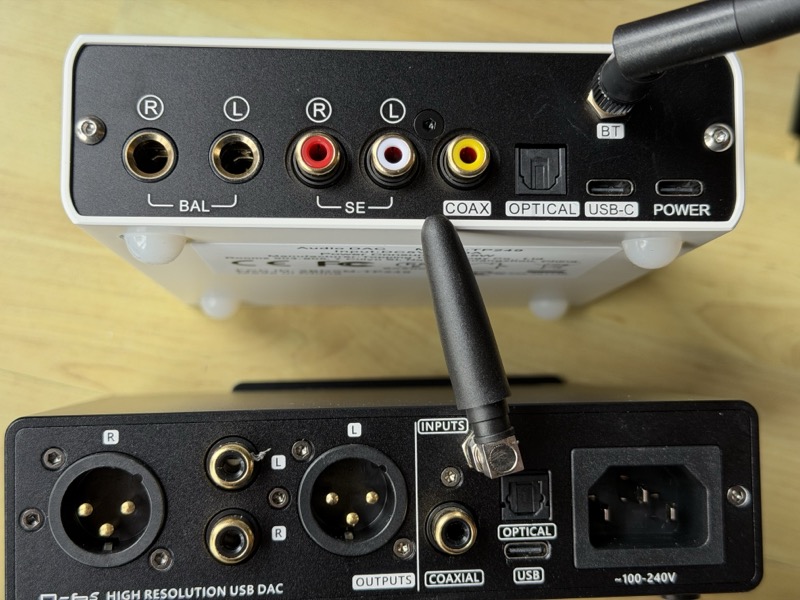
In measured performance, both products are strong enough that the decision comes down to features. The E50 II wins with hands down due to its features: the Topping Tune app, ten-band PEQ, LDAC Bluetooth, and ADAT optical support. The D6S wins if you specifically need full XLR connectors for compatibility with professional or studio equipment. For most home listening setups, TRS balanced is fine, and the E50 II’s feature set is deeper.
Topping DX5 II
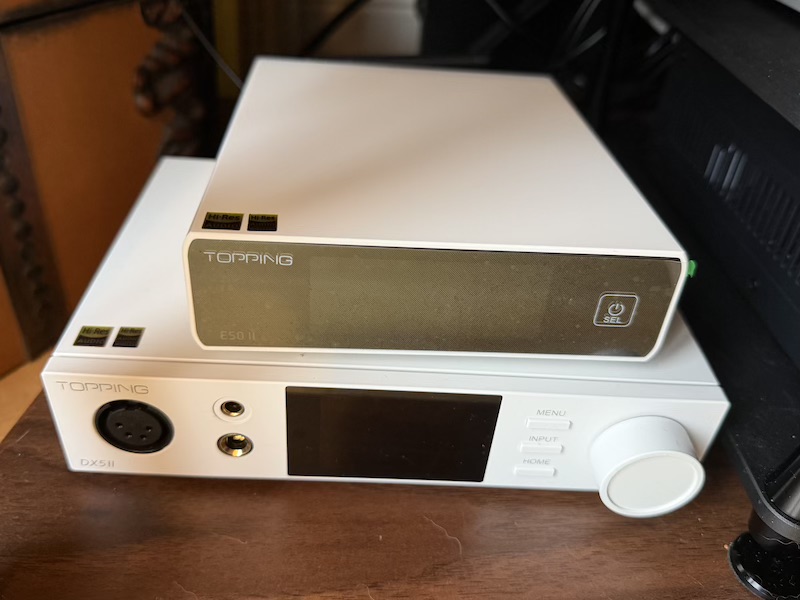
The Topping DX5 II is the E50 II’s bigger sibling — a $299 DAC and headphone amplifier combo that shares the same Topping design language and the same commitment to measurement excellence, but adds a fully balanced headphone output stage, crossfeed capability, and all the additional complexity that comes with driving headphones directly.
 |
 |
If you already own a headphone amplifier you are satisfied with and need a top-performing DAC to feed it, the E50 II is the sharper choice — it costs $100 less and delivers DAC performance that is functionally equivalent in every area that matters. The DX5 II makes sense if you want the full integrated stack in one box or need headphone outputs directly. For a speaker or powered-monitor setup where the amplifier question is already answered, the E50 II is the more logical buy.
Specifications and Measurements
| Specification | SE | BAL |
|---|---|---|
| DAC chip | AKM AK4497S (VELVET SOUND) | — |
| USB interface | XMOS XU316 | — |
| PCM support | 44.1kHz–768kHz / 16–32-bit | — |
| DSD support (Native) | DSD64–DSD512 | — |
| DSD support (DoP) | DSD64–DSD256 | — |
| Digital inputs | USB-C, coaxial, optical (S/PDIF & ADAT), Bluetooth | — |
| Bluetooth codecs | LDAC, aptX Adaptive, aptX HD, aptX, AAC, SBC | — |
| Line outputs | RCA single-ended | TRS balanced |
| Output level (PCM, U-L) | 2.6Vrms / 10.7dBu | 5.3Vrms / 16.7dBu |
| Output level (PCM, U-H) | 5.6Vrms / 17.2dBu | 11.3Vrms / 23.2dBu |
| Output level (DSD, DAC mode) | 3.8Vrms / 13.7dBu | 7.5Vrms / 19.7dBu |
| THD+N @1kHz, A-wt | 0.0001% | 0.0001% |
| THD @No-wt, 90kBw | 0.0005% (20–20kHz) | 0.0002% (20–20kHz) |
| SINAD @A-wt | 120dB @1kHz | 120dB @1kHz |
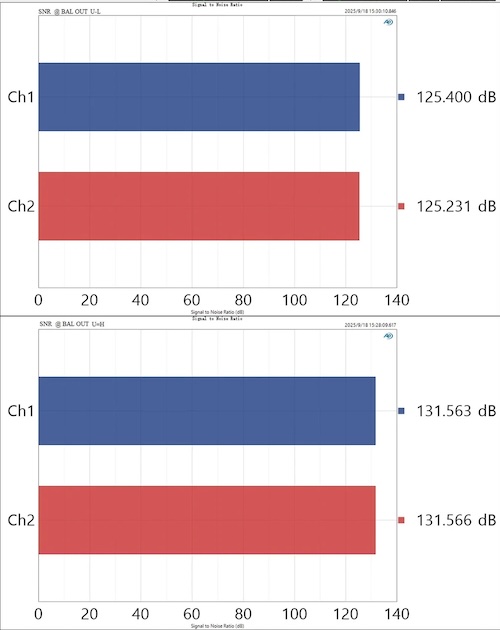
| SNR @A-wt (U-L / U-H) | 124dB / 131dB @1kHz | 125dB / 131dB @1kHz |
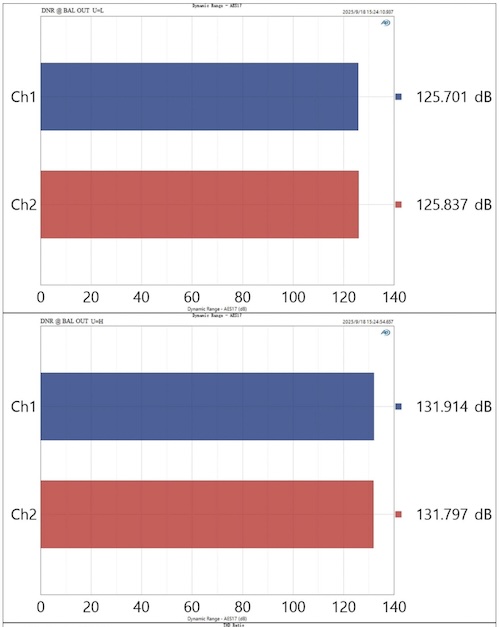
| Dynamic range (U-L / U-H) | 124dB / 130dB @1kHz | 125dB / 131dB @1kHz |
| Frequency response | 20Hz–20kHz (±0.1dB), 20Hz–40kHz (±0.3dB) | 20Hz–20kHz (±0.1dB), 20Hz–40kHz (±0.3dB) |
| Noise @A-wt | 1.7µVrms | 3.0µVrms |
| Channel crosstalk | −130dB @1kHz | −130dB @1kHz |
| Channel balance | 0.3dB | 0.3dB |
| Output impedance | 50Ω | 100Ω |
| Output coupling | AC | AC |
| Jitter (optical/coax) | −160dB | — |
| PEQ | 10-band parametric, independent L/R | — |
| Dimensions (W × D × H) | 155 × 129 × 41mm | — |
| Weight | 465g | — |
| Colours | Black, Silver, White | — |
| Bluetooth chip | Qualcomm QCC5125 | — |
| MQA support | No | — |
| Power consumption | 3.0W | — |
| Output DC offset | 1mVrms | 1mVrms |
Measurements
Note: These measurements were published by Topping themselves
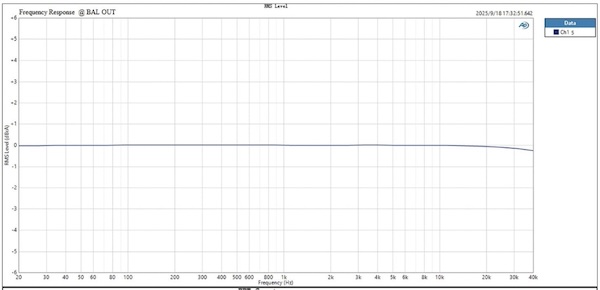
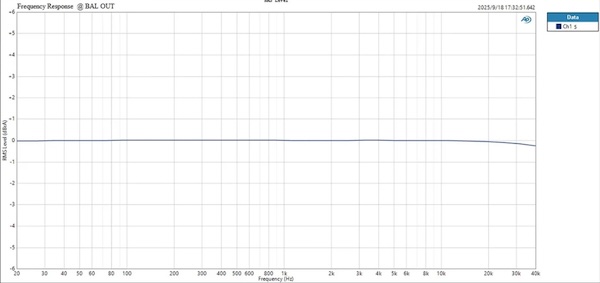
The E50 II measures extremely well at this price. The frequency response measured at the balanced output is flat across the full audible band and maintains that linearity well into the ultrasonic region, only beginning to roll off past 30kHz:
 |
 |
The SINAD figure of 120dB is excellent for a sub-$200 DAC, confirming that distortion and noise are comfortably below audibility in normal listening.
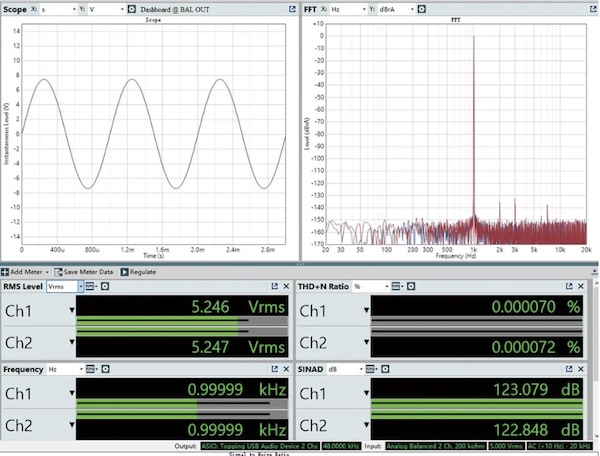
Dynamic range figures reach 130–131dB in U-H gain mode — numbers that were associated with considerably more expensive equipment just a few years ago.
 |
 |
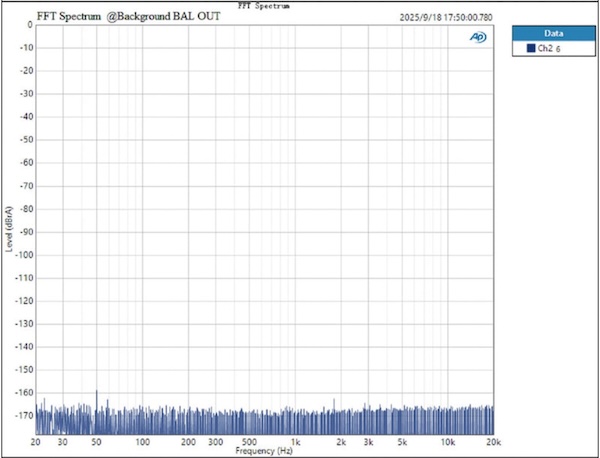
The background noise FFT at the balanced output is extremely quiet, with a noise floor sitting at or below −165dBrA and no mains hum or spurious tones of concern:
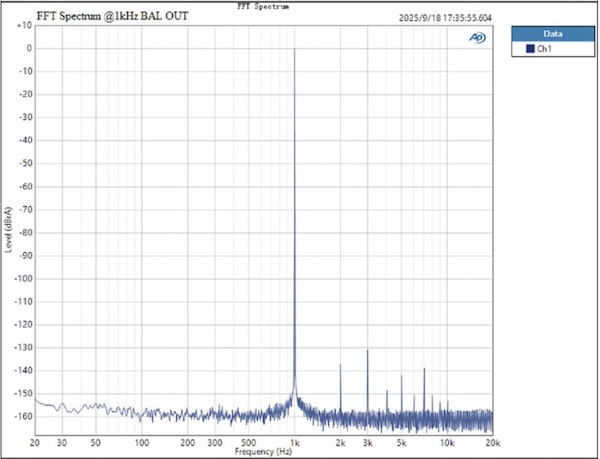
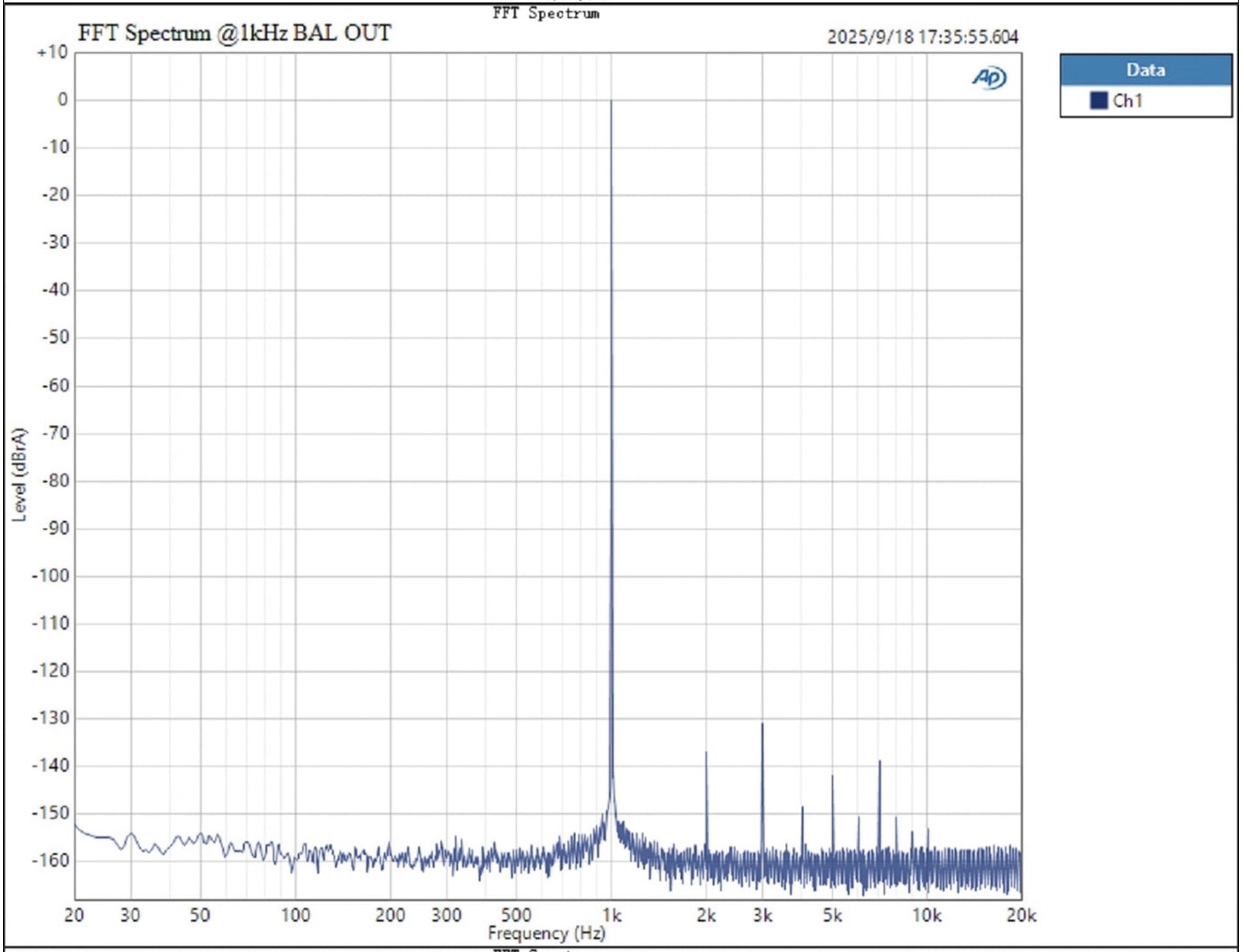
The 1kHz FFT at the balanced output shows the fundamental and harmonics clearly, with the harmonics so far below the signal that they are inaudible under any realistic condition:
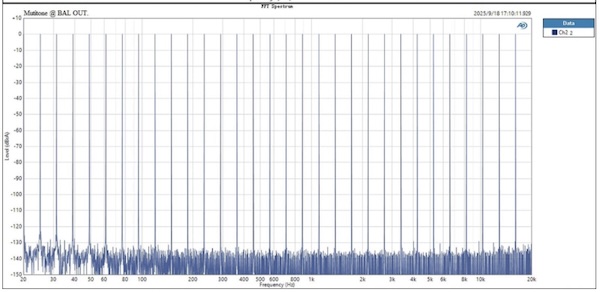
The remaining FFT and multi-tone tests confirm a clean noise floor with no significant spurious tones or harmonic artefacts:
 |
 |
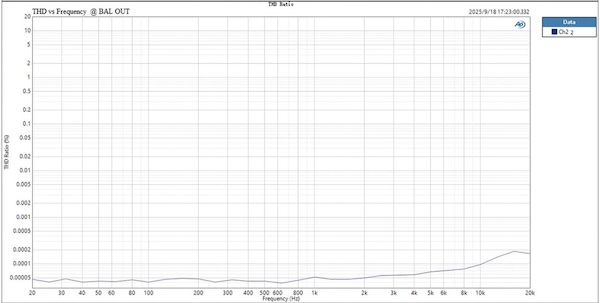
THD across the frequency range is even, with no significant elevation in the bass or upper registers that might indicate a less controlled implementation.
The DAC filter roll-off graph shows the different reconstruction filter options available through the app — each with a distinct profile in the ultrasonic region, allowing you to choose between filter presentations based on your preference for bandwidth, pre-ringing, and post-ringing behaviour.
Rating Explanation
At $199 (on sale for $169.15 at the time of publishing this review), the Topping E50 II earns a five out of five pragmatic rating by delivering a very complete package: excellent DAC measurements, ten-band parametric EQ through a polished mobile app, LDAC Bluetooth, ADAT-capable optical input, balanced and single-ended line outputs, selectable output levels, and preamp mode with remote control. The combination is what matters. You can find cheaper transparent DACs, but few at this price combine this level of measurement performance with this much control.
The price rating sits at four rather than five because the DAC market in 2026 is competitive. Transparent-sounding DACs are available at lower prices, including some using the same AK4497S chip, and they will get you most of the way there on pure sonic performance. The E50 II earns its premium through the app integration, PEQ, LDAC, ADAT support, and balanced output stage. If those features do not matter to your setup, the value case is less dominant. It is also worth being direct about what the E50 II is not: there is no built-in headphone amplifier, the front panel is deliberately utilitarian rather than luxurious, and if you specifically want R-2R or NOS ladder architecture, the FiiO Warmer R2R is a better starting point.
Features and measurements both score five. The E50 II gives you a lot of control over the signal chain, and the measured performance leaves little to complain about.
Conclusion
The Topping E50 II does exactly what the absolute best DACs do, it gets out of the way providing exceptional analog output, but it avoids being boring by giving you useful control over the system around it. The app gives you practical day-to-day access to settings, and the bundled infrared remote — still a genuine rarity at this price — lets you switch inputs, toggle outputs, recall saved configurations, and adjust volume from across the room without ever reaching for your phone. The ten-band PEQ makes it a tuning tool, not just a signal converter. LDAC Bluetooth and ADAT optical input extend its reach beyond the usual desktop DAC use case.
If you want a clean standalone DAC and you will actually use the app, PEQ, Bluetooth, or ADAT support, the Topping E50 II is easy to recommend. If you only need a basic transparent DAC, some cheaper options exist, but they do lack both the exceptional clean measurements and those features like PEQ. So for me if you already have an exceptional headphone amplifier and want a DAC with the great features, the E50 II is an easy recommendation.