FiiO Air Amp
A streaming integrated amplifier with a TPA3255 / PFFB output stage, ten-band PEQ and lots of streaming options
FiiO’s first attempt at the one-box streaming amplifier — network player, DAC and 120 watts a side, in a chassis the size of a hardback book.
FiiO have built plenty of desktop DAC/amps for headphones, but the Air Amp is a different proposition: a network streamer, an ES9020Q DAC and a TI TPA3255 Class D power stage in one 207 × 188 × 42 mm chassis with speaker binding posts on the back. There is no headphone jack anywhere on it. This is a device for a pair of speakers, a network cable and nothing else.
That description will sound familiar to anyone who has looked at a WiiM Amp, and the comparison is unavoidable — same output chip, near-identical price, same “one box replaces the rack” pitch. What is worth checking is whether FiiO have matched the part of the WiiM proposition that actually matters day to day, which is the software.
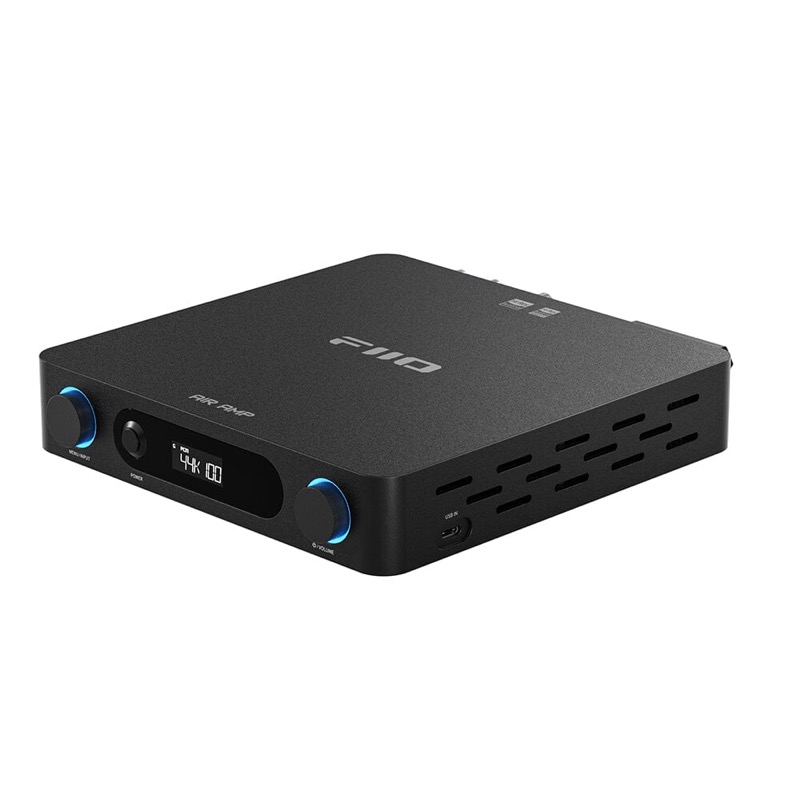
I would like to thank FiiO for providing the Air Amp for the purposes of this review.
If you are interested in finding more information about this product, you can find it at the official product page, and on HiFiGo.
The Air Amp sells for between $249 and $299 depending on tariffs, and between €225 and €269 in Europe — FiiO’s own EU store lists it at €224.99, while dealers sit nearer €269 (prices checked September 2026). Available in black and silver; the unit reviewed here is the black variant.
I have had the Air Amp for about a month, driving a pair of KEF LS50 Meta in a smaller room. Most of that time has been spent A/B testing it against the other recent TPA3255 amplifiers on my shelf, including the Aiyima units, all of which use post-filter feedback.
The finding that matters most is the least dramatic one: there is nothing to complain about. No noise, no hiss, no switching artefacts, enough power for the room, and a PEQ that behaves. At this price that combination is rarer than it should be.
Unboxing and Build Quality
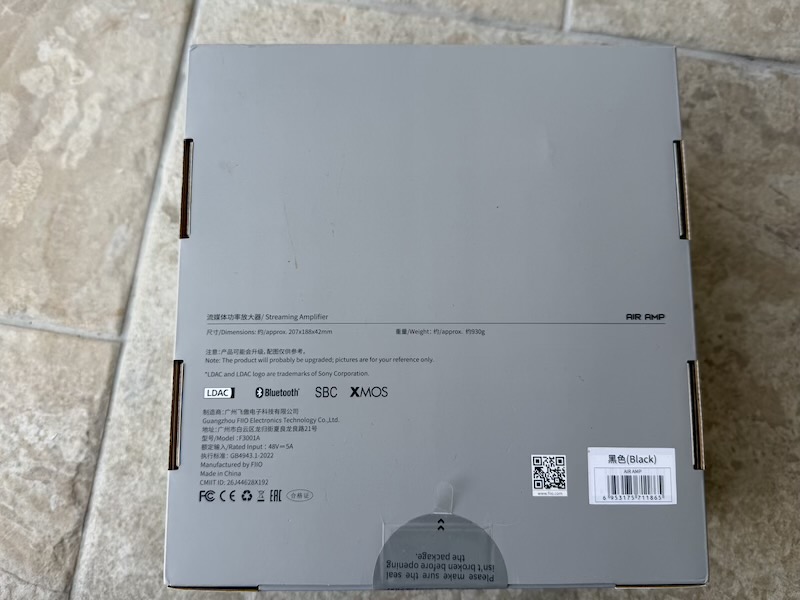
The box is plain grey card with a line drawing of the amplifier and the words “STREAMING AMPLIFIER” down one side, which is at least an honest description of what is inside. The rear panel of the box carries the dimensions and weight, the LDAC and XMOS logos, and the model number FT3001A:
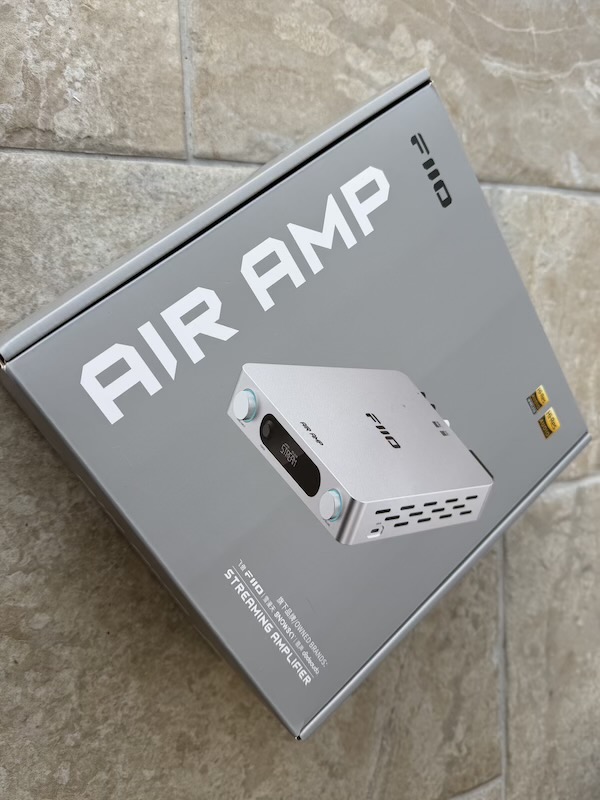 |
 |
Worth reading the small print on the back, because it is where the physical numbers actually live — 207 × 188 × 42 mm and roughly 930 g — along with the LDAC, Bluetooth, SBC and XMOS marks:
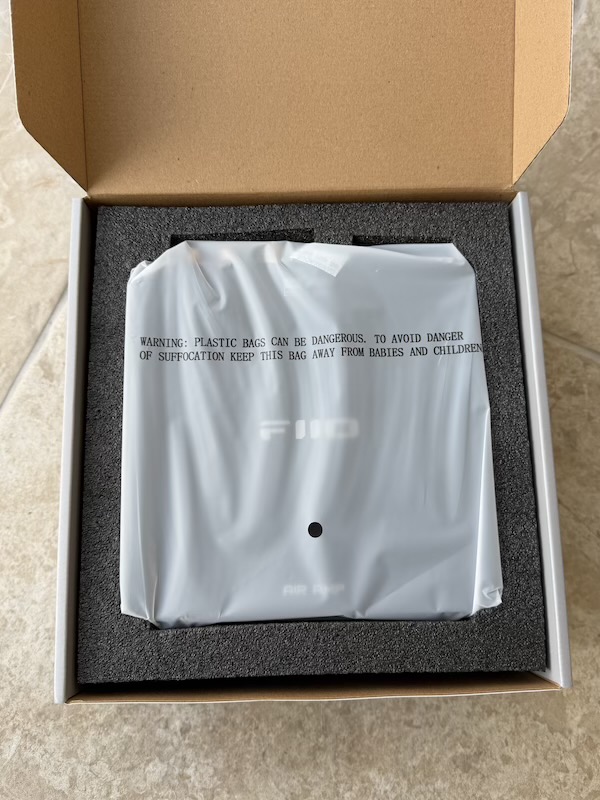
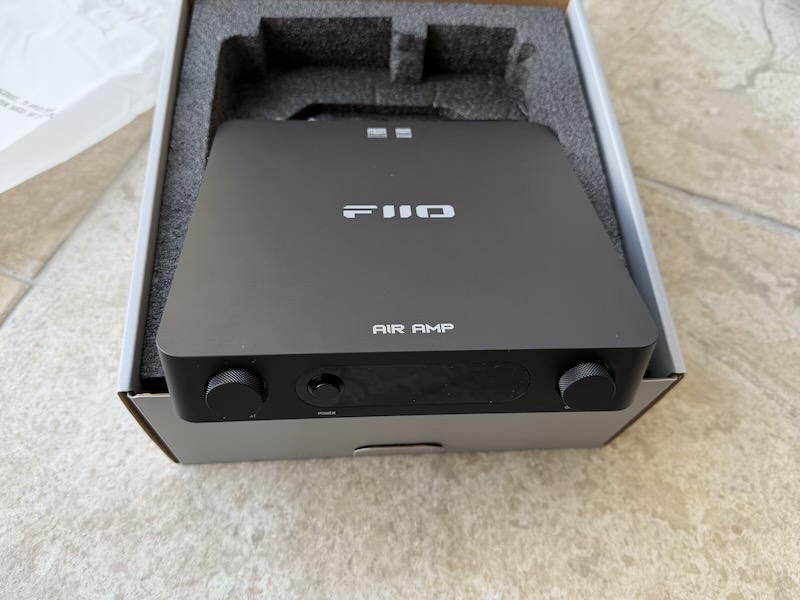
Under the lid the amplifier sits in a moulded foam tray, front panel up, with the two knurled knobs and the display window visible before anything is unwrapped:
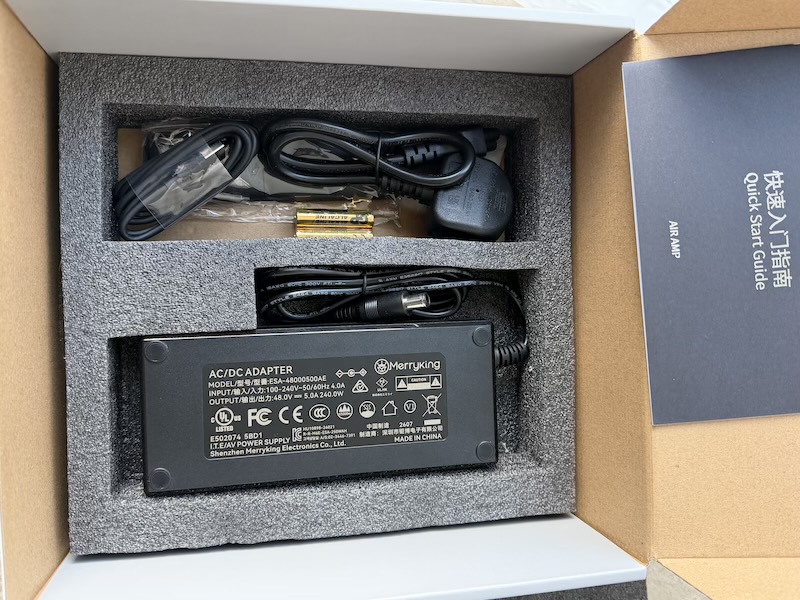
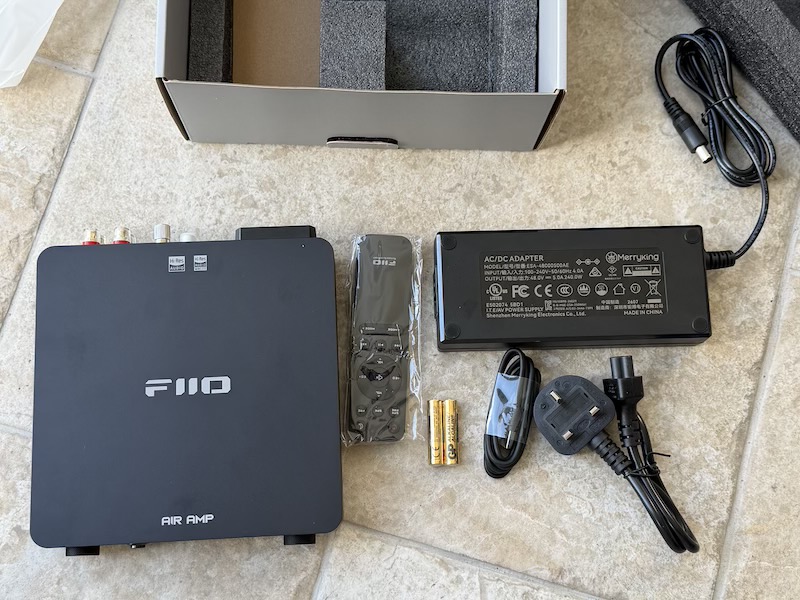
Accessories live in a second foam layer above the unit, and the whole set is laid out below. What you get is the amplifier, an infrared remote with two AAA batteries, the 48 V power brick with a locking DC connector, a regional mains lead, and a quick start guide:
 |
 |
The power supply deserves a look rather than a shrug, because it sets the amplifier’s actual output. It is a Merryking ESA-48000500AE rated 48.0 V at 5.0 A, so 240 W total:
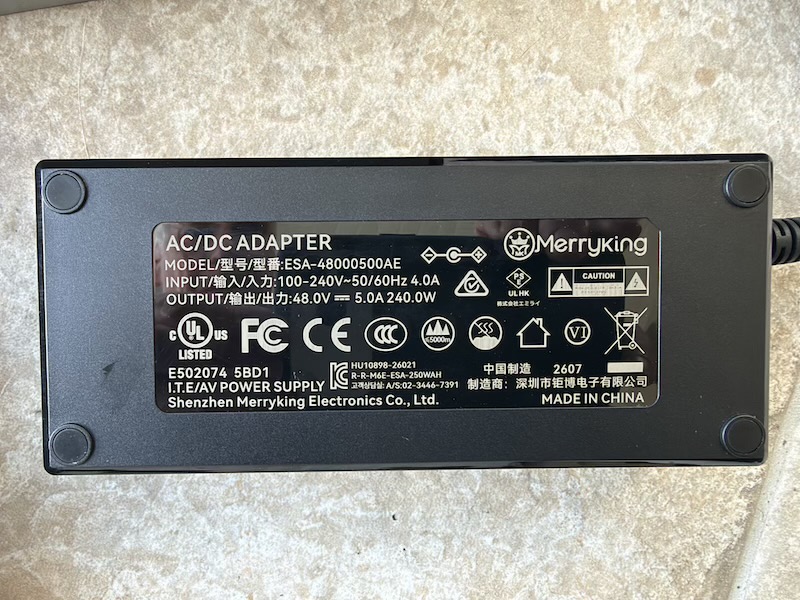
That number matters later. FiiO quote 120 W + 120 W into 4 Ω with this supply and up to 235 W + 235 W with a 48 V/10 A one, so the bundled brick is the 120 W configuration. The 235 W figure is not what you have out of the box, and at least one retailer’s specification table conflates the two.
The chassis itself is a single machined-looking aluminium shell with a long ventilation grille down one flank, a brushed top with the FiiO logo and “AIR AMP” screened on the front lip. Both knobs are knurled metal with a ring of illumination behind them, and the display between them is a small monochrome panel that shows the input, the incoming sample rate and the volume value rather than a menu system. Everything else is done from the app or the remote. At 930 g it is heavy enough not to slide around when speaker cable is stiff, which is more than can be said for some class D boxes this size.
The rear panel is where the argument for this product lives, so it is worth taking in as a whole first:
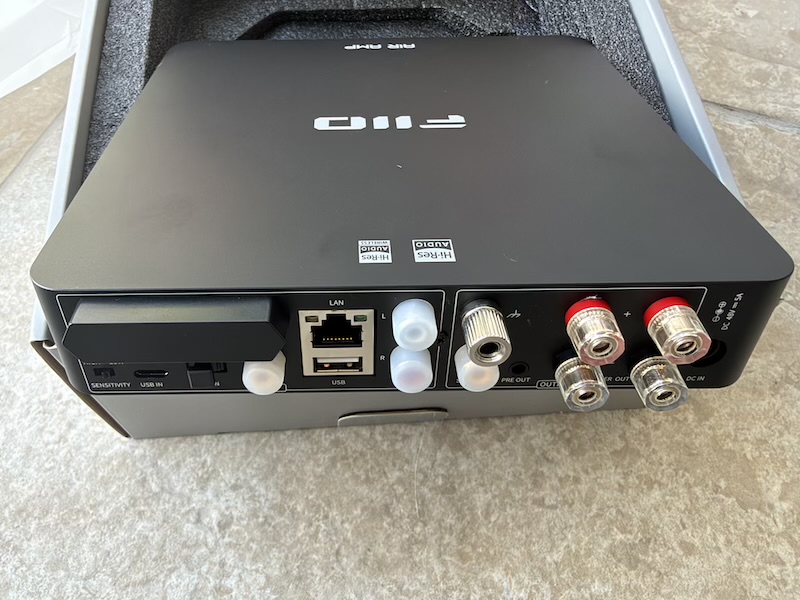
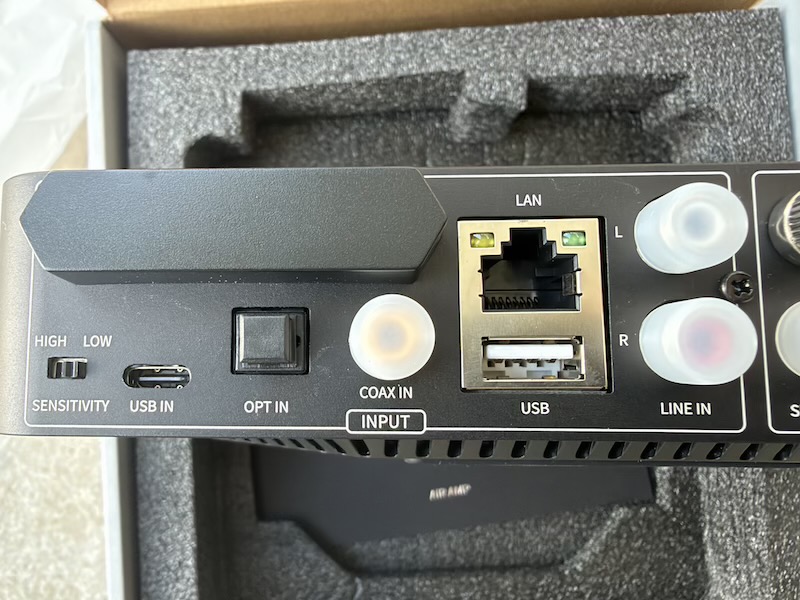
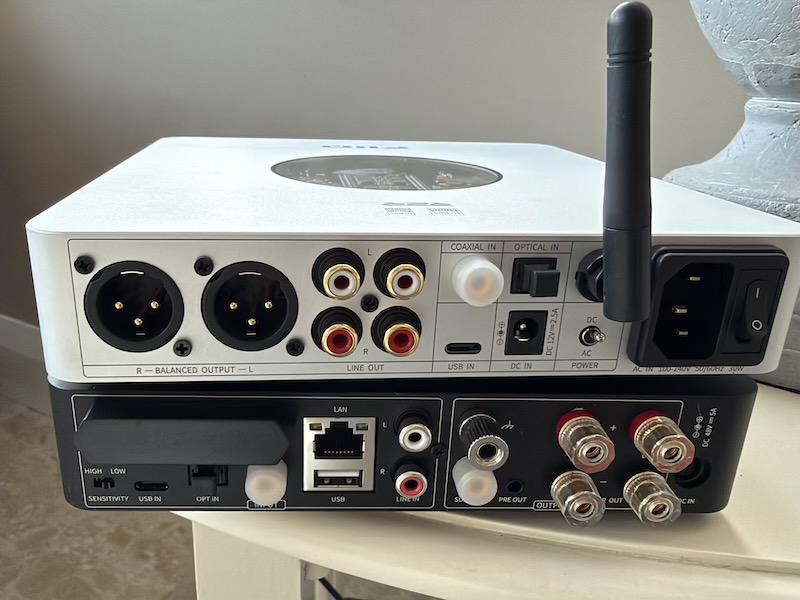
Reading left to right on the input half: a HIGH/LOW sensitivity switch for the analogue input, which selects between a 1 V and a 2 V input level, USB-C for a computer, TOSLINK, coaxial S/PDIF, gigabit Ethernet, a USB-A port for a stick or drive, and RCA line in. The output half has an RCA subwoofer output, a 3.5 mm pre-out, the speaker binding posts, and the 48 V DC inlet:
 |
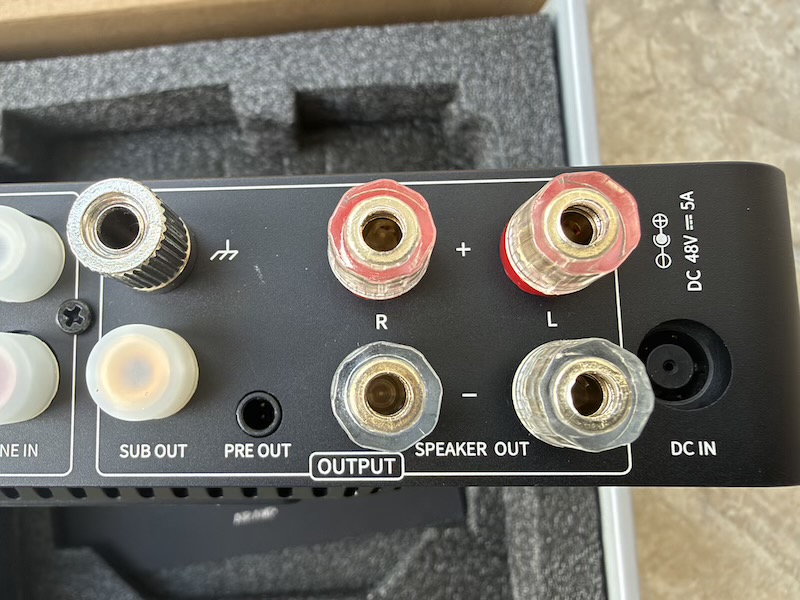 |
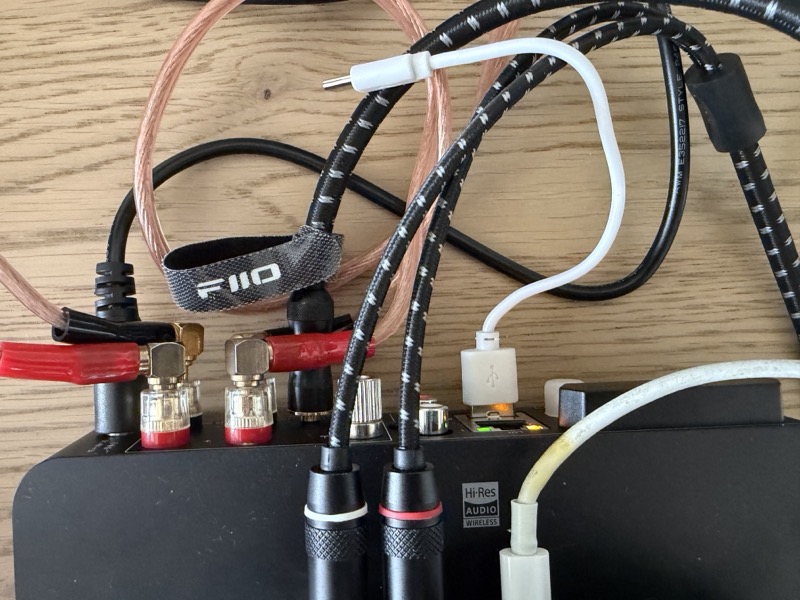
Two practical notes on that panel. The binding posts are full-size and take banana plugs or bare wire, which is not guaranteed at this size — plenty of compact class D amplifiers make do with spring clips. And the pre-out is a 3.5 mm jack rather than RCA, so feeding a separate power amplifier or a pair of actives means a 3.5 mm-to-RCA lead rather than an interconnect you probably already own. With everything connected it gets busy but stays legible:
In its intended place — one box on a shelf, driving a pair of standmounts, with the remote sitting on the lid — the footprint argument makes itself. Here it is between a pair of KEF LS50 Meta with the display showing 44.1 kHz:
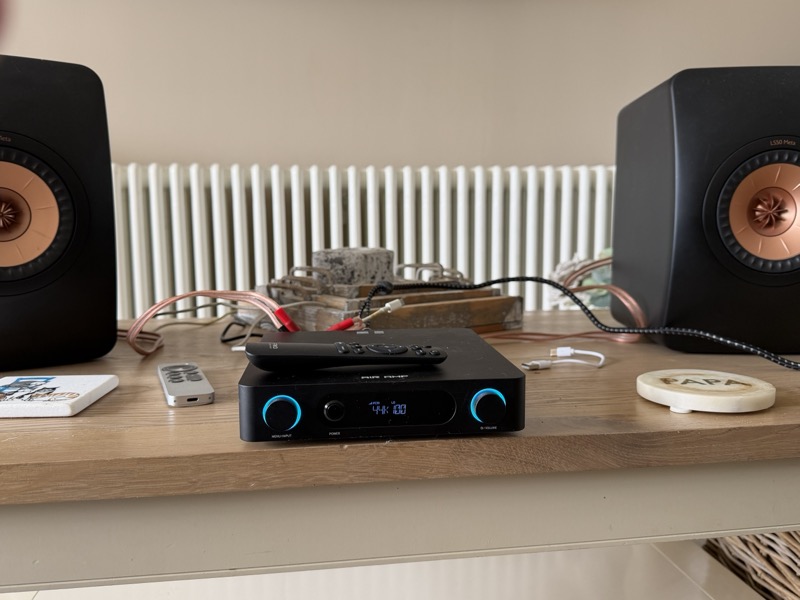
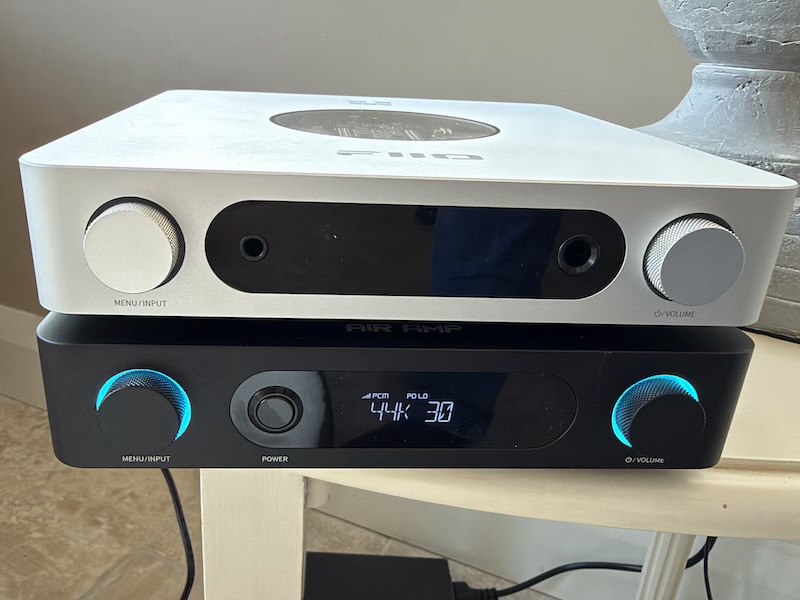
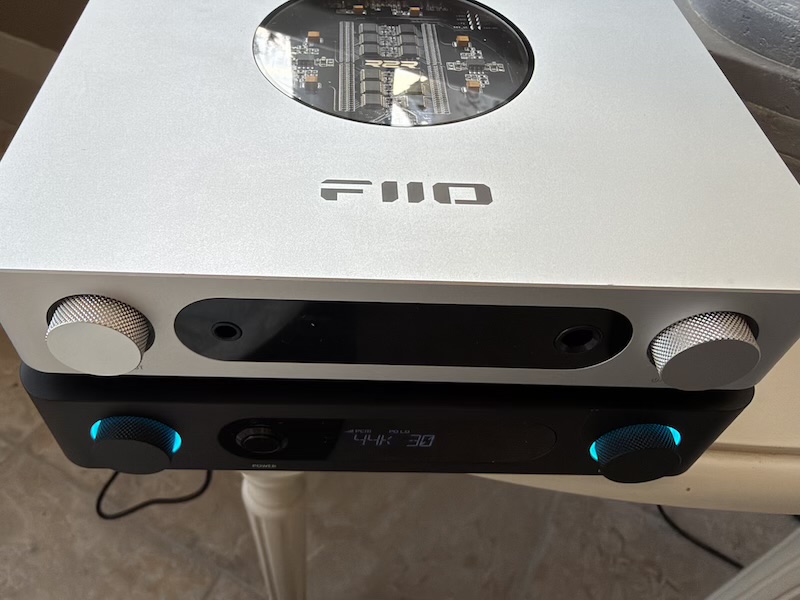
For scale against desktop gear, it is a little wider and a lot flatter than a typical FiiO desktop DAC/amp. Below it sits under a silver FiiO K13 R2R, whose top window over the circuit board and balanced XLR outputs make the size and design contrast obvious:
 |
 |
The rear panels side by side are the clearer comparison, because they show the two devices' different jobs. The K13 R2R has balanced XLR line outs to feed something else; the Air Amp has speaker posts and a network socket, because it is the something else:
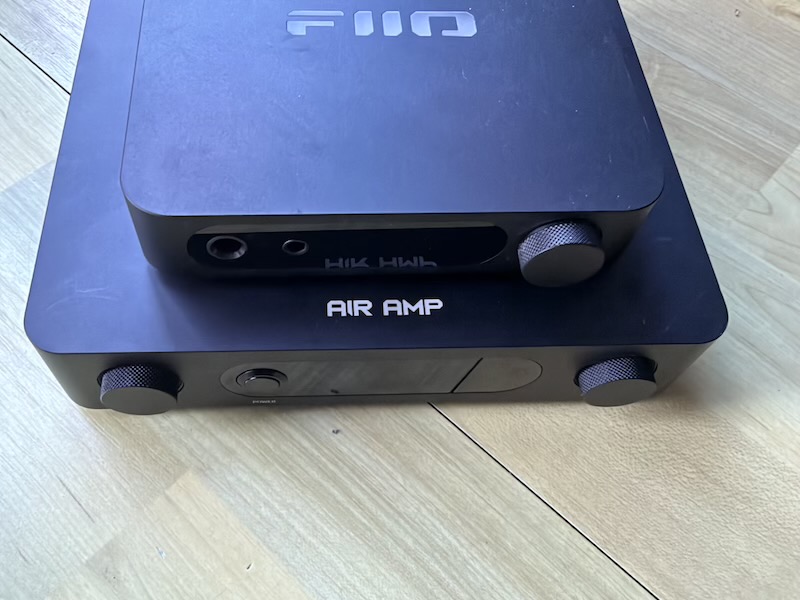
The same exercise with the FiiO K11 shows how close the footprints are, and the top-down view shows the Air Amp is the wider of the two:
 |
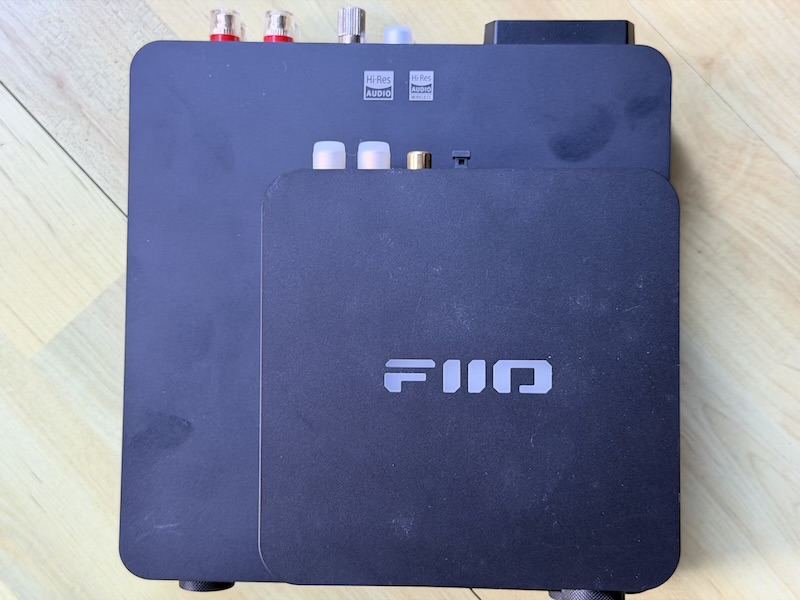 |
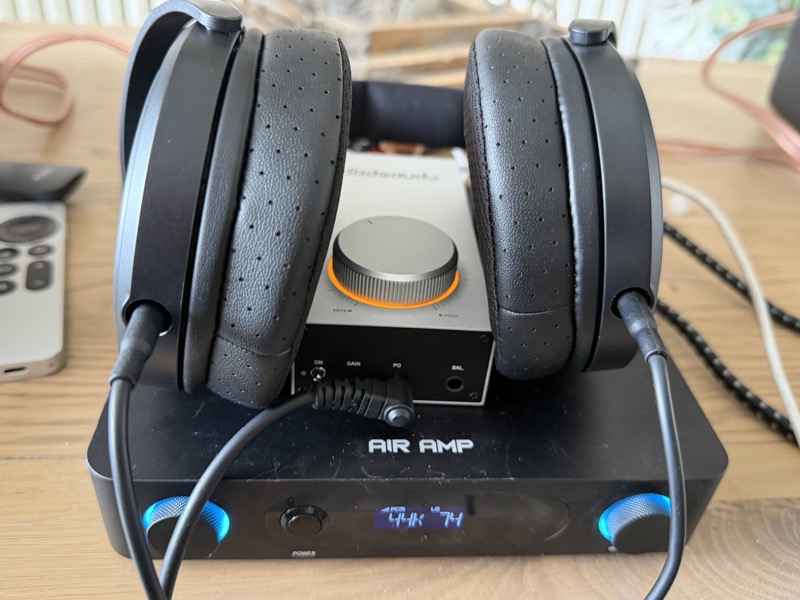
The K11 is worth a word of its own here, because it has been quietly forgotten in the rush of newer R2R desktop amplifiers and it still has a great deal to offer — particularly if you come across one on a deal. Stacking it on top is a reasonable use of the space too, given the Air Amp has no headphone output of its own; the pre-out can feed one:
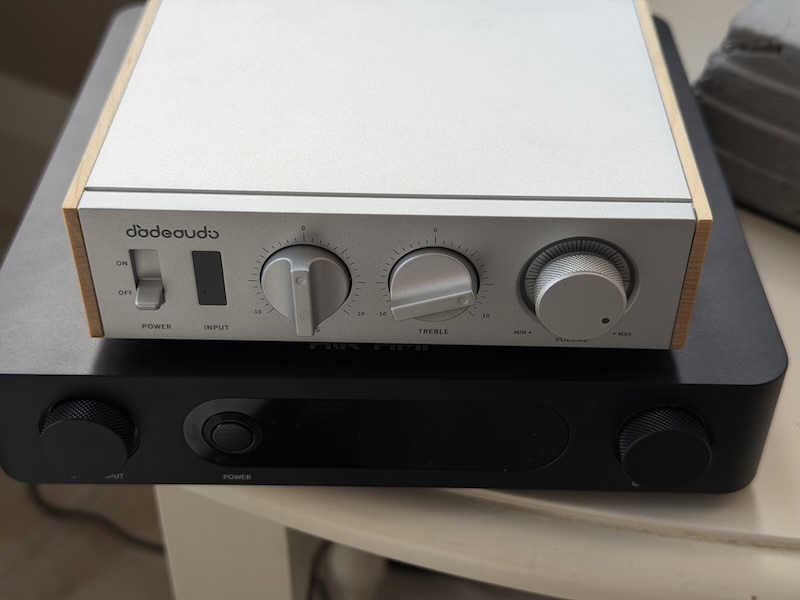
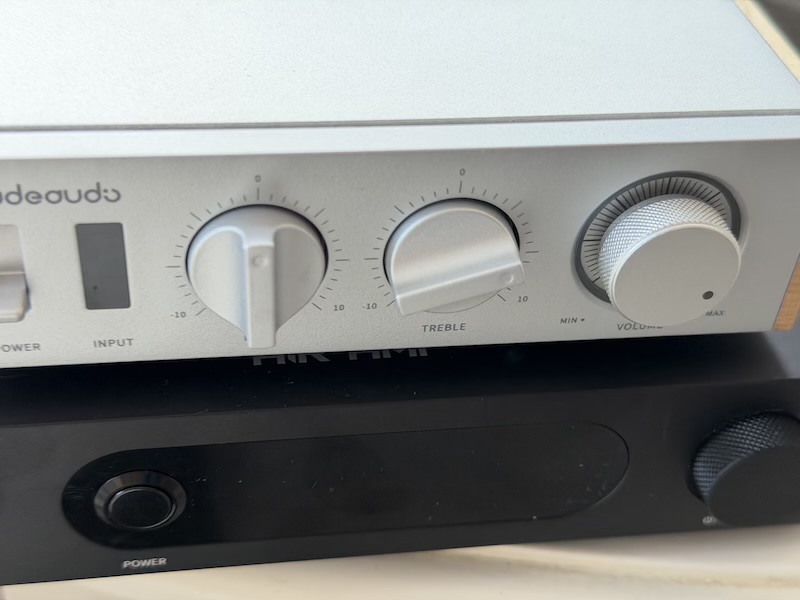
Sitting it under the Jade Audio Level 1 makes the design difference explicit, and it is philosophical rather than cosmetic. The Level 1 puts a rotary bass control, a rotary treble control and a volume knob across its front panel. The Air Amp has no tone controls on the chassis at all, because they live in the app:
 |
 |
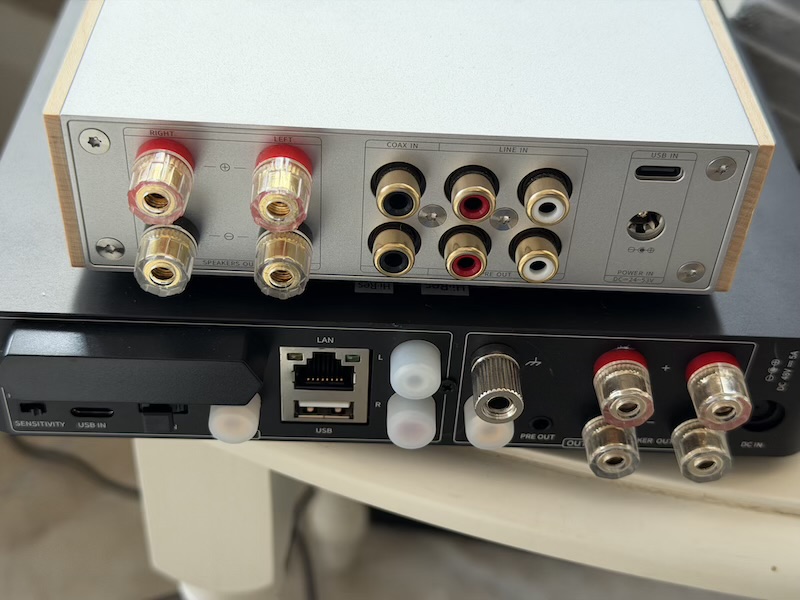
The rear panels make the trade explicit. The Level 1 has coaxial in, line in, line out and USB-C, but no network socket and no USB-A for local files, so everything it plays has to arrive on a cable from something else:
Features and Performance
Getting it onto the network
Setup is the first thing a streaming amplifier has to get right, and the Air Amp uses the old captive-portal method rather than an in-app Bluetooth handshake. The quick start guide walks through it with a QR code and a mock-up of the configuration page:
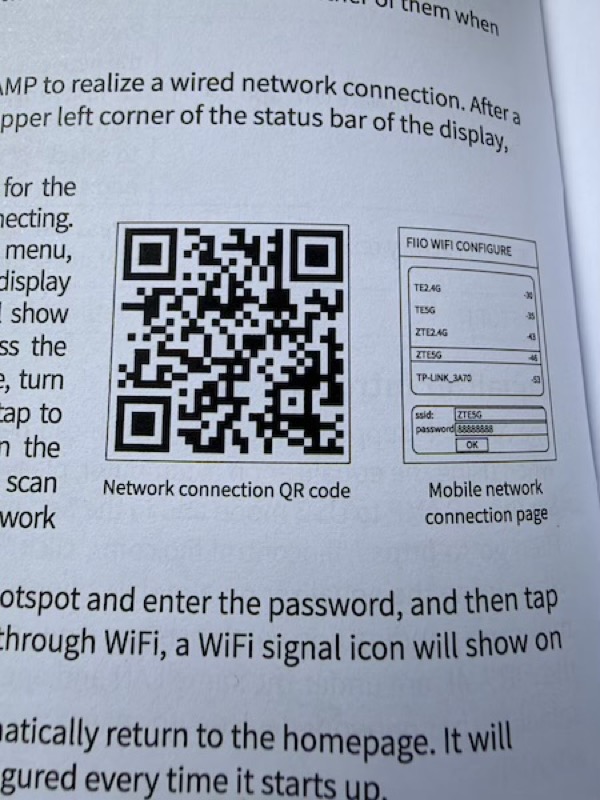
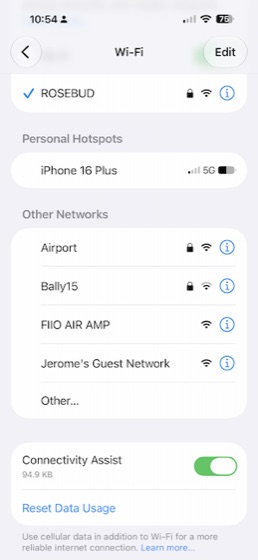
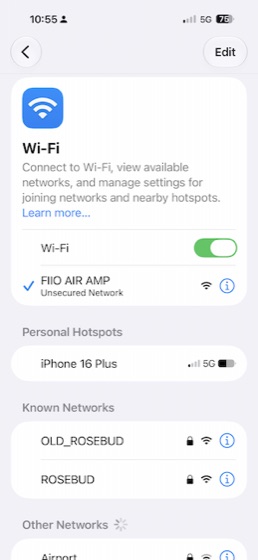
In practice the amplifier broadcasts its own open access point named “FIIO AIR AMP”, you join it from the phone’s Wi-Fi settings, and a page at 192.168.237.1 lists the networks it can see with their signal strengths so you can type in an SSID and password:
 |
 |
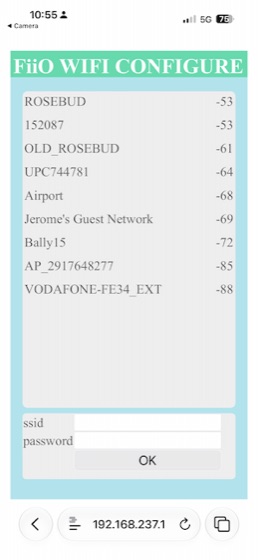 |
It works, and the signal-strength list is genuinely useful, but it is a step behind the app-driven onboarding on competing streamers, and the setup hotspot being unsecured is worth noting even if it is only live for a minute. Once it is on the network the FiiO Control app finds it by IP and adds it:

Gigabit Ethernet is on the back and is the connection I would use if the shelf has a cable within reach; dual-band Wi-Fi covers 2.4 and 5 GHz otherwise.
Inputs and work modes
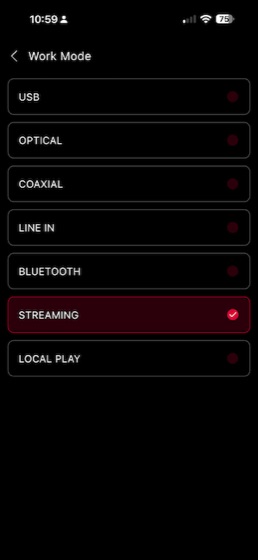
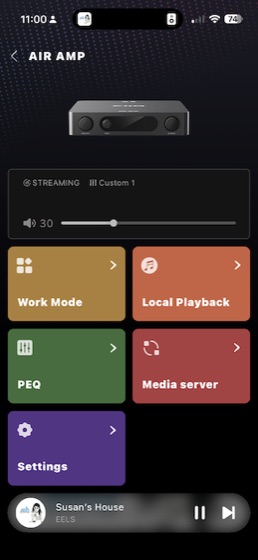
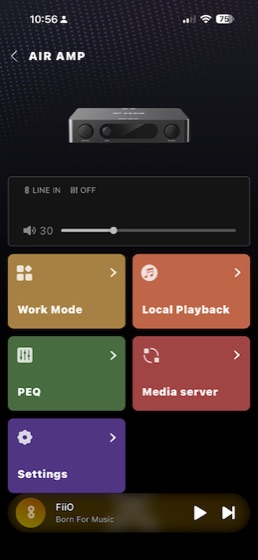
The Air Amp does not auto-switch. You pick an input, called a Work Mode, from a list of seven: USB, optical, coaxial, line in, Bluetooth, streaming and local play. The home screen then changes to match — a transport and volume slider in streaming mode, a bare volume control in line-in mode:
 |
 |
 |
The practical consequence is that a TV on optical and a turntable on line in both work, but neither will wake the amplifier and grab it the way an auto-sensing input would. There is also no HDMI ARC, which is the input most people actually want for a TV, and no phono stage, so a turntable needs its own.
The front panel display uses abbreviations that are not explained anywhere obvious, so for reference: PO is speaker out, LO is pre out, PO LO is both together, SE indicates the sub out is enabled, and G appears to indicate ground connected, though I have not confirmed that last one.
Two things about the outputs are worth knowing before you plan a system around the Air Amp. The subwoofer output and the pre-out are not live by default — each has to be enabled from the front knob. And there is no subwoofer crossover, so the sub out is a full-range feed and any filtering has to happen in the subwoofer itself.
Streaming and local playback
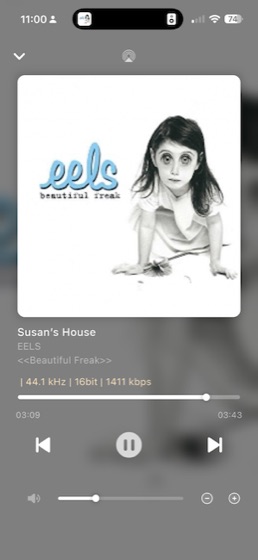
Streaming is where the specification and the reality diverge most usefully. FiiO list Roon Ready, AirPlay and QPlay, plus DLNA playback from a NAS or from a USB stick in either the USB-A or USB-C socket. That is a workable set: Roon covers the serious library case, AirPlay covers anything on an Apple device. The app shows artwork, title, album and the incoming format, which is the information you actually want on screen:
 |
 |
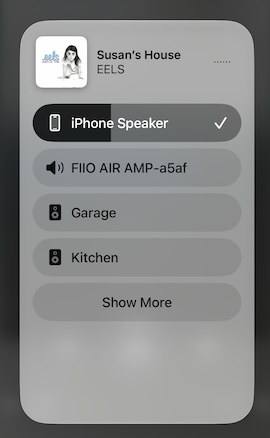
AirPlay works as it should — the amplifier appears in the iOS output picker alongside the HomePods, named “FiiO AIR AMP” with its device suffix:
What is not on the list is the thing worth being blunt about: FiiO do not name Spotify Connect, TIDAL Connect or Qobuz Connect anywhere in the Air Amp’s material, and none of the coverage at launch found them either. If your listening is a Spotify or TIDAL app on a phone, this amplifier expects you to reach it over AirPlay or Bluetooth rather than handing playback to the device. That is a real functional gap against a WiiM, not a footnote, and it is the single specification I would check against your own habits before buying.
Streamed and locally played material is quoted as topping out at 32-bit/384 kHz and DSD256, which is well beyond anything a streaming service sends.
USB input, and what a Mac actually sees
FiiO quote 768 kHz/32-bit PCM and native DSD512 over USB, handled by an XMOS XU316. Worth knowing what that looks like from the host side. On macOS, with the class driver and no FiiO software installed, Audio MIDI Setup offers the Air Amp as a 0-in/2-out device with 16- and 32-bit integer formats at 44.1, 48, 88.2, 96, 176.4 and 192 kHz — and stops there:
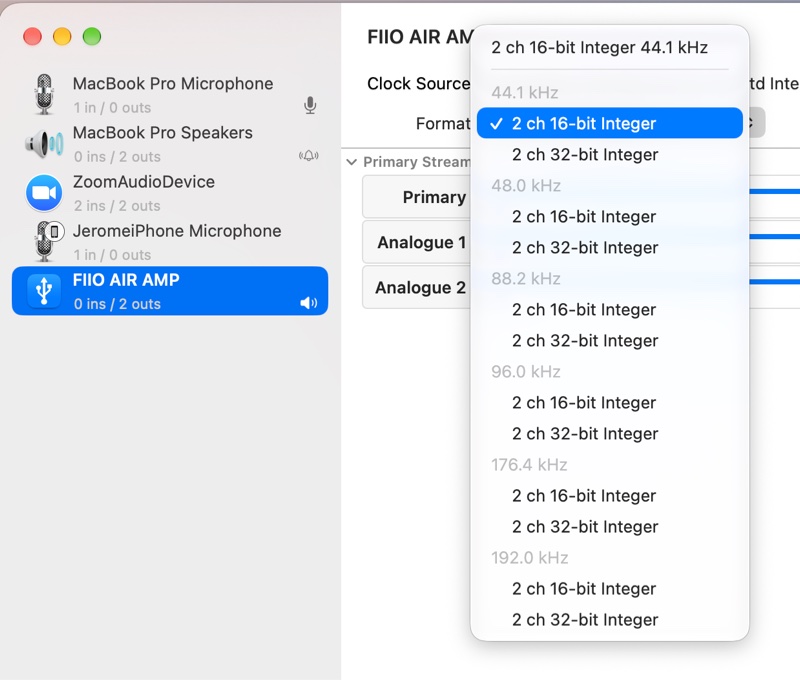
That is not a fault so much as a fact about how the device presents itself to a Mac, and 192 kHz is more than any streaming service or all but a handful of downloads will ever need. But if the 768 kHz number is part of why you are buying it, it is worth knowing where it is and is not available.
I did not test the USB input on Windows or try DSD over USB, so I cannot say whether the FiiO driver unlocks higher rates there than macOS reports.
PEQ, digital filters and firmware
The ten-band PEQ is the feature that makes an amplifier like this interesting, because speaker-and-room problems are the biggest audible variable in the chain and this is the only box in the system that can fix them. The basic view gives ten sliders on fixed centres from 31 Hz to 16 kHz plus a master gain, saved into named presets:
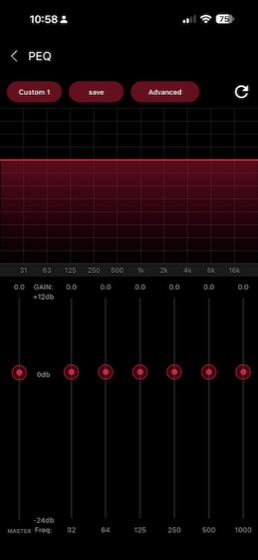
One limitation to note before the detail: the PEQ is applied in stereo, to both channels together, rather than per channel. That is fine for tonal correction and it is the reason the Air Amp cannot do the kind of asymmetric room correction that per-channel EQ allows.
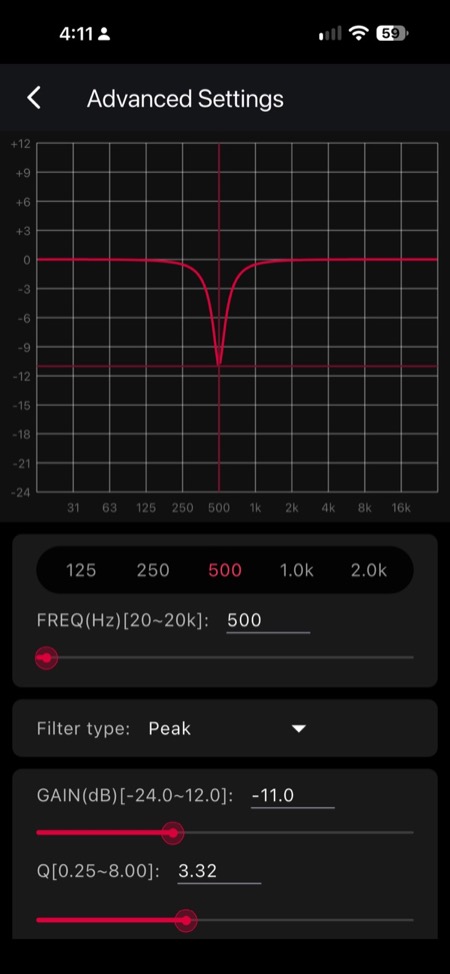
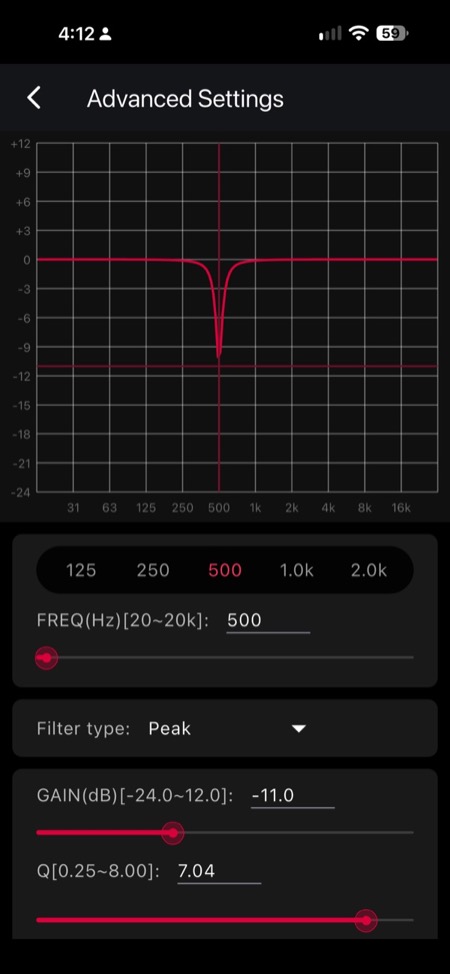
The Advanced page is the one that matters, and it is more capable than the slider view suggests. Each band can be set to an arbitrary centre frequency from 20 Hz to 20 kHz, a filter type, a gain from −24.0 to +12.0 dB, and a Q from 0.25 to 8.00 — typed in, not just dragged. The three screens below show the same band at 500 Hz and −11 dB with Q raised from 3.32 to 7.04, and then a broader cut of −7.1 dB at 579 Hz with Q 1.0, which is the shape you would actually use on a room mode:
 |
 |
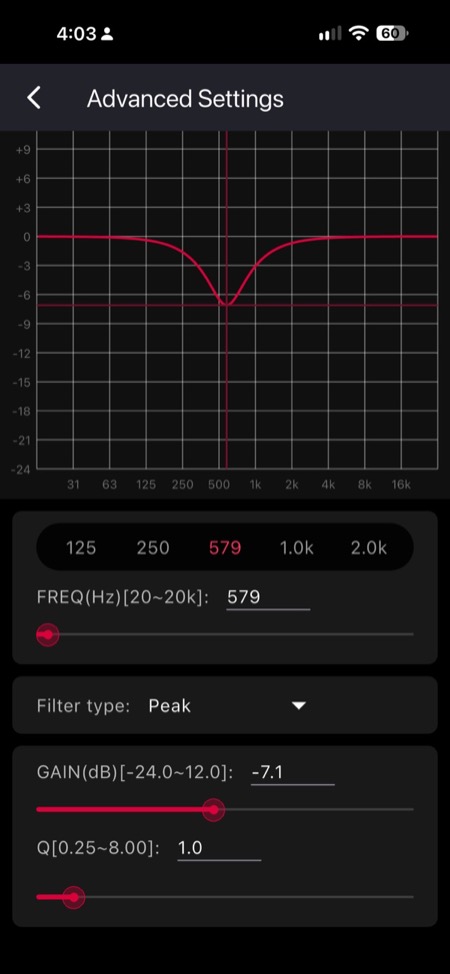 |
Those ranges are worth stating plainly because they decide what the PEQ is good for. A gain range down to −24 dB and a Q up to 8 is enough to notch a single sharp room mode; a Q floor of 0.25 is wide enough for a broad house-curve tilt. The asymmetry — 12 dB of boost against 24 dB of cut — is the right way round, since cutting is what you should mostly be doing. What there is not, in the app as shown here, is any measurement-driven room correction: no sweep, no microphone, no automatic filter generation. Every filter here is one you decide on yourself, which means the PEQ is only as good as the measurement you took elsewhere.
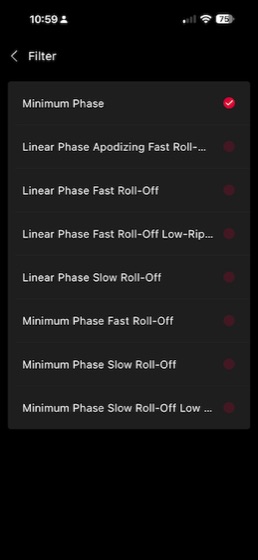
The DAC’s reconstruction filter is also exposed, with eight ESS options and Minimum Phase selected by default, alongside indicator light controls and the firmware version:
 |
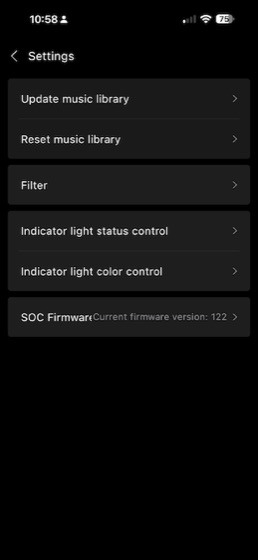 |
Filter choice on an ES9020Q changes behaviour above about 20 kHz and is not something to expect to hear; it is there for completeness. The firmware version on the unit as reviewed was 122, and updates are pushed through the app.
There were no firmware updates during my review period, so everything described here is the unit as it shipped. FiiO have not said anything publicly about adding Spotify or TIDAL Connect.
Sound Impressions
This is an excellent, clean-sounding Class D amplifier. With the KEF LS50 Meta connected, the PFFB circuit is doing real work: the speakers sounded natural and neutral, without the amplifier adding a character of its own on top. That is the result you want from an amplifier — the speaker and the room doing the talking, not the amp.
There is no noise or hiss. With the LS50 Meta connected and the volume down, the tweeters are silent, and there are no thumps or clicks when the amplifier is switched on or off. That is the first thing to check on a Class D integrated at this price and the Air Amp passes it cleanly.
On power, 120 W into the LS50 Meta was perfectly adequate for the room I use them in. In a much larger space I suspect you would start to run short of headroom, but for a straightforward setup this is a sensible choice rather than a compromise. The chassis has no fan and did not need one.
The volume control and the button quality are good for the money without matching the fineness of more expensive amplifiers — the steps are usable but not as finely graded as I would like at low listening levels. Engaging the PEQ was smooth and did what it was set to do, consistent with the other FiiO devices I have used.
The internal DAC is sufficient. I expect some reviewers will recommend feeding it from an external one, but I did not find a reason to — and there is a practical argument against it, because the PEQ sits in the digital domain. If you want to use the PEQ, you want the signal arriving digitally, and the internal DAC is more than good enough for that.
Comparisons
The WiiM Amp and the WiiM Amp Pro
The obvious rivals are the two WiiM amplifiers, and all three boxes run the same output chip, the TPA3255. What separates them now is the feedback topology around that chip, the DAC and USB front end, and the software.
Here is how the three line up on published specification and September 2026 pricing. Everything in this table is the manufacturers’ own claim — I have measured none of it, and I own only the Air Amp of the three:
| FiiO Air Amp | WiiM Amp | WiiM Amp Pro | |
|---|---|---|---|
| Price | $249–299 depending on tariffs, or €224.99 direct from FiiO EU | $329 | $399 |
| Amplifier | TPA3255 + PFFB | TPA3255, no PFFB | TPA3255 + PFFB |
| Power into 8 Ω / 4 Ω | 90 / 120 W/ch | 60 / 120 W/ch | 60 / 120 W/ch |
| DAC | ES9020Q | ES9018K2M | ES9038Q2M |
| USB DAC / coaxial input | Yes / Yes | No / No | No / No |
| HDMI ARC | No | Yes | Yes |
| AirPlay | Yes | Yes | No |
| Spotify / TIDAL Connect, Room correction | No | Yes | Yes |
| PEQ | 10-band + Auto EQ | 10-band | 10-band |
Two things in that table matter more than the raw numbers. The power gap looks larger than it is — FiiO’s 90 W figure is quoted at 1% THD+N, a more generous distortion allowance than WiiM’s numbers use, and into 4 Ω all three claim the same 120 W, which is already more than a pair of standmounts in a normal room needs. The real differentiator is post-filter feedback (PFFB): it removes the amplifier’s high-frequency response from depending on the speaker’s impedance curve. The Air Amp and the Amp Pro both have it; the original WiiM Amp does not.
Put the feature rows alongside that and each box earns its place. The WiiM Amp has AirPlay but no PFFB; the Amp Pro has PFFB but no AirPlay; the Air Amp is the only one of the three with both, and the only one with a real USB DAC input and a coaxial input, which makes it usable as a desktop DAC with speakers attached. Where WiiM stay ahead is everything downstream of the amplifier — HDMI ARC, Spotify and TIDAL Connect, and measurement-based room correction that the Air Amp’s PEQ does not attempt; it corrects a speaker, not a room.
So it comes down to what you actually need: if the box is going under a television or your listening lives inside Spotify or TIDAL, the WiiM Amp fits without a workaround; if measured performance is the priority, the Amp Pro has the strongest numbers on paper for $100–150 more; and if you want the most hardware for the money — PFFB, a real USB DAC input, coaxial, a pre-out — the Air Amp is the cheapest way to get all of it at once.
The Aiyima A20 uses the same chip and the same PFFB implementation for around €180 with no network features at all, and considerably more raw power — 250 W into 4 Ω against the Air Amp’s 120 W:
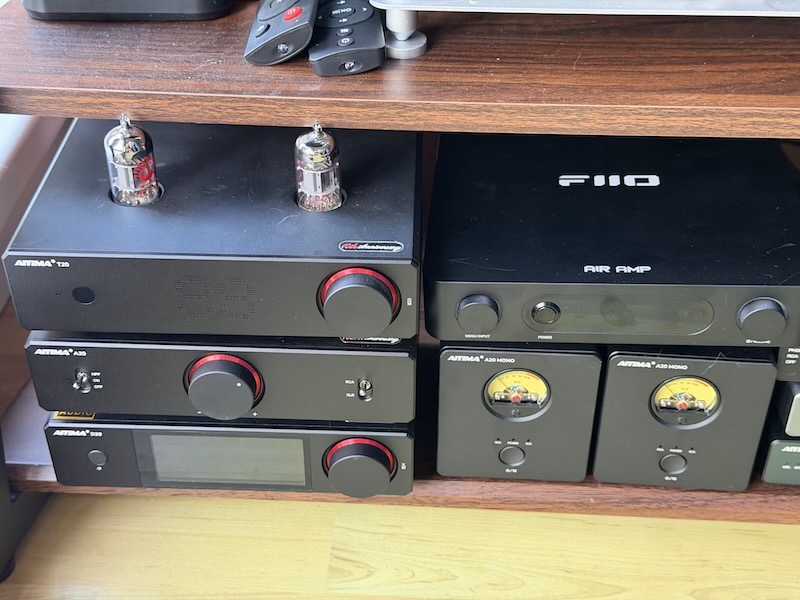
If you already have a streamer you are happy with, the A20 is more amplifier for less money and the Air Amp is not a sound-quality upgrade over it. If you do not, the Air Amp’s price already includes the streamer, DAC and PEQ that the A20 has no equivalent of, and buying those separately costs more than the difference. Either way, the Air Amp is close to an impulse buy for a second, smaller room where you want music to start without thinking about it — on the condition, as with the WiiM comparison above, that its streaming inputs are the ones you actually use.
Specifications and Measurements
Specifications
Manufacturer’s published specification, as listed by FiiO and their retailers. Note the power-supply dependency in the output figures — the first line is what the bundled brick is rated for.
| Specification | Value |
|---|---|
| Type | Streaming integrated amplifier (network player + DAC + Class D power amp) |
| Amplifier chip | TI TPA3255 with PFFB (post-filter feedback) |
| DAC chip | ESS ES9020Q |
| USB controller | XMOS XU316 (16-core) |
| Output power (48 V/5 A supplied) | ≥120 W + 120 W into 4 Ω, ≥90 W + 90 W into 8 Ω (THD+N <1%) |
| Output power (48 V/10 A, not supplied) | 200 W + 200 W into 4 Ω (THD+N 1%); ≥235 W + 235 W into 4 Ω (THD+N <10%) |
| THD+N | <0.0022% (1 kHz / −15 dBV @ 8 Ω) |
| SNR | >110 dB (A-weighted) |
| Inputs | USB-C, TOSLINK, coaxial S/PDIF, RCA line in, Bluetooth, network streaming, USB-A local storage |
| Outputs | Speaker binding posts, 3.5 mm pre-out, RCA subwoofer out |
| USB sample rates | PCM to 768 kHz/32-bit, native DSD512 |
| Coaxial sample rates | PCM to 192 kHz/24-bit, DSD64 |
| Optical sample rates | PCM to 96 kHz/24-bit |
| Streaming / local playback | to 384 kHz/32-bit, DSD256 |
| Network | Gigabit Ethernet, dual-band Wi-Fi (2.4/5 GHz) |
| Streaming protocols | Roon Ready, AirPlay, QPlay, DLNA (NAS and USB storage) |
| Bluetooth | 5.2, SBC and LDAC |
| EQ | 10-band PEQ (20 Hz–20 kHz per band, −24.0 to +12.0 dB, Q 0.25–8.00), plus bass/treble ±10 dB |
| Control | FiiO Control app, web interface, included IR remote |
| Power supply | DC 48 V / 5 A (240 W) Merryking ESA-48000500AE |
| Dimensions | 207 × 188 × 42 mm |
| Weight | approx. 930 g |
| Model number | FT3001A |
| Colours | Black, Silver |
Two of those lines are worth translating. The THD+N and SNR figures, if they hold up independently, put the Air Amp in the range where the amplifier is not the limiting factor in the system — the speakers, the room and the EQ decide what you hear from there. And the output power figure is the one people misread: 120 W a side into 4 Ω is what the box in your hands does, and 120 W is already far more than a pair of standmounts in a normal room will ever ask for. The 235 W headline requires buying a bigger power supply.
Measurements
I have not run my own measurements of the Air Amp at the speaker terminals, and no independent measurement set had appeared at the time of writing. The one thing I would flag from use is the PEQ: the Q values do not seem to be implemented as precisely as I would like, which is the single technical reservation I have about the unit.
I have not measured the Air Amp yet, so everything in the table above is FiiO’s own claim rather than confirmed performance. FiiO do not publish an Audio Precision dashboard for this product, so there is not even a manufacturer graph to reproduce — only the summary numbers.
Rating Explanation
Four for pragmatic rather than five, and the missing point is not about the hardware. As a piece of hardware there is genuinely nothing to complain about at this price — it is quiet, it has enough power for a normal room, it sets up without a fight, and it does what it says. But the pragmatic score is about whether the thing solves your problem without you working around it, and for a meaningful share of the people buying a one-box streaming amplifier it does not yet: no Spotify, TIDAL or Qobuz Connect, no HDMI ARC for a television, and no room correction. Five for price, because at this money the hardware on offer is not close to matched. Four for features rather than five, for the same reasons as the pragmatic score — for all that the Air Amp offers on the input side, both WiiMs beat it on streaming options and on room correction, and that is a real gap rather than a quibble. Four for measurements, because the PEQ’s Q values are not as accurate as I would hope, and because I have not measured the amplifier myself — if independent measurements appear and the amplifier section holds up, that number should go to five.
Conclusion
The Air Amp is a compact, well-built and unusually well-connected all-in-one speaker amplifier. It combines proper binding posts, subwoofer output, ten-band PEQ, USB-C, USB-A and enough power for normal standmount use in a very small chassis.
Its closest rival is the WiiM Amp Pro, but the Air Amp has one important advantage for Apple users: it combines AirPlay with post-filter feedback, something the Amp Pro does not offer.
The main difference is the approach to streaming. WiiM puts its own app and integrated streaming services at the centre of the experience, whereas FiiO expects you to reach the Air Amp through Roon, AirPlay, Bluetooth, a NAS or USB. The PEQ is also more manual, with no built-in room correction or separate left/right EQ at present.
If you mainly use Roon, AirPlay, a NAS or USB and want one box to handle streaming, DAC duties and amplification, the Air Amp is an easy recommendation. If HDMI ARC, tightly integrated app-based streaming or automated room correction are priorities, the WiiM Amp range remains the better fit.