Topping DX1 II
Familiar Topping, Travel Size
A familiar Topping design shrunk down to something very portable, with extraordinary features and measurements.
The DX1 II is the cheapest way into Topping’s current desktop line, and it has no wall adapter or DC barrel jack (the single USB-C port on the back carries both the audio data and the 5V that powers the unit, which Topping rate at 2.5W typical). Inside is an ESS ES9039Q2M DAC fed by an XMOS XU316 USB controller, and the front panel has both a 3.5mm headphone jack and a 4.4mm balanced one.
Having used this as mostly a portable desktop device for a number of months, I have been extremely impressed with its power output (when connected to my MacBook) and its PEQ capabilities. At its price it does have some competition, like the FiiO K11, but with that extra level of portability and the very decent 1W of power into 32Ω, it provided everything I could have wanted from a portable desktop headphone DAC amplifier.
The DX1 II has been a portable companion of mine for a number of months, along with the Chord Electronics Mojo 2. My day job (nothing to do with audio) had me travelling extensively across the US and Europe, working at various random desk setups in different buildings. I didn’t get to publish many reviews during that period, but, thankfully, that is now finished, and I did want to bring some of my favourite headphones and some portable headphone amplifiers with me. This Topping and the Chord Electronics Mojo 2 came along, and of the two, the audio nerd in me loved playing with the Topping’s PEQ editing capability, though the Mojo 2 had its own portable advantages which I also appreciated. I did end up writing support for reading and writing PEQ filters to the Topping within my devicePEQ tool (and within my new Pragmatic Audio PEQ Android and macOS app).
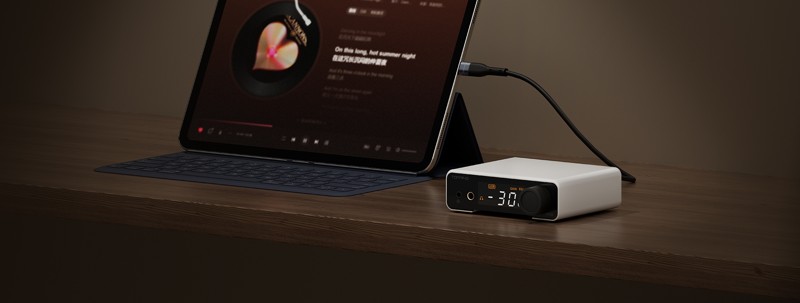
I would like to thank Topping for providing the DX1 II for the purposes of this review.
If you are interested in finding more information about this product, you can find it at the Topping DX1 II product page.
The official user manual is available here: DX1 II User Manual (PDF).
The DX1 II is listed at $119 on the Topping store, and launch coverage in June and July 2026 quoted the same figure as £119 and €119. The Topping store’s limited deal page currently lists the brand new DX1 II at $112 in black and $110 in silver. It comes in black, silver and white; the unit here is the white one.
Topping also aim this one at gamers, and the 3.5mm jack is a TRRS socket with a 2.5V bias voltage for headset microphones, while a rear switch drops the USB input from UAC 2.0 to UAC 1.0 for consoles that will not talk to a class-2 device. First, the box.
Unboxing and Build Quality
The DX1 II comes in a textured black box, and the branding is simple: the Topping logo in silver foil on the lid:
 |
 |
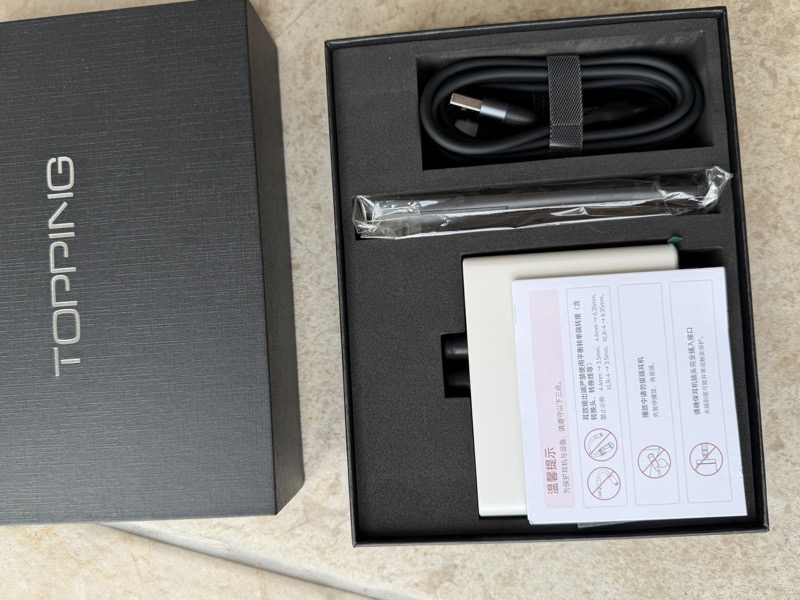
Inside, the unit sits in a foam tray with a pink warning card on top, and the pictograms say not to use balanced-to-single-ended adapters on the 4.4mm output, not to plug or unplug headphones during playback, and to seat the plug fully:
 |
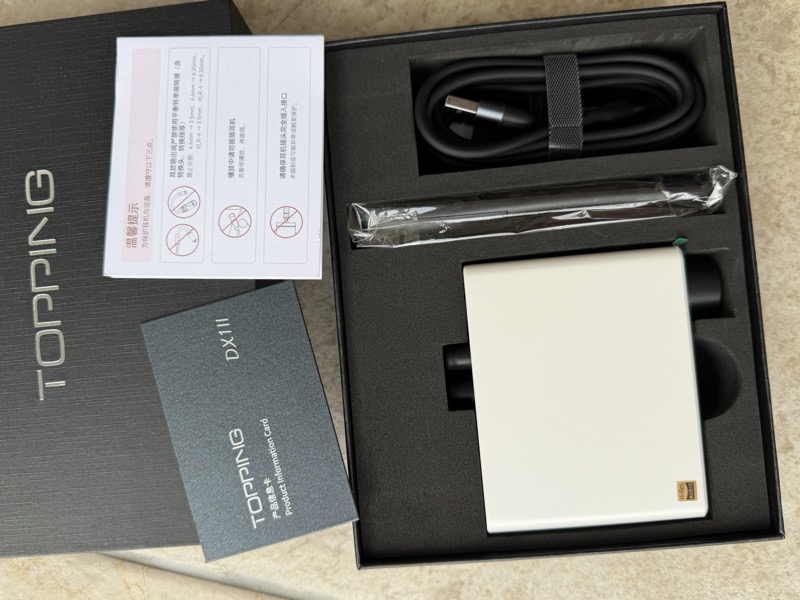 |
The full contents are the DX1 II, the remote control, a USB-A to USB-C cable, a USB-C to USB-C cable and a product information card. There are two cables because which one you need depends on what you are plugging it into:
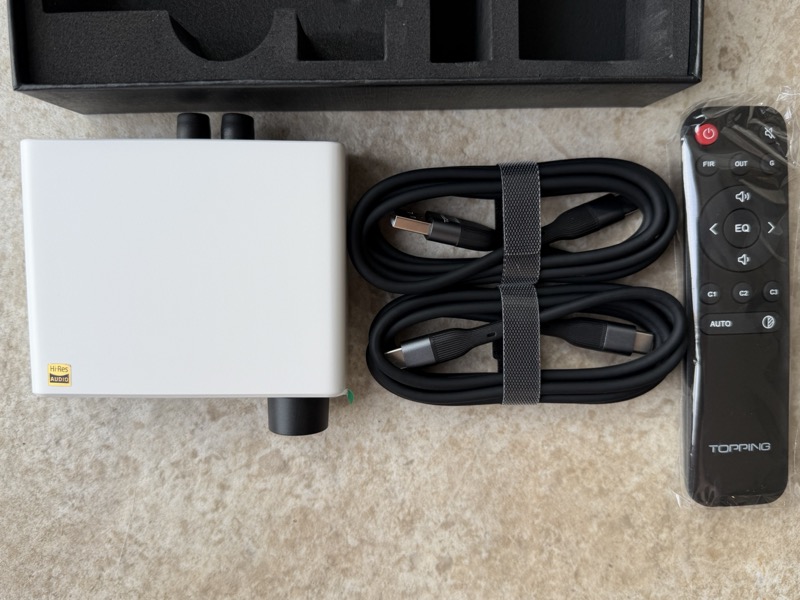
I appreciated the inclusion of the remote. Something this small and portable does not usually come with one, and it turned out to be a pretty useful addition.
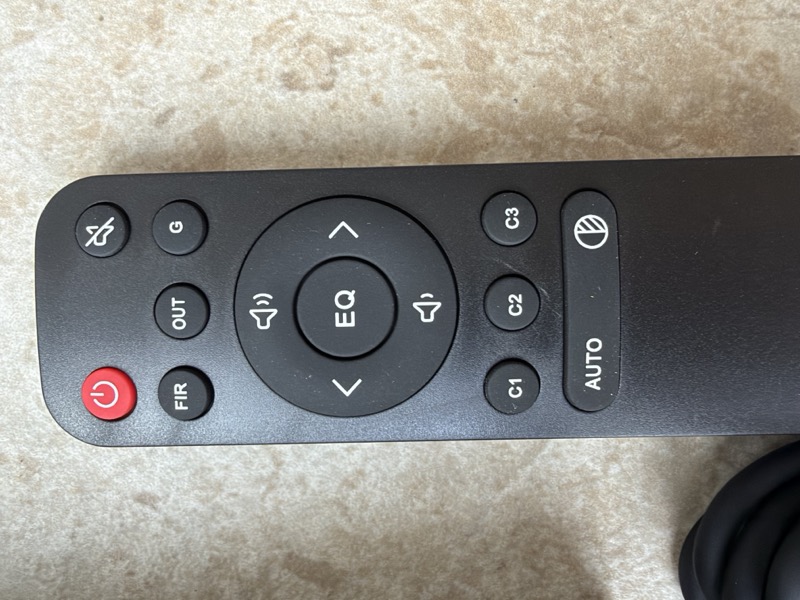
The remote has power, mute, filter, output, gain, volume, PEQ cycling, three custom buttons and an auto/display key:
The case is machined aluminium, 10 × 10 × 3.2 cm including the protruding parts, and 275 g.
It feels very solidly built.
A Brief Comparison with the Chord Electronics Mojo 2
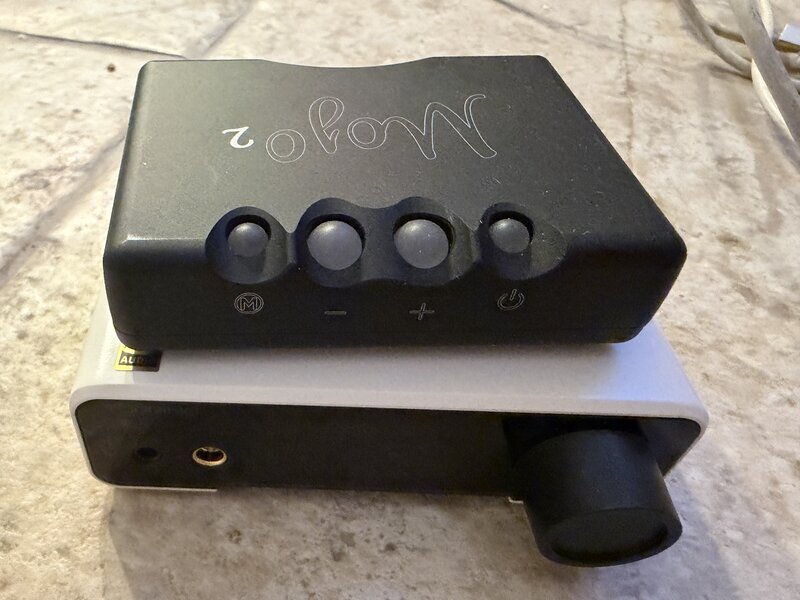
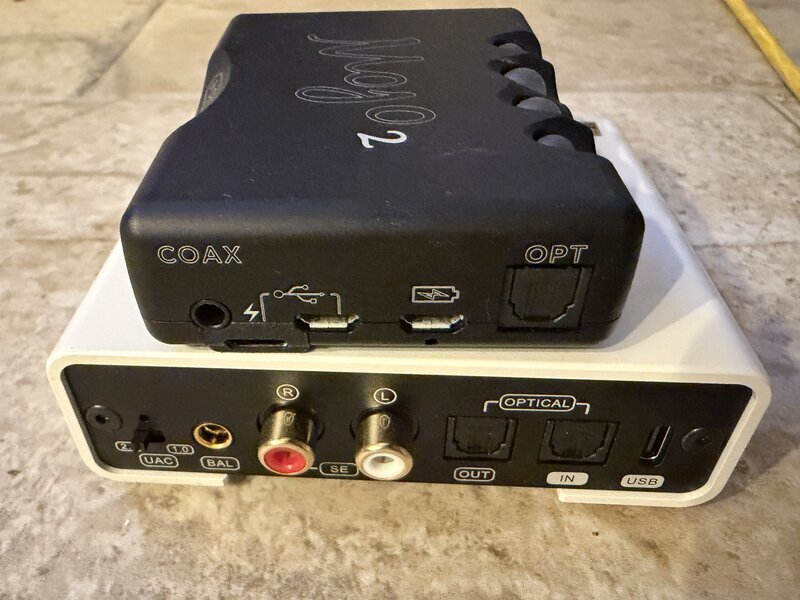
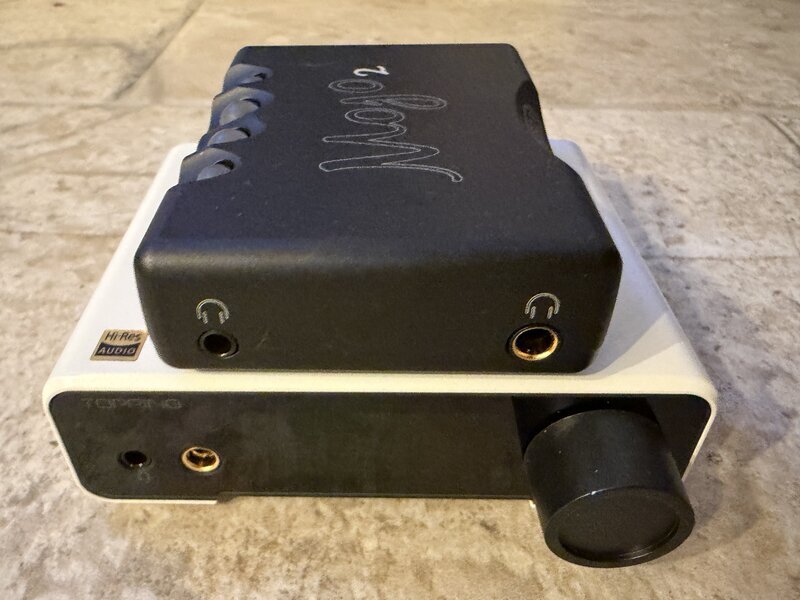
I have also put it next to the Chord Electronics Mojo 2, and it compares very favourably: the DX1 II is definitely bigger, but it is equal in quality audio ‘feel’. Here are the two stacked: the front controls, the rear panels, which show how much more the DX1 II has in the way of inputs and outputs, and the headphone outputs, both with a 3.5mm and a 4.4mm jack:
 |
 |
 |
Side by side on paper, the two are not the same kind of product, as the Mojo 2 has a battery and the DX1 II takes its power from the USB cable (the sizes and weights are from each manufacturer’s specifications):
| Topping DX1 II | Chord Electronics Mojo 2 | |
|---|---|---|
| Size and weight | 10 × 10 × 3.2 cm, 275 g | 83 × 62 × 22.9 mm, 185 g |
| Power | USB bus power, 5V | Internal battery, up to 8 hours |
| Headphone outputs | 3.5mm and 4.4mm balanced | 3.5mm and 4.4mm pseudo-balanced |
| Digital inputs | USB-C and optical | USB-C, micro-USB, coaxial and optical |
| EQ | Ten-band parametric EQ, three profiles | Four-band tone control (UHD DSP) |
| Remote control | Yes, in the box | No |
| Output impedance | <1 Ω (3.5mm), <2 Ω (4.4mm) | 0.06 Ω |
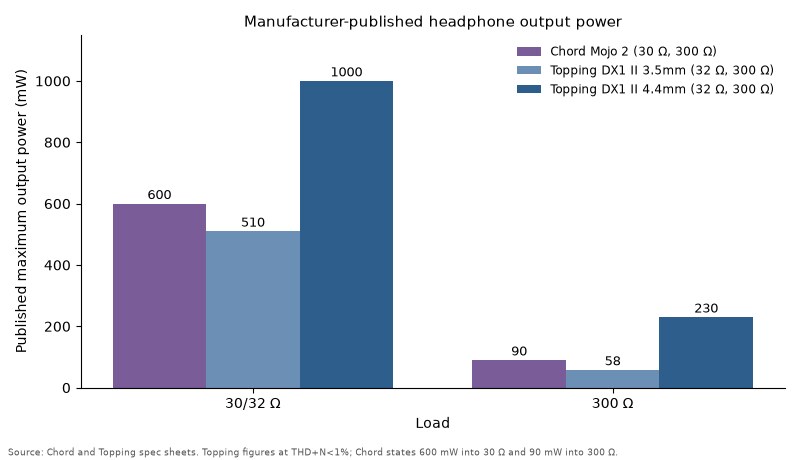
| Output power | 1000 mW into 32 Ω, 230 mW into 300 Ω (4.4mm) | 600 mW into 30 Ω, 90 mW into 300 Ω |
And the power output, as published by each company:
Features and Performance
Inputs, outputs and what the front panel tells you
The rear panel has a UAC 1.0/2.0 switch, a 4.4mm balanced line output, left and right RCA single-ended line outputs, an optical output, an optical input, and the USB-C port that does both audio and power. The rear 4.4mm socket is a line output only (the manual says headphones do not belong there), and the 4.4mm socket on the front is the headphone output.
The front is a 3.5mm headphone/headset jack, the 4.4mm balanced headphone jack, an IR receiver, the LED display and the multifunction knob:
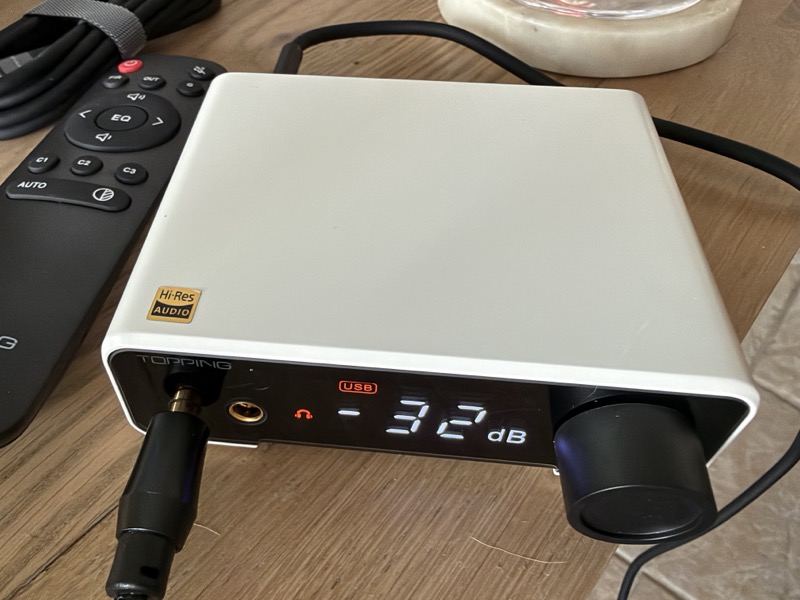
The display shows the selected input, whether the signal is DSD or PCM, whether high gain is engaged, which of the three PEQ profiles is active, and whether line out, headphone out or both are live, and it can show the sampling rate instead of the volume. The knob cycles through line out, headphone out, optical out and the combinations of all three, with all three enabled at once as the default.
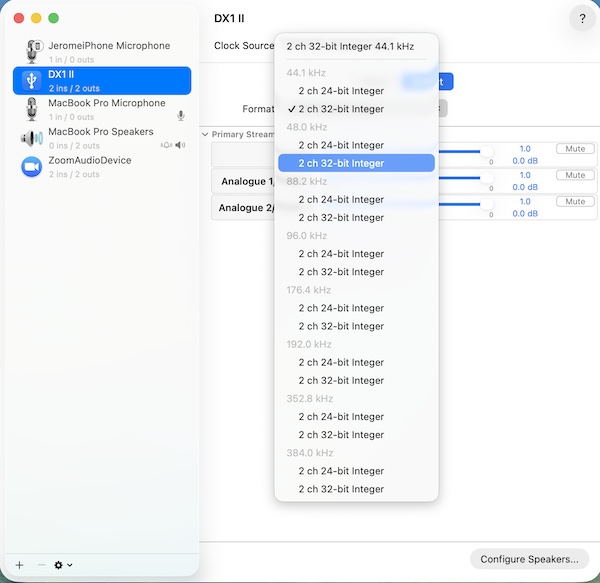
Over USB the DX1 II takes PCM up to 384 kHz and DSD256, which macOS reports without a driver:
 |
 |
The optical input is more limited, at 24-bit/192 kHz PCM and DSD64 over DoP, and the manual notes that the default optical input mode does not pass DoP64 at all, so you have to switch to the second mode for that.
PEQ, and where you configure it
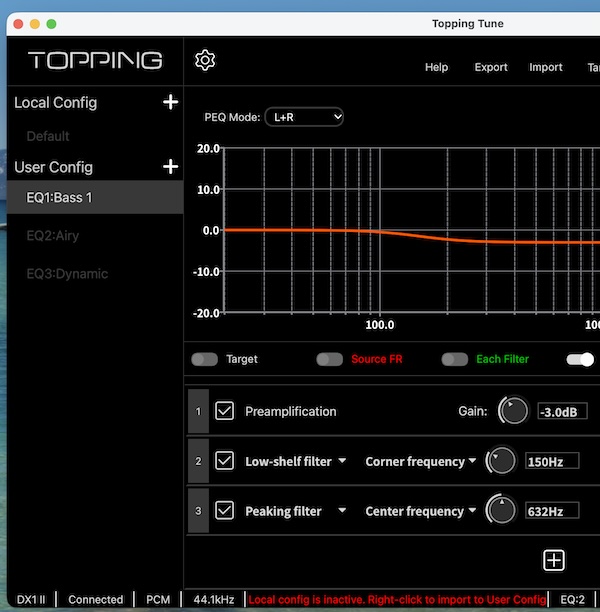
The DX1 II stores three local PEQ profiles, EQ1 to EQ3, each with ten bands of frequency, gain and Q, and independent left and right settings, and they are off by default. The screenshot above is the Topping Tune desktop app with the unit connected, showing a bass profile built from a preamplification stage set to −3.0 dB, a low-shelf at 150 Hz and a peaking filter at 632 Hz. Any boost you dial in has to be paid for with headroom, and Topping’s own troubleshooting notes list “PEQ preamp gain set too high” as a cause of distortion and “set too low” as a cause of no sound at all.
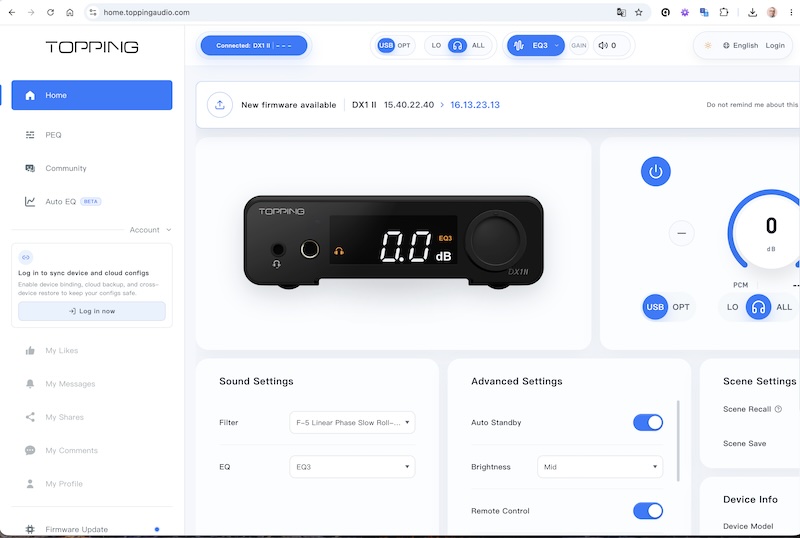
The manual points you to TOPPING Home WEB instead, a browser-based control centre at home.toppingaudio.com that needs WebHID, so Chrome or Edge on the desktop. That page can also reassign the remote’s buttons and the knob’s short and double press, and trim the cycle lists so the knob only steps through the outputs and filters you use.
Here is the TOPPING Home page with the DX1 II connected, which also shows that a newer firmware is available for the unit:
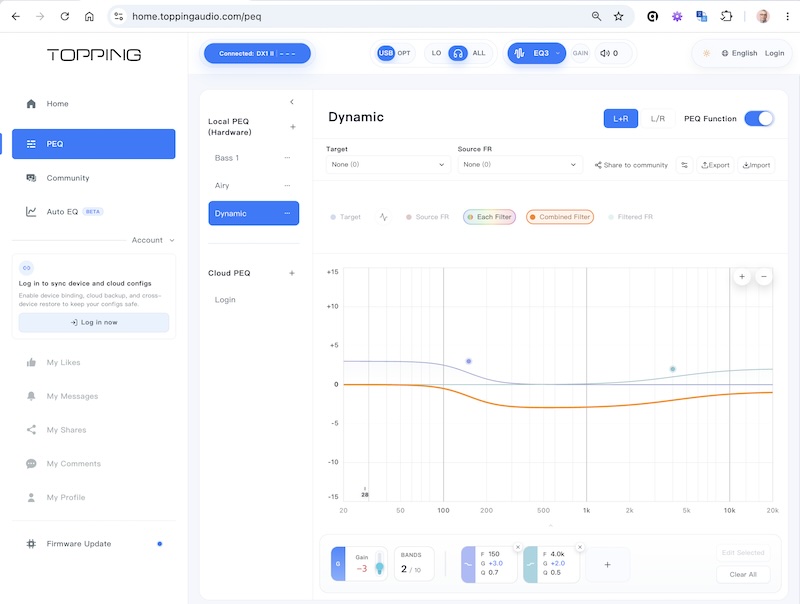
The PEQ page of the same tool lists the hardware profiles stored on the unit (Bass 1, Airy and Dynamic here), draws each filter and the combined curve, and has buttons to share a profile to the community, export it and import it:
Firmware updates also go through the browser. You connect the DX1 II to the page first, and the page warns that insufficient USB power, a hub or a long cable can make an update fail:
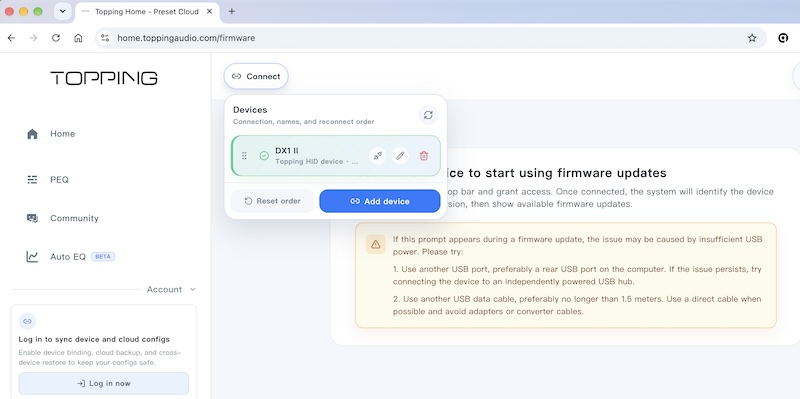
There is one limitation to know about before you buy for the PEQ. Enabling it constrains the sample rate the unit will process, so the EQ indicator flashes when the incoming rate is outside the supported range, and Topping’s own FAQ says content above 192 kHz may be muted with PEQ and high-sample-rate muting both active. If your library is 192 kHz and below that does not matter, but with 384 kHz material and EQ it does.
PEQ can be applied to the analog outputs, the optical output, or both, which is the default. The same curve goes to whichever you select, as there is no separate profile per output.
Firmware updates
Earlier reviews rightly did mention some issues that the Topping team have fixed in the firmware, and part of my delay in getting this review published was waiting for the firmware update to sort out the niggly issues that were reported. Happily it has been extremely stable for me for a number of months now.
I thought it might be useful to outline the various fixes that Topping have been diligently applying, as there has been lots of discussion online. This is one of the most impressive things, as often we are stuck with devices that work and have the bugs they shipped with, but Topping keep getting updates out. I would recommend looking at upgrading the firmware almost immediately, because I feel it is always worth getting the most up to date firmware when available:
| Version | Changes |
|---|---|
| V2.46 | Fixes sample-rate sync on the web interface, noise after screen-off, and clock switching on USB. |
| V2.50 | Fixes EQ/PEQ after sample-rate switching and adds custom knob click actions. |
| V2.53 | Fixes random noise after USB playback, enables volume control for UAC 1.0, and reduces crackle when switching sample rates on Macs. |
| V2.54 | Fixes random noise after playing for a while. |
| V2.69 | Better optical input compatibility with CD players, UAC 1.0 support for Switch 2 and PS5, and a UAC 1.0 microphone input. |
Moving a PEQ between your Topping and other devices
While I was on a long trip I decided to integrate full support for Topping devices into my new cross platform, system wide Pragmatic Audio PEQ app (there is more about it in this article). I also extended my support for Topping devices in my devicePEQ tool. The idea of this integration is not to replace the existing Topping Home app but to make it simple for you to export and import a PEQ profile to and from the DX1 II. If you like a PEQ and want to move it from your Topping to your MacBook or Android device, or the other way round, you can now do that, and adding Topping hardware support was a new feature that I wanted to explain here. Here is the app’s audio device screen with the DX1 II found over USB, next to two WiiM streamers on my network, and the button that sends the current profile to the device:
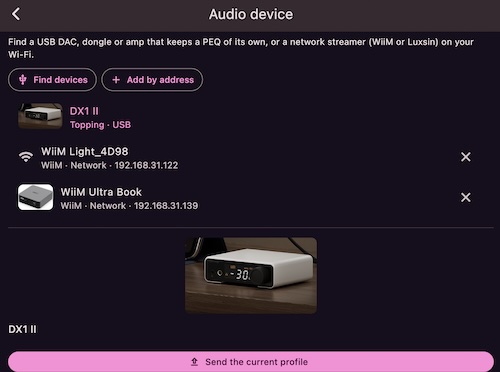
The Topping support is in the macOS and Android versions of the app, and not in the iOS one, as there is still no USB read/write on iOS devices. The PEQ transfer works well on both macOS and Android, though you will need an Android device with high output power to boot the DX1 II before you can read and write PEQ filters from it. The screenshot above shows the app recognising the device, where it can then push or pull the PEQ filters.
Filters, gain and standby
Eight PCM reconstruction filters are selectable from the FIR button on the remote, running from minimum phase through the linear-phase fast and slow roll-offs, with linear phase slow roll-off as the default.
Gain is low by default, with the GAIN indicator lighting when high gain is engaged; you switch it from the remote’s G button or by pressing and rotating the knob within 1.5 seconds. Auto standby defaults to one minute, can be extended to five or ten minutes or disabled, and the unit wakes on signal.
Bus power at 5V/1A limits the output, and the figures are 510 mW into 32 Ω from the 3.5mm output and 1000 mW into 32 Ω from the balanced one, dropping to 58 mW and 230 mW respectively into 300 Ω. Topping say in their own FAQ that phones vary in what they will supply over OTG and that the DX1 II is designed for computers, with a Y-split cable as the workaround for a phone that cannot feed it.
One key thing to understand with the DX1 II is the power requirement to drive it. The FiiO M25 and most other smartphones, including my iPhone, are not providing enough power to drive the DX1 II, so just be aware that this is a small, very capable desktop DAC amp and not really one for mobile devices. Different connections have different power outputs:
| Connection | Power |
|---|---|
| USB 2.0 USB-A | 2.5 W |
| USB 3.0 USB-A | 4.5 W |
| USB 3.0 USB-C | 15 W |
Sound Impressions
Day to day: plug in via USB-C and use balanced 4.4mm into IEMs or easy-to-drive headphones. The sound is clean and the noise floor is very low. Use low gain for sensitive IEMs.
This is a very transparent headphone output.
Here it is with the Meze Strada, which is one of those quality headphones that I feel needs a little bit of PEQ (specifically in the presence region) to sound its best:
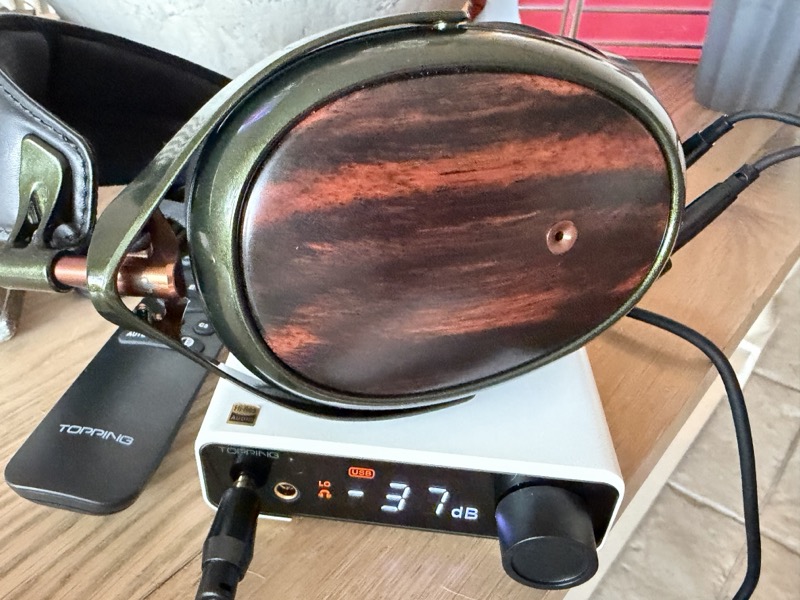
Overall, and the measurements presented later show this, without PEQ this is a completely transparent sounding headphone amplifier. That means the DX1 II does not add anything of its own to the bass, the midrange, the treble or the soundstage, so what you hear in each of them is the headphone or IEM that you have plugged in.
When it is needed, like with the Strada, you can use the PEQ to open up the sound and turn a good headphone like the Strada into an exceptionally good headphone.
Other Comparisons
These are other comparisons beyond the portable Chord Electronics Mojo 2 comparison that I made earlier in the review.
The Topping E50 II at $199 is the closest sibling in features rather than price, with the same ten-band PEQ plus LDAC Bluetooth and ADAT, but no headphone amplifier at all. If you already have an amplifier you like and want a line output plus PEQ, the E50 II is the one, but if you want the PEQ and a headphone output in one bus-powered box the DX1 II does it for $80 less and gives up the Bluetooth, the ADAT input and two of the E50 II’s five PEQ slots.
The Topping DX5 II at $299 costs more mainly for power and distortion margin. Its balanced output is rated 7600 mW into 16 Ω and 990 mW into 300 Ω against the DX1 II’s 730 mW and 230 mW, and its published THD+N at 850 mW into 32 Ω is <0.00008% where the DX1 II quotes <0.0010% at the same operating point. It also has five PEQ profiles rather than three and runs from its own supply rather than the USB port, so for hard-to-drive headphones the DX5 II is the relevant comparison.
The FiiO K11 is an entry level competitor from FiiO, though much more a desktop only option. It has its own power supply and more current, at 1400 mW into 32 Ω and 250 mW into 300 Ω from its 4.4mm output against the DX1 II’s 1000 mW and 230 mW, but the SINAD figures in my K11 review put its balanced output at 97 dB and its single-ended output at 104.5 dB, against the low 120s Topping publish here, and it has no PEQ.
Specifications and Measurements
Specifications
The following is the manufacturer’s published specification, measured by Topping Lab under a DC 5V supply. Line output first:
| Parameter (Line Out, USB In @96kHz) | RCA SE | 4.4mm BAL |
|---|---|---|
| THD+N @1kHz (A-wt) | <0.00009% | <0.00007% |
| THD @20-20kHz (90kBw) | <0.0008% | <0.0005% |
| SNR @1kHz (A-wt) | 125 dB | 128 dB |
| Dynamic Range @1kHz (A-wt) | 125 dB | 128 dB |
| Frequency Response | 20Hz - 20kHz (±0.1dB), 20Hz - 40kHz (±0.3dB) | 20Hz - 20kHz (±0.1dB), 20Hz - 40kHz (±0.3dB) |
| Output Level @0dBFS | 2.4 Vrms | 5.1 Vrms |
| Noise (A-wt) | <1.3 µVrms | <2.0 µVrms |
| Channel Crosstalk @1kHz | −126 dB | −140 dB |
| Channel Balance | 0.3 dB | 0.3 dB |
| Output Impedance | 50 Ω | 100 Ω |
And the headphone amplifier:
| Parameter (Headphone Out, USB In @96kHz) | 3.5mm jack | 4.4mm jack |
|---|---|---|
| THD+N @1kHz (A-wt) | <0.0005% @200mW (32Ω), <0.00015% @22mW (300Ω) | <0.0010% @850mW (32Ω), <0.0001% @90mW (300Ω) |
| THD @20-20kHz (45kBW) | <0.0020% @200mW (32Ω), <0.0003% @22mW (300Ω) | <0.0050% @850mW (32Ω), <0.0003% @90mW (300Ω) |
| SNR @MAX OUT 1kHz (A-wt) | 125 dB | 128 dB |
| Dynamic Range @1kHz (A-wt) | 125 dB | 128 dB |
| Output Level | 0.8 Vrms @G=L, 4.0 Vrms @G=H | 1.6 Vrms @G=L, 8.1 Vrms @G=H |
| Noise (A-wt) | <0.9 µVrms @G=L, <1.9 µVrms @G=H | <1.2 µVrms @G=L, <3.3 µVrms @G=H |
| Gain | −1.6 dB @G=L, 12.4 dB @G=H | 4.4 dB @G=L, 18.4 dB @G=H |
| Channel Crosstalk @1kHz | −102 dB | −140 dB |
| Output Impedance | <1 Ω | <2 Ω |
| Output Power (THD+N<1%) | 800 mW @16Ω, 510 mW @32Ω, 260 mW @64Ω, 58 mW @300Ω, 29 mW @600Ω | 730 mW @16Ω, 1000 mW @32Ω, 1000 mW @64Ω, 230 mW @300Ω, 115 mW @600Ω |
| Load Impedance | >8 Ω | >8 Ω |
The rest of the sheet: ESS ES9039Q2M DAC, XMOS XU316 USB controller, USB-C power input at DC 5V/1A, USB and optical S/PDIF digital inputs, optical S/PDIF output, 3.5mm headset input sharing the headphone jack with a 2.5V bias, 4.4mm balanced and RCA single-ended line outputs, LED display, switchable UAC 1.0/2.0, 2.5W typical consumption and 0.8W in standby, 10 × 10 × 3.2 cm and 275 g.
Turning the output level row for the 4.4mm jack into power is simple arithmetic (volts squared divided by the load), and it is my calculation rather than a measurement. The 1.6 Vrms in low gain works out at about 80 mW into 32 Ω and 8.5 mW into 300 Ω, and the 8.1 Vrms in high gain at about 2000 mW into 32 Ω and 220 mW into 300 Ω. Into 300 Ω that lines up with the 230 mW Topping rate it at. Into 32 Ω the voltage alone would allow more than the 1000 mW on the sheet, so the limit there is the current the 5V USB supply can feed the amplifier, not the output voltage.
Initially I was concerned about the output power when driving it from my MacBook Pro, but the USB-C/Thunderbolt ports on the MacBook Pro provide 15W, so headphones like my HD600 were driven exceptionally well. I was also a little concerned about noise over the USB interface, but I did not notice any issues with either my IEMs or my headphones.
The output impedance of under 1 Ω on the 3.5mm and under 2 Ω on the 4.4mm means low-impedance IEMs should not have their frequency response bent by the source, and the sub-1 µVrms noise figure in low gain is what decides whether sensitive IEMs hiss.
Measurements
Topping publish Audio Precision dashboards on the product page. These are Topping’s own measurements of their own product, not an independent verification, and I am reproducing the dashboards here because the captures are dated and show the instrument settings. Many thanks also to Amir at Audio Science Review for measuring the DX1 II independently; you can read his excellent review here.
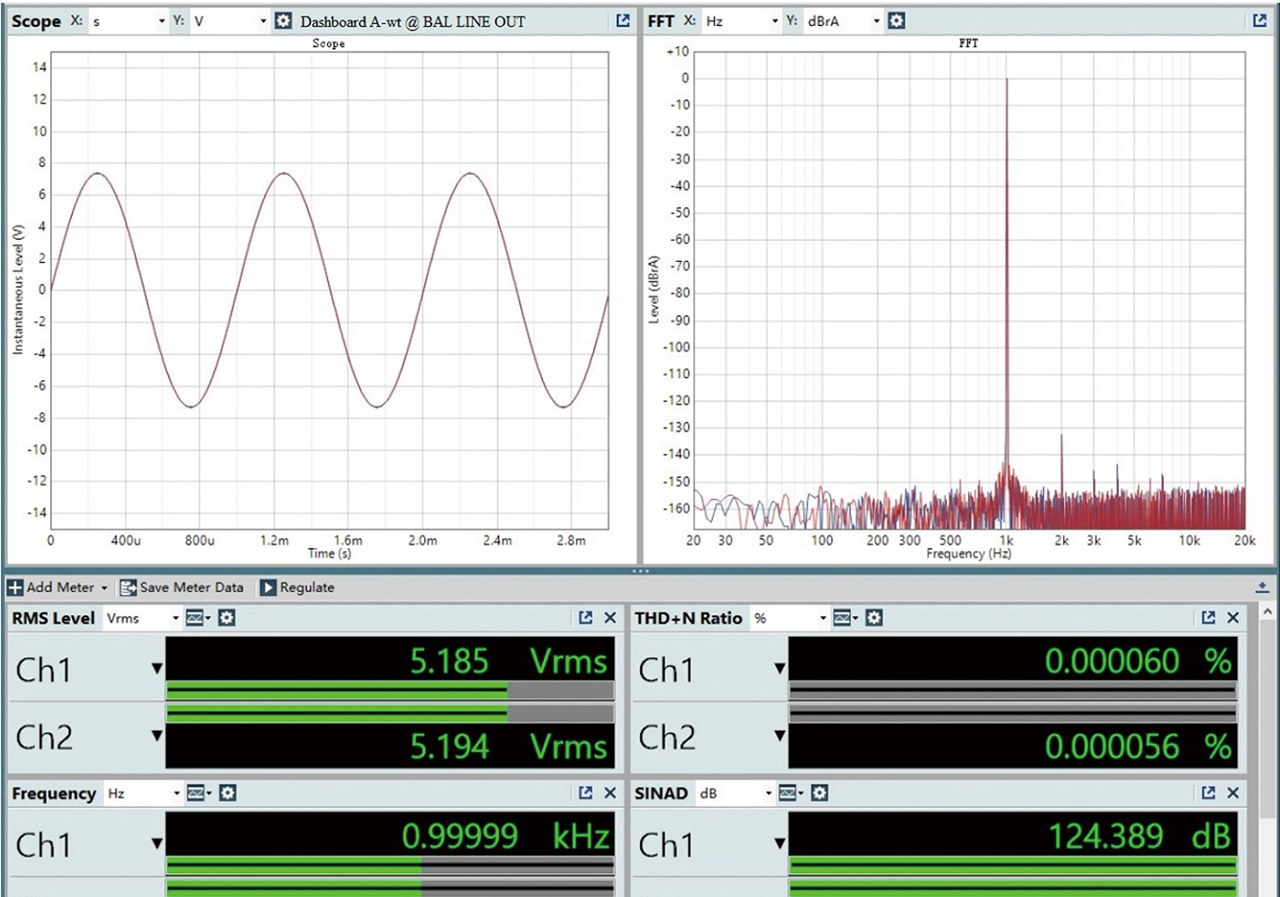
Topping’s dashboard at the balanced line output shows 5.185 and 5.194 Vrms with THD+N of 0.000060% and 0.000056%, giving SINAD figures of 124.389 dB and 125.036 dB, and SNR and dynamic range both just under 129 dB:
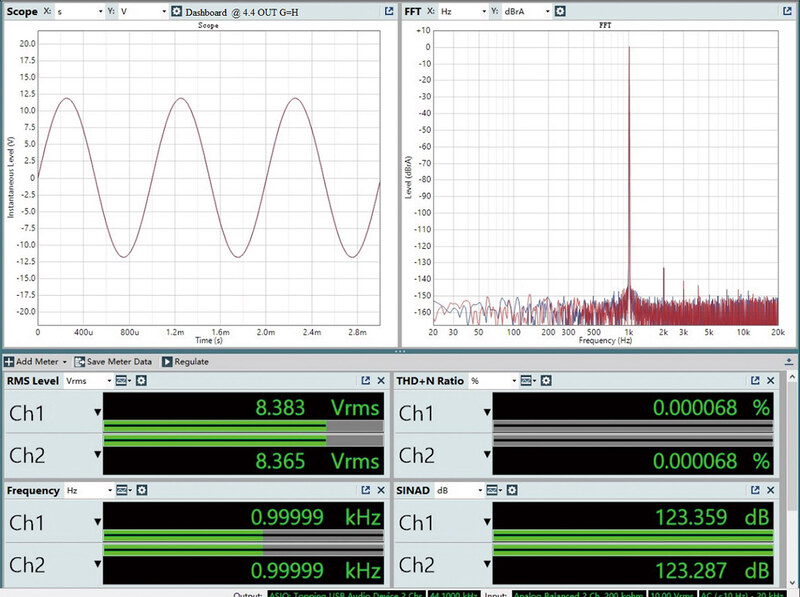
Topping’s own headphone-output dashboard for the 4.4mm jack in high gain shows 8.383 and 8.365 Vrms at 0.000068% THD+N, a SINAD of about 123.3 dB, so the amplifier stage gives up roughly a decibel and a half against the line output:
Amir measured the rear 4.4mm balanced output at volume -2, getting 4.085 and 4.089 Vrms with THD+N of 0.000089% and 0.000091%, which is a SINAD of 121.019 dB and 120.778 dB, against 124.4 and 125.0 dB on Topping’s own dashboard (their capture is at a higher level, 5.185 Vrms, so it is not quite the same operating point):
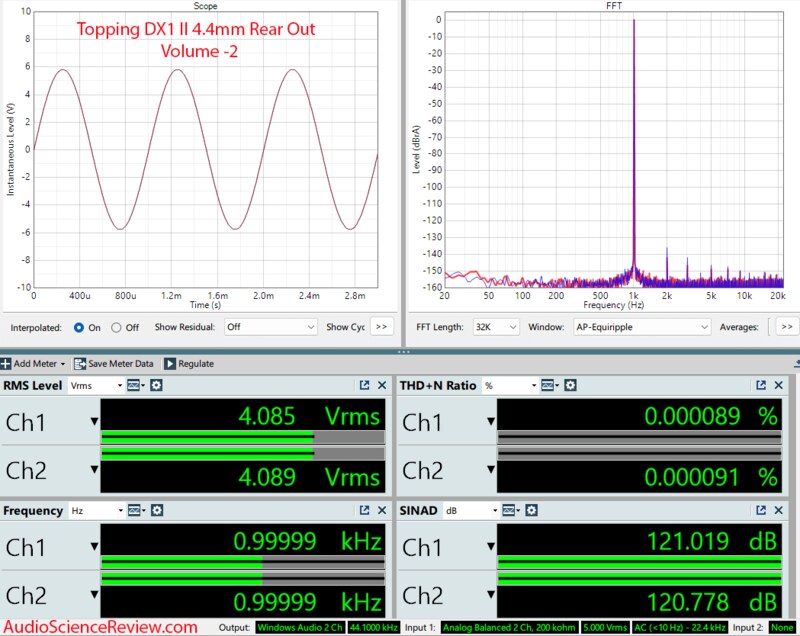
Credit for this dashboard: from Amir’s Audio Science Review review.
A SINAD that high means the DAC stage should be transparent in normal listening, and the headphones, the room and any EQ dominate what you hear from there. Amir did not publish an output impedance figure for the DX1 II, so Topping’s own under 1 Ω and under 2 Ω are excellent, with no unnecessary ‘surprises’ from the impedance interfering with your headphone’s frequency response.
Rating Explanation
I rate it 5 overall and 5 for price, as it is a great price for its capabilities and power. Features get a 4, because the PEQ is amazing, but the USB power requirements mostly limit its excellent features to desktop usage. Measurements get a 5, as they are pretty incredible.
Conclusion
At $119 the DX1 II puts hardware parametric EQ, a balanced headphone output and independently measured low distortion into a box that needs nothing but a USB cable, making this an extremely easy device to recommend to anyone, especially as it can act both as something to throw into your laptop bag and as a permanent desktop option.
My main advice with this product is to give it good clean power, either from a 15W power plug or, like my setup, a high spec MacBook Pro, as the USB-C / Thunderbolt connections are designed to provide high quality clean output power and I feel that is what this device needs. I would also advise upgrading the firmware, as some of the issues related to audible pops on startup or when changing sample rates were fixed. Overall, if you can give it that clean power, this is one of the best bargains, something that is good for 99% of headphones and all IEMs yet small enough to be ‘portable’. This, together with its features and measurements, means I cannot think of a better bargain.