Jade Audio Gigas1
The first portable amplifier I would accept as a desktop amplifier
A compact analogue amplifier with no DAC, but with “giant” power for a device of this size.
The name is the clearest statement of intent: GIGAS is the Greek for “giant”, and JadeAudio — FiiO’s value sub-brand — aimed it squarely at powering entry-level planars from FiiO and other brands.
What it is, then, is a pure analogue headphone amplifier with no DAC and just RCA and 3.5mm line inputs on the back, 4.4mm balanced and 3.5mm single-ended headphone outputs on the front, a two-position gain switch.
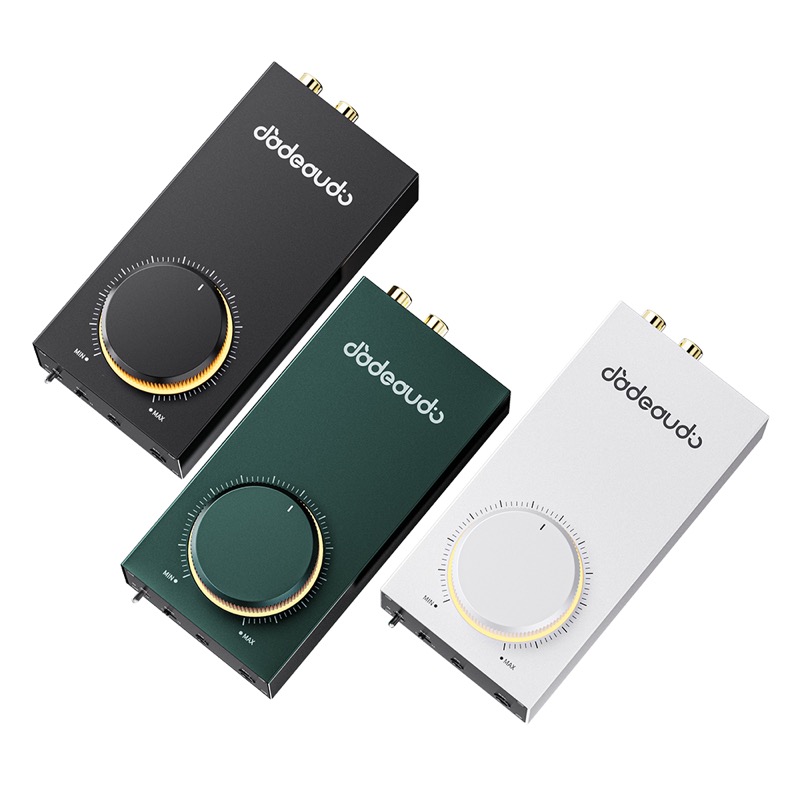
I would like to thank FiiO for providing the JadeAudio Gigas1 for the purposes of this review.
If you are interested in finding more information about this product, you can find it at the official JadeAudio product page, the Chinese-language GIGAS 1 product page which carries the full specification sheet and packing list, and FiiO’s own launch announcement.
The Gigas1 sells for $49.99 on Amazon US at the time of writing, and is listed at HK$399 by Hong Kong retailers. Available in black, silver and green — the unit reviewed here is the silver variant.
I have had the Gigas1 for about three weeks and it has been through most of the headphones currently on my desk: the Sennheiser HD 600, the JadeAudio JT7 and JT9, a few planars including the Hifiman Sundara and the Ananda, and, because I could not resist trying, the Lily Audio Genesis One — a headphone that nothing this small and this cheap has any business attempting. I also took it into the office for a few days to drive the HD 600 at my desk.
This is a device I did not think I needed. A “giant” dongle sounds like a contradiction in terms, but the Gigas1 has the power of a small desktop amplifier in something you can put in a bag, and that turns out to be an excellent place to be. A good dongle will run most things but runs out of headroom on an insensitive planar, and a desktop amplifier that does not is several times the price, ties you to a wall socket and takes up the space to prove it. The Gigas1 sits between the two, and I think it may be a new segment rather than simply a gap — there is not much else in it.
The Gigas1 is fed from a USB-C port, and the manufacturer’s published output tables split into two entirely different amplifiers depending on what that port can supply: roughly 580mW into 32Ω balanced from an ordinary 5V/2A charger (or for example a laptop USB-C port), or 4600mW into the same load from a 12V Power Delivery supply. So this is probably the key thing to understand about the Gigas1: without a 12V Power Delivery supply you get a good amplifier, but with 12V PD you get a “giant” one.
A bit of history
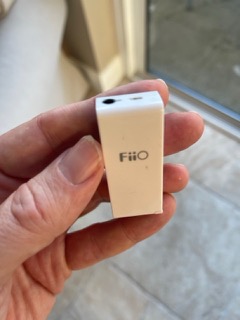
There is also a small personal reason I wanted to try the Gigas1. My first ever FiiO device might be thought of as the grandfather of the Gigas1, it was a tiny little analog amplifier that I bought 10+ years ago:
But first, let’s look at what comes in the box.
Unboxing and Build Quality
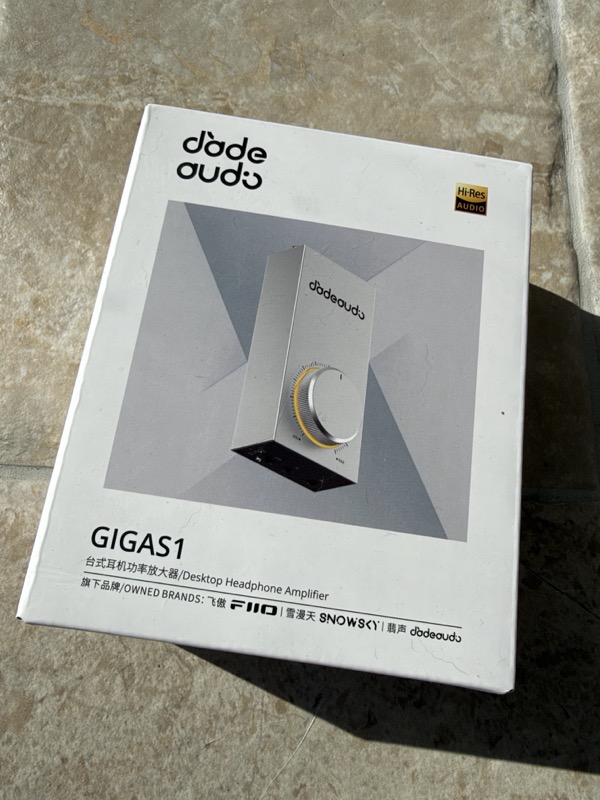
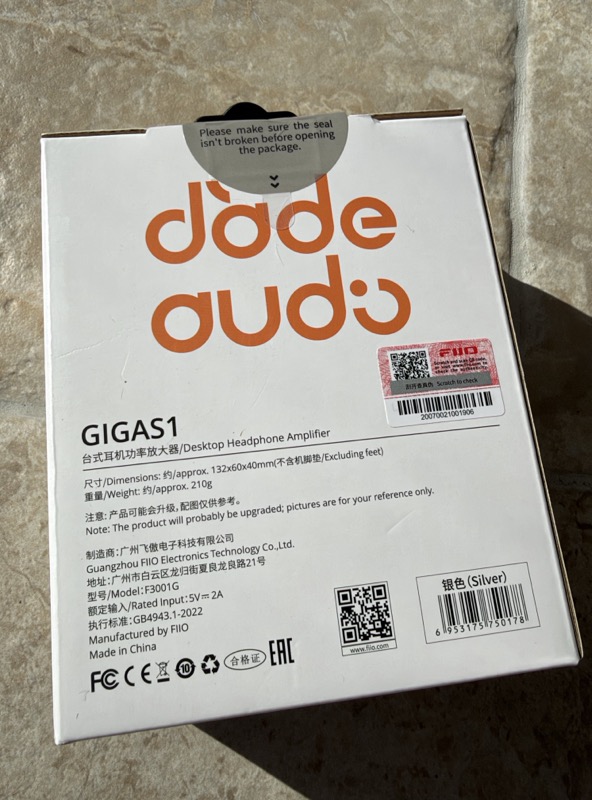
The packaging is plain white card with the JadeAudio wordmark and a rendered product shot on the front, and the essential specification printed on the back. The rear panel of the box is worth a read before you open it, because it carries the one number that matters most for setup — “Rated Input: 5V ⎓ 2A” — along with the model code F3001G, the 132 × 60 × 40 mm dimensions excluding feet, and the 210 g weight:
 |
 |
Inside there is very little, and JadeAudio’s own packing list confirms that this is deliberate: the amplifier, a USB power cable, a quick start guide and a warranty card:
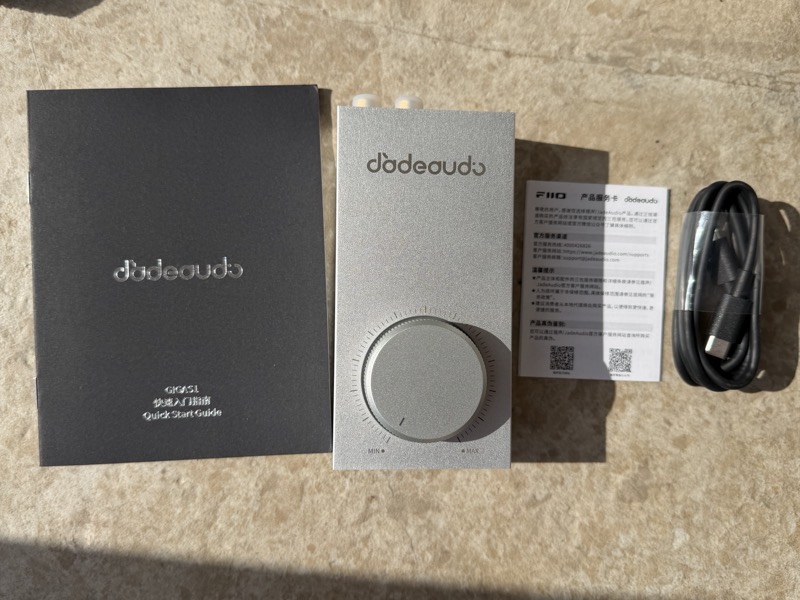
So there is no interconnect in the box. That matters more than it usually would, because the Gigas1 has no digital input — you cannot use it at all until you have a cable from something else’s line output to its RCA or 3.5mm input, and you have to supply that yourself. The bundled USB-C lead powers the amp and carries no audio.
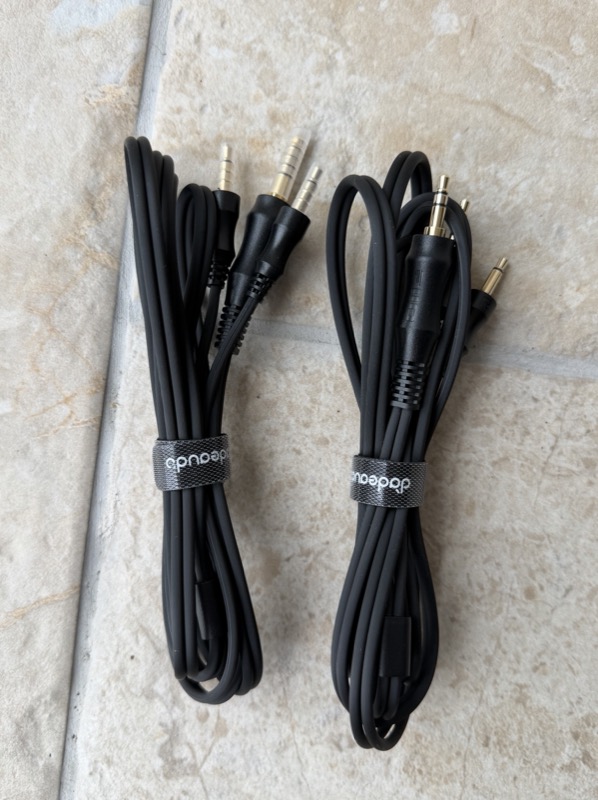
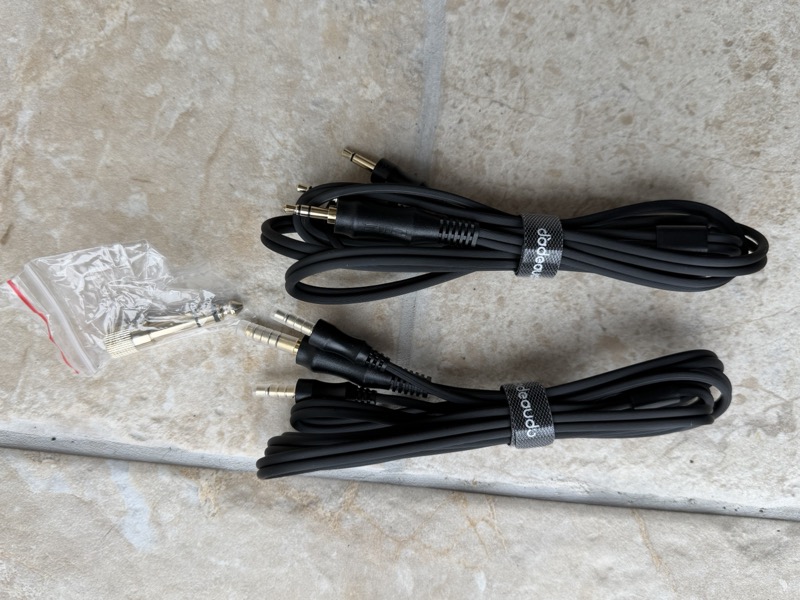
The JadeAudio-branded cables in the next two photos are worth explaining, because they are easy to mistake for Gigas1 accessories. They are not. Both have dual 3.5mm TS plugs at one end, which means they are headphone cables, and one terminates in 3.5mm while the other terminates in 4.4mm. With the 3.5mm-to-6.35mm screw adapter alongside them, that is exactly the accessory set published for the Jade Audio JT9, which is the headphone I ran on the Gigas1’s balanced output. So they arrived with the headphone, not with the amplifier, and they do not solve the problem above: a headphone cable will not carry a line signal into the Gigas1’s input. JadeAudio are explicit about that on the product page, where the footnote under the input section lists their TURST cable series — a Type-C to 3.5mm decoding cable, a 3.5mm-to-3.5mm stereo lead, RCA-to-RCA, 3.5mm-to-RCA and a Type-C to RCA decoding cable — plus the LINK series, all as optional purchases. The interconnect you need is a separate line item whichever way you buy it:
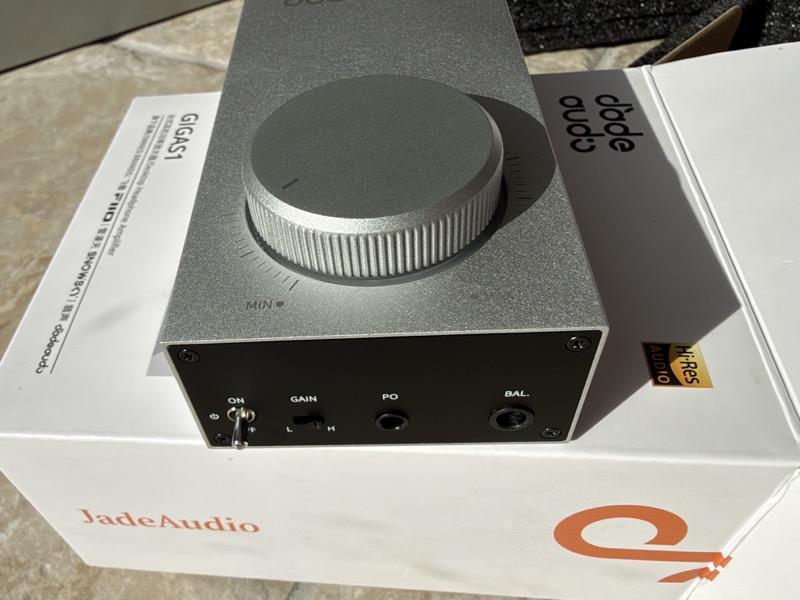
The chassis itself is anodised aluminium with a fine bead-blasted texture, and at 210 g it has enough mass that a stiff 4.4mm cable does not drag it around the desk. Both end panels are black-anodised plates held on with visible hex screws — an honest, machine-shop way to build a case at this price, not a pretence at a milled monobloc. The front panel carries the power toggle, the L/H gain slider, and the two outputs marked PO and BAL; the rear carries POWER IN, 3.5mm IN, and a gold-plated RCA pair:
 |
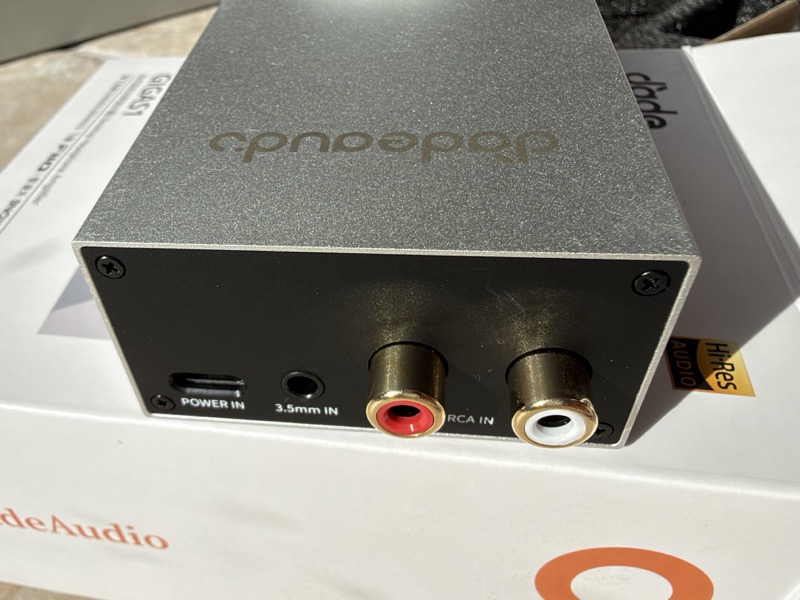 |
Two details on the front panel are worth pointing out. The power switch is a mechanical toggle and not a soft button, which means the amp is genuinely off when it is off — useful on a device that runs warm. And the gain slider is a physical two-position switch, not a menu item, so the setting is visible from across the desk.
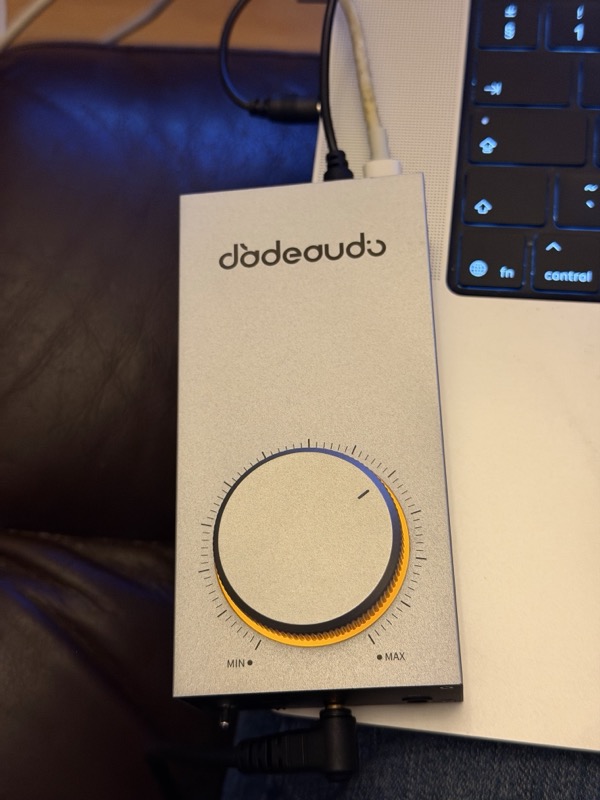
The volume knob is the part that gets noticed. It is a large knurled aluminium disc mounted on the top face instead of the front, ringed by a warm orange backlight and a machined scale from MIN to MAX. Mounted on top it is easy to reach when the amp sits below a laptop, and the backlight ring doubles as the only power indicator:
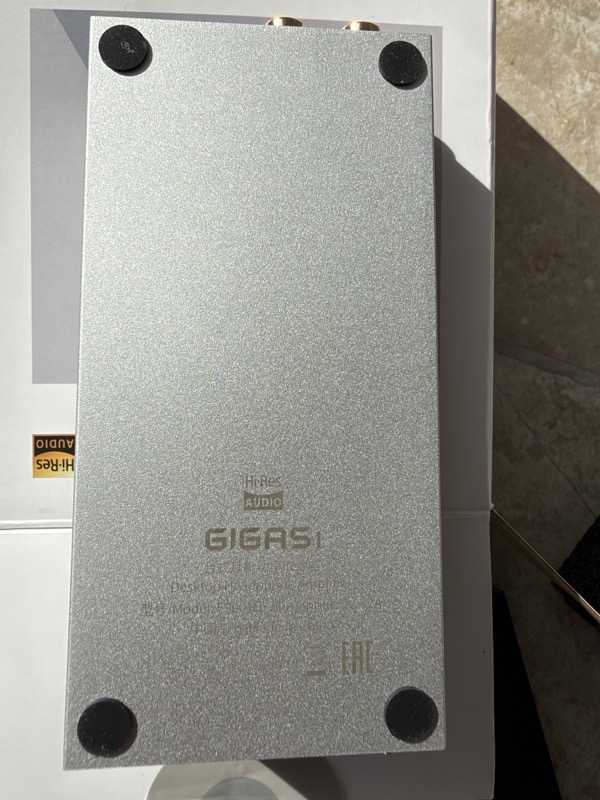
The underside is a plain machined baseplate with the GIGAS1 branding, Hi-Res logo and regulatory text engraved into it, and four generously sized rubber feet at the corners:
Features and Performance
The circuit, and why it is built this way
FiiO’s own description of the output stage is a “Class AB discrete transistor current-amplification headphone amp circuit” using onsemi MJE243G and MJE253G complementary pairs — four of each, eight transistors in total. Their block diagram is more informative than the marketing copy around it, because it shows how the balanced output is assembled: the incoming single-ended signal is split by an inverter into a normal and an inverted phase, each phase passes through the gain switch and an op-amp voltage stage, and each op-amp then drives a complementary transistor pair that supplies the current. That gives four separately buffered outputs — LCH+, LCH−, RCH+, RCH− — which is what the 4.4mm socket needs:
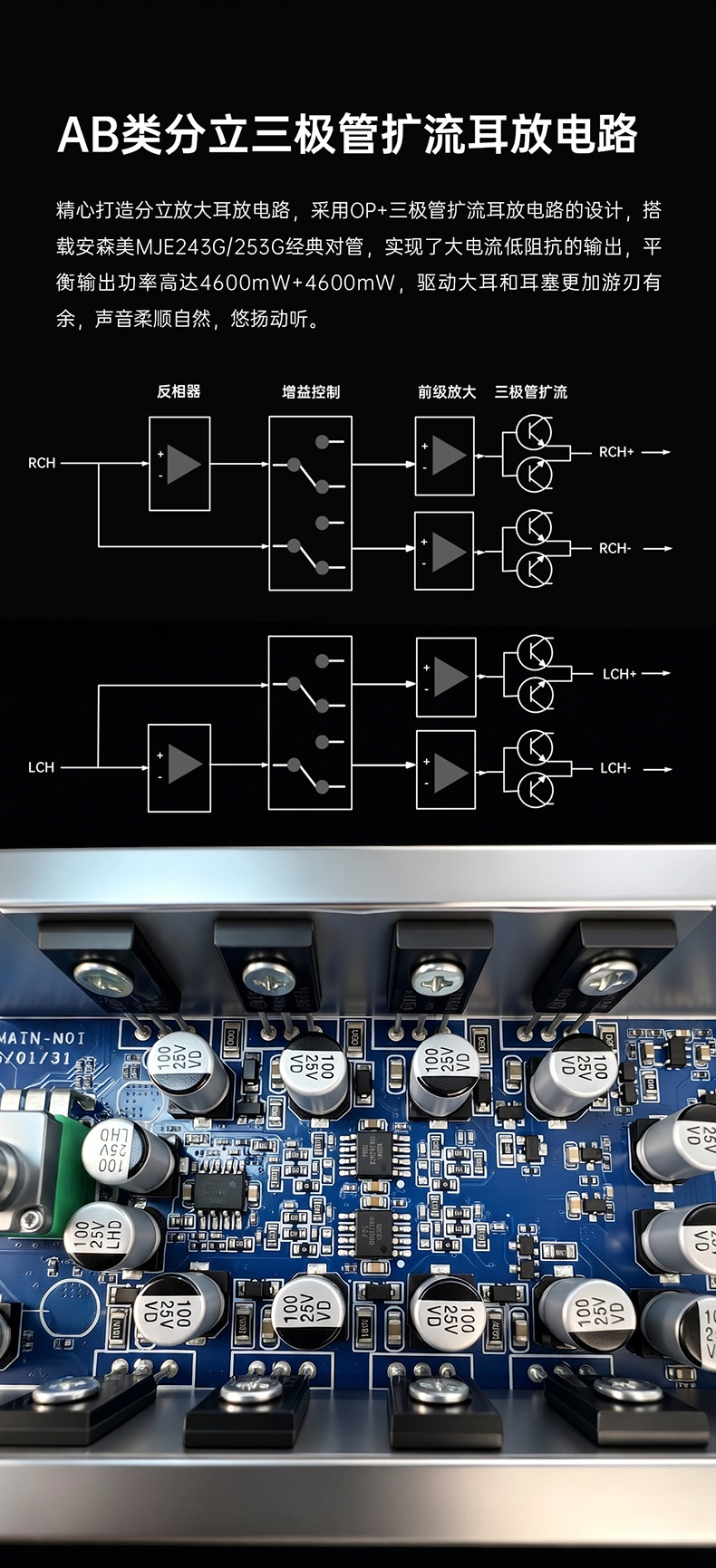
The practical consequence of this topology is worth spelling out, because “discrete Class AB” is the sort of phrase that gets used as a virtue in itself. It is not. What the arrangement actually buys you is current: the op-amps set the voltage gain and the transistors do the work of delivering amps into a low-impedance load, which is exactly the problem a chip amp runs into with an 18Ω planar. It is a sensible engineering choice for the stated target, not an inherently better-sounding circuit than a good integrated headphone driver.
FiiO’s own photograph of the populated board shows where those eight TO-126 transistors go: bolted along the front and rear edges of the chassis, so the aluminium case is doing double duty as the heatsink. That explains the machined-plate construction, and it is also why the whole case warms up in use instead of one spot on it:
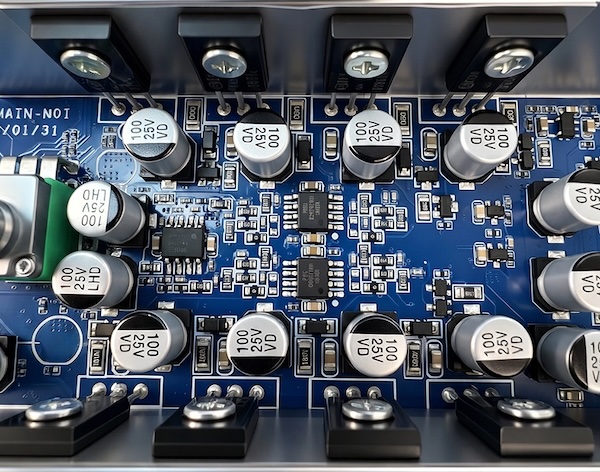
FiiO’s own support pages carry a dedicated FAQ entry on heat generation, which tells you it comes up often enough to warrant one. With eight bias-on transistors and a case with no vents, some warmth is what the design predicts and not a fault.
Mine ran only slightly warm on a 12V supply over three weeks, never became uncomfortable to touch, and never shut itself down. I would not describe it as a hot-running amplifier. How warm a Class AB amp gets depends on how hard it is being asked to work, so your mileage will vary with your headphones and your levels — but if heat is what was putting you off, it did not materialise here.
Power, and the 5V versus 12V question
This is the feature that defines the product. The Gigas1 has no internal power supply that steps voltage up; it runs off whatever rail the USB-C port hands it, and the published output tables therefore describe two different amplifiers.
JadeAudio’s own framing of this is worth quoting because it sets an expectation about what you have to do. Their product page says the Type-C input accepts both 5V and PD 12V and switches between them automatically, that a computer or a plain 5V adapter is “enough for most headphones”, and that connecting a 12V PD supply is what releases the amp’s full drive. There is no switch and no indicator for this, so the claim is that the amp negotiates the higher rail on its own when the charger offers it — which also means the only way to know which amplifier you are listening to is to know what you plugged it into.
The negotiation was silent on every charger I tried, exactly as JadeAudio describe, and there is no indicator to tell you which rail it settled on. In practice I could tell by ear, because the difference in available level is not subtle — but that is a poor way to check a configuration, and a single LED would have solved it.
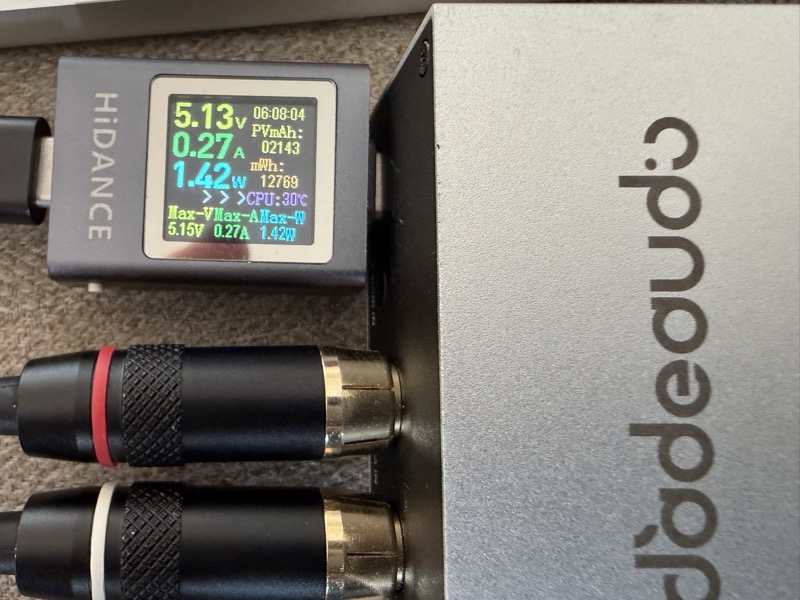
Since the box will not tell you, I put a USB power meter inline and looked. The two cases are the ones most people will actually meet:
 |
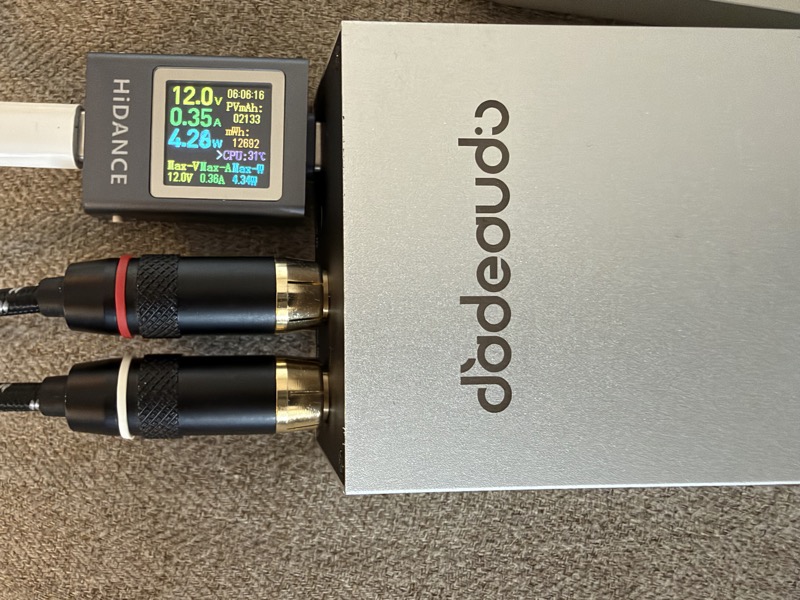 |
Powered from a USB-C port on my MacBook Pro, the meter reads 5.13V at 0.27A — 1.42W, the 5V amplifier. Powered from the MacBook Pro’s own charger, it reads 12.0V at 0.35A, 4.28W, and the amp is in its full-output mode. That is the whole configuration question made visible, and it settles it more reliably than listening does: a laptop port gives you the modest amplifier, and any 12V PD charger — the MacBook’s is simply the one I had to hand — gives you the powerful one.
From a plain 5V/2A charger the balanced output makes 580mW into 32Ω at 4.3Vrms, and 790mW into 16Ω at 3.6Vrms. From a PD 12V/2A supply the same output makes 4600mW into 32Ω at 12.1Vrms, 3300mW into 16Ω at 7.3Vrms, and 740mW into 300Ω at 14.9Vrms. Note the shape of that: into 300Ω the amp reaches its highest voltage but its lowest power, and into 16Ω the power actually falls below the 32Ω figure. The 32Ω number is voltage-limited, the 16Ω number is current-limited, and the 300Ω number is purely voltage-limited. The headline 4600mW is not a general capability — it is the single load where those two limits happen to cross.
Working that through for the headphone the amp was designed for makes the point better than the wattage does. The JT7 is specified at 109 dB/Vrms, but Solderdude measures it at 107, so 7.3Vrms on the balanced output is around 124 dB of available level, and even the 3.6Vrms available from a 5V charger works out around 118 dB. In other words the 12V mode is not what makes the JT7 usable — 5V already does that, with headroom. What the 12V mode buys is headroom for loads that need voltage rather than current.
Putting 4.6W in perspective
Watts are a bad unit for intuition, because the ear works in decibels and the numbers do not. The gap between 8mW and 4600mW looks like a rounding difference on a spec sheet next to the gap between $49.99 and $499, and it is not — it is nearly ten doublings of power.
So here is the same information on a scale people already read fluently: a sixteen-position volume bar. This is not a volume control and it is not iOS’s attenuation curve; the resemblance to a phone volume indicator is deliberate but it is only an analogy. The scale is defined arithmetically and nothing else: one step is a doubling of amplifier power, which is about +3 dB of maximum available SPL into the same load. The Gigas1’s 4600mW into 32Ω sits at the top, at position 15, and everything else falls where the arithmetic puts it.
| Device | Power into 32Ω | Relative to the Gigas1 | dB below | Doublings below | Position |
|---|---|---|---|---|---|
| JadeAudio Gigas1, 12V PD, balanced | 4600mW | 1× | 0 dB | 0 | 15 |
| FiiO QX13, desktop mode, balanced | 900mW | 1/5.1 | −7.1 dB | 2.4 | 13 |
| CrinEar Protocol Max, Boost, balanced | 500mW | 1/9.2 | −9.6 dB | 3.2 | 12 |
| JadeAudio Gigas1, 5V, balanced | 580mW | 1/7.9 | −9.0 dB | 3.0 | 12 |
| Apple USB-C dongle, US version | ~31mW | 1/148 | −21.7 dB | 7.2 | 8 |
| Apple USB-C dongle, EU version | ~8mW | 1/590 | −27.7 dB | 9.2 | 6 |
AMPLIFIER POWER / HEADROOM INTO 32 OHMS
each step = 2x power = approx +3 dB of maximum SPL

15  |###############  JadeAudio Gigas1  (12V PD, bal)   4600 mW
14  |##############
13  |#############    FiiO QX13         (desktop, bal)   900 mW
12  |############     CrinEar Protocol Max (Boost, bal)  500 mW
12  |############     JadeAudio Gigas1  (5V, bal)        580 mW
11  |###########
10  |##########
 9  |#########
 8  |########         Apple USB-C dongle (US)             ~31 mW
 7  |#######
 6  |######           Apple USB-C dongle (EU)              ~8 mW
 5  |#####
 4  |####
 3  |###
 2  |##
 1  |#
 0  |
The Gigas1 and Protocol Max figures are the manufacturers’ published balanced outputs into 32Ω; the QX13’s is FiiO’s desktop-mode figure. The Apple numbers are derived, not published: the US dongle is commonly measured at about 1Vrms and the EU version, which is voltage-limited to meet European output regulations, at about 0.5Vrms, which into 32Ω work out at roughly 31mW and 8mW.
The reason to draw it this way is that the scale is initially misleading in a useful direction. A reader glancing at it sees the Apple dongle already halfway up and reasonably concludes the Gigas1 cannot be dramatically more powerful. But position 8 to position 15 is seven doublings — 31, 62, 125, 250, 500, 1000, 2000, 4000mW — which is about 128 times the power and roughly 21 dB more maximum SPL. Half the bar is two orders of magnitude.
That is the argument for the Gigas1 at $49.99, and it is also the argument for reading its own two modes carefully. On a plain 5V charger it lands at position 12, in the same territory as a good dongle. Give it 12V and it moves three steps up, past everything portable, into a region that has until now meant a mains lead and a desktop chassis. The charger is worth more than the chassis here, which is the least intuitive thing about this amplifier and the single fact most likely to decide whether someone likes it.
Inputs, outputs and the microphone quirk
The two line inputs are wired in parallel and not switched, so you connect one source and leave the other alone. There is no input selector and no line output, which means the Gigas1 can only ever be the last box in the chain — it is not a preamp:
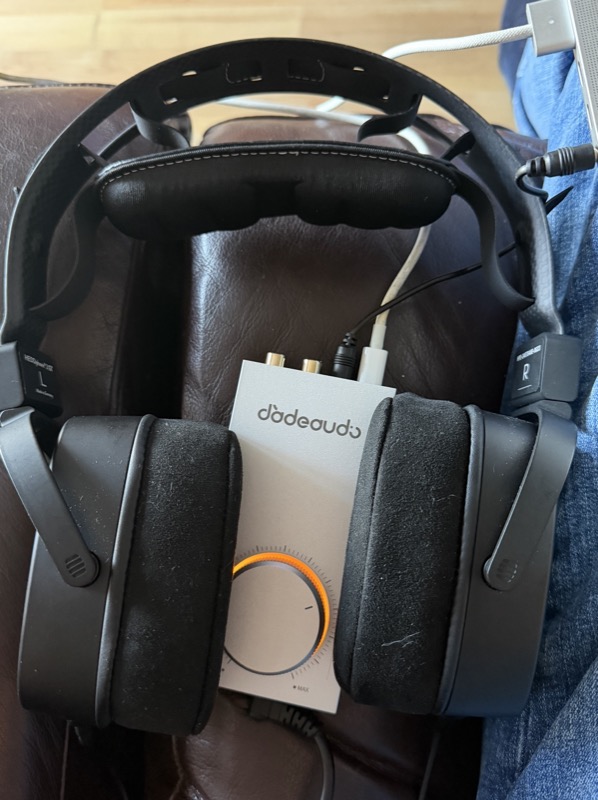
The 3.5mm front output supports CTIA microphone passthrough, which is the one feature here aimed squarely at gaming and calls, not music. The manufacturer’s note on this is easy to miss and worth repeating: the front 3.5mm output and the rear 3.5mm input share the microphone line, so passthrough only works if the rear input is also connected to a CTIA-standard device. Plug a headset into the front and take the line input from an RCA source and the microphone has nowhere to go.
Gain is set by the front slider, and the published input-sensitivity figures tell you what the two positions actually are: on balanced high gain, 1.2Vrms in produces the full 12.1Vrms out, which is roughly +20 dB; on low gain the same output needs 5.7Vrms in, roughly +6.5 dB. Low gain is therefore the correct default for a normal 2Vrms line source and sensitive IEMs, and high gain exists for planars and for sources with weak outputs.
Jade Audio publish that input sensitivity for every combination of supply, output and load, and reading down the column shows the low-gain setting is not really usable at full output from a normal source. On PD 12V, low gain needs 3.65Vrms in for full balanced output into 16Ω, 5.7Vrms into 32Ω and 6.6Vrms into 300Ω — voltages no ordinary 2Vrms line output will produce. On a 5V supply the numbers come back into range, 1.72 to 2.1Vrms depending on output and load, which is exactly what a DAC’s line output delivers. Put plainly: low gain on 5V is a matched pairing with a standard source, and low gain on 12V is a way of throwing away most of the headroom the 12V supply just bought you.
With sensitive IEMs the gain switch does its job, and low gain is the right position for them. The usable travel on the knob is short in that combination, so you are setting level within a narrow arc, but I did not hear channel imbalance at the bottom of the range, and on most of the IEMs I tried there was no hiss to listen past.
Sound Impressions
An analogue amplifier with a published SNR of 118 dB A-weighted, a noise floor under 10.6 µV and THD+N below 0.00057% should be inaudible as a component. At that level of performance the amplifier is not a tone control — the headphones, the DAC feeding it, the recording and any EQ you apply dominate everything you hear. What is worth listening for on a device like this is not tonality but the things that actually vary between amplifiers at this price: audible hiss with sensitive IEMs, whether the volume control tracks evenly at low settings, whether the amp hardens up on dynamic peaks when the supply runs out of headroom, and whether the 5V and 12V modes are distinguishable on a headphone that does not need the extra voltage.
There is one finding here that matters more than anything about tonality, and it is a warning. The first time I set the Gigas1 up I ran it from a convenient USB-C port and got terrible hiss on the headphone output — bad enough that I would have written the amplifier off had I stopped there. The port was the problem, not the amp. A USB-C source that is noisy on its 5V rail puts that noise straight into an amplifier with no internal supply to isolate it. The FiiO Air Amp’s own USB-C port was one of the poor ones in my testing. Moving to a proper 12V PD supply, or powering it over a Thunderbolt cable from the MacBook Pro, cleaned it up completely, and from there it was quiet: even level tracking down the bottom of the knob’s range, and no audible difference between the balanced and single-ended outputs beyond level. So treat the choice of charger as part of the purchase, not an afterthought.
Almost all of my listening was on planars and the HD 600. I did briefly try a few IEMs and most were fine, though in a quiet room I could hear some hiss from the more sensitive ones — which is about what the noise floor figure in the specifications predicts.
Once fed properly, everything else follows from having voltage in reserve. On the HD 600, the JT7 — which is harder to drive than the JT9 — and on the Sundara and Ananda, I never found the point where the amp hardened up or compressed on a dynamic peak. This is the first genuinely portable device I have used that I would accept as a full replacement for a desktop amplifier, and that is a sentence I did not expect to write about a $49.99 box.
The pairing that interested me most was with the Lily Audio Genesis One, because that headphone is the opposite problem to the JT7 — a near-capacitive load that draws almost no current but wants a great deal of voltage:
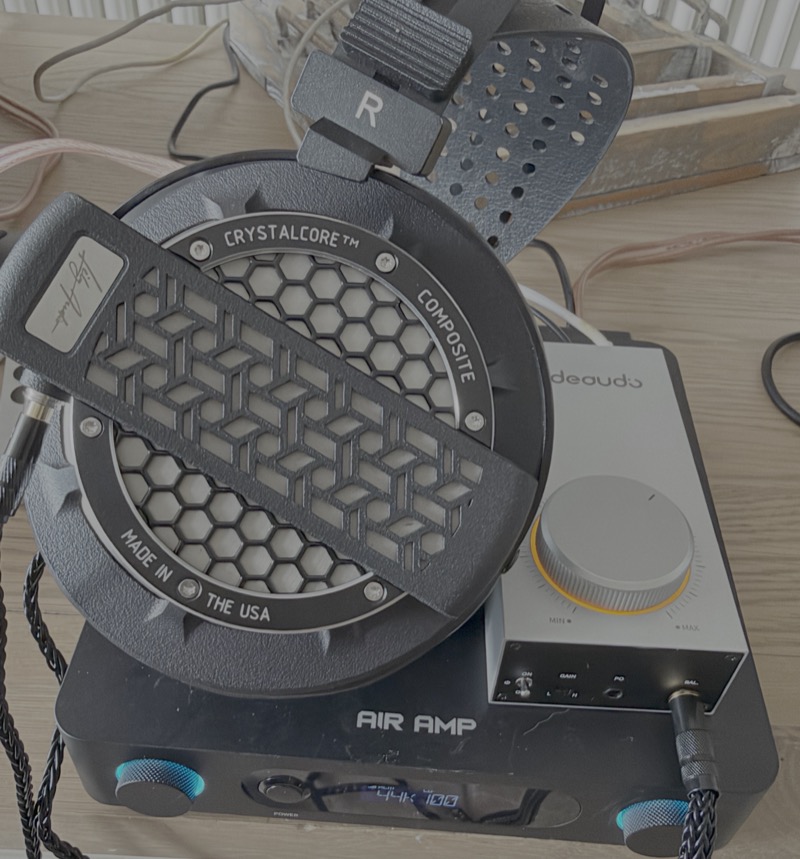
On paper the Gigas1’s ceiling here is its 300Ω figure of 14.9Vrms balanced. Against the Genesis One’s measured 74–76 dB/V that is about 98 dB of available level, which clears Lily Audio’s own 10V minimum but sits under the roughly 17V that Solderdude’s measurements suggested as a practically-useful target. So the expectation is that most material will play at a satisfying level and the most dynamic classical and orchestral tracks will not.
Close, and closer than anything else this size, but not all the way. On most material the Genesis One played at a satisfying level. Where it ran out was exactly where the specification said it would: on tracks with real dynamic range, Pink Floyd’s “Wish You Were Here” among them, the amp could not find the extra headroom the peaks wanted. There is a caveat worth stating, because it changes who this matters to. Given how compressed most modern masters are, someone streaming Spotify would be adequately served here, which is more than any other mobile device I have tried with the Genesis One can manage. But the Genesis One still wants more voltage than this for anything with the dynamics left in it.
I also used it stacked on the FiiO Air Amp, taking a line feed from the Air Amp’s preamp output so the streaming and DSP happened upstream and the Gigas1 just drove the headphones:
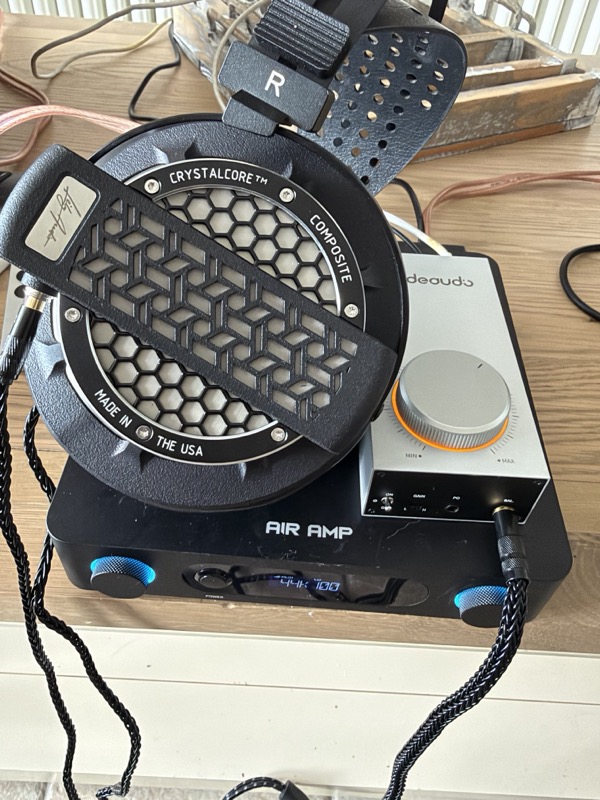
The Air Amp has no headphone output at all, so there is nothing to compare against — the Gigas1 is not improving on the Air Amp’s headphone stage, it is supplying the one the Air Amp does not have. Taking a line feed from the Air Amp’s preamp output and letting the Gigas1 drive the headphones turns a speaker amplifier into a complete desktop system, and the two stack neatly. The one thing not to do is power the Gigas1 from the Air Amp’s USB-C port, for the reason given above.
Comparisons
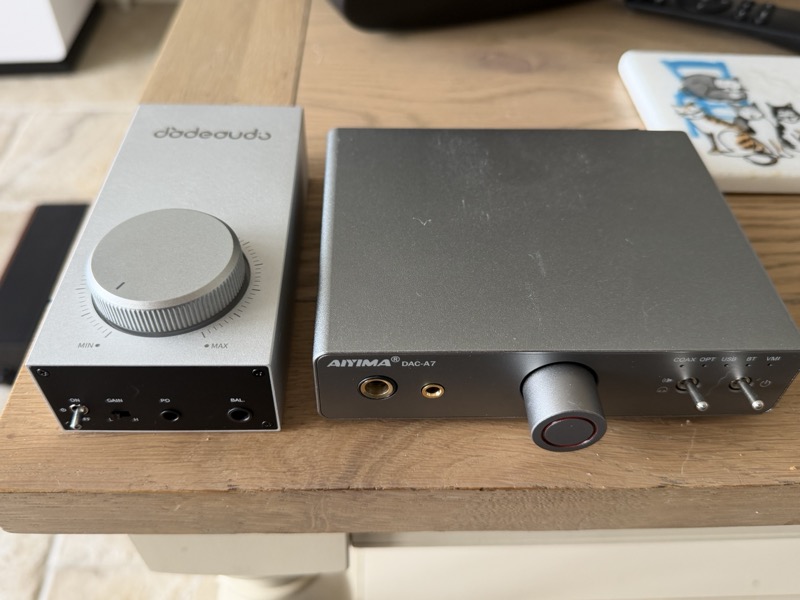
The most direct comparison in my own collection is the Aiyima DAC-A7, which costs about twice as much and is a fundamentally different proposition. The DAC-A7 is a complete desktop DAC-amp: ES9038Q2M, Bluetooth 5.4 with LDAC, coaxial, optical and USB inputs, a switchable line output, and a TPA6120A2 headphone stage rated at 1500mW into 32Ω. The Gigas1 has none of that — no DAC, no wireless, no digital inputs, no line out. What it has instead is more voltage on tap and a balanced output that the DAC-A7 simply does not offer, since both of the Aiyima’s headphone jacks are single-ended. The two sit side by side on the desk here, and the size difference is as stark as the feature difference:
The practical rule is straightforward. If you do not already own a DAC, buy the DAC-A7 and not this — the Gigas1 is unusable on its own. If you already have a transparent DAC or a streamer with a line output and the only thing missing is drive for a difficult headphone, the Gigas1 adds exactly that for $49.99 and adds nothing else.
The Fosi Audio ZH3 at $179 is what the Gigas1 is not allowed to be. It is a balanced DAC, headphone amp and preamp in one box, with a 4.4mm output rated at 2570mW into 32Ω, XLR and RCA line outputs, and an independently measured SINAD of over 113 dB from its balanced headphone output. On the numbers the Gigas1’s published 4600mW into 32Ω is the higher figure, but that comparison is close to meaningless: both have far more output than a 32Ω headphone needs, and the ZH3 wins on everything that is actually scarce — a DAC, preamp outputs, and third-party measurements to back the specification. The Gigas1 is only the better buy if the $130 difference matters and you genuinely have nothing to plug it into but a line output you already own.
The Topping E50 II is a partner rather than a rival, and it makes the case for the Gigas1 more clearly than either amp above. The E50 II is a $199 DAC with a line output, ten-band PEQ and no headphone stage at all — on its own it cannot drive a headphone. Add the Gigas1 and you have a balanced-output desktop chain for around $250 with the DAC and the amplifier chosen independently, and with the PEQ living upstream in the DAC where it belongs. That is a more sensible way to spend $250 than buying one all-in-one box and being stuck with both halves of it.
What the comparisons above miss is the category the Gigas1 actually competes in, which is not really desktop DAC-amps at all. The positioning is that it sits in the middle ground between a portable dongle-class amplifier and a full desktop amp, and until now that middle ground has been empty. Against the CrinEar Protocol Max or the more powerful FiiO QX13, both of which I like, the Gigas1 is a different order of drive: the numbers in the headroom scale above put it about four doublings above the Protocol Max and two and a half above the QX13. Against a desktop amplifier it gives up the DAC, the inputs and the preamp outputs, and gives up nothing at all on drive.
The comparison I did not expect to find useful was against the headphone outputs built into things that are not headphone amplifiers. My WiiM Ultra has a decent DAC and a poor headphone output; feeding the Gigas1 from its line output makes it a genuinely good headphone source. The same argument applies to the headphone jack on an AV receiver. That is probably the strongest practical case for the Gigas1 and it is not one the marketing makes.
Specifications and Measurements
Specifications
The following is Jade Audio’s published specification, transcribed from the specification sheet on the official GIGAS 1 product page and cross-checked against the box, as of 9 September 2026.
| Product type | Desktop analogue headphone amplifier (no DAC) |
| Model | F3001G |
| Amplifier topology | Class AB discrete transistor current-amplification stage (op-amp voltage gain + transistor current gain) |
| Output devices | onsemi MJE243G ×4, MJE253G ×4 |
| Inputs | RCA jacks + 3.5mm jack (line level) |
| Outputs | 4.4mm balanced + 3.5mm single-ended; 3.5mm supports CTIA microphone passthrough |
| Gain | Two-position switch (low / high) |
| Supported headphone impedance | 8–350Ω |
| Frequency response | 20Hz–200kHz, attenuation < 0.4dB |
| SNR | ≥ 118dB (A-weighted) — the Chinese-language page states ≥ 116dB |
| Noise floor | < 10.6µV (A-weighted) |
| THD+N | < 0.00057% (1kHz / −5dB @ 32Ω) |
| Balanced output, PD 12V | 4600mW ×2 @ 32Ω (12.1Vrms); 3300mW ×2 @ 16Ω (7.3Vrms); 740mW ×2 @ 300Ω (14.9Vrms) |
| Single-ended output, PD 12V | 2200mW ×2 @ 16Ω (5.9Vrms); 1400mW ×2 @ 32Ω (6.7Vrms); 185mW ×2 @ 300Ω (7.5Vrms) |
| Balanced output, 5V | 790mW ×2 @ 16Ω (3.6Vrms); 580mW ×2 @ 32Ω (4.3Vrms) |
| Single-ended output, 5V | 280mW ×2 @ 16Ω (2.1Vrms); 170mW ×2 @ 32Ω (2.3Vrms) |
| Power input | USB-C, 5V ⎓ 2A or PD 12V ⎓ 2A, selected automatically |
| Dimensions | approx. 132 × 60 × 40 mm excluding feet (the connector diagram on the product page annotates the case as 132.3 × 60 × 42.2 mm) |
| Weight | approx. 210g |
| Colours | Black, silver, green (anodised aluminium) |
| In the box | Gigas1, USB power cable ×1, quick start guide ×1, warranty card ×1 |
The noise floor figure is the one worth converting into something you can hear. 10.6 µV is −99.5 dBV, so the hiss reaching your ear is simply the headphone’s sensitivity in dB/Vrms minus 99.5. The JadeAudio and FiiO figures below are Solderdude’s measurements rather than the published specifications, which run a couple of decibels optimistic:
| Headphone | Sensitivity | Noise at your ear |
|---|---|---|
| Sennheiser HD 600 (97 dB/mW, 300Ω) | 102 dB/V | 3 dB SPL |
| Jade Audio JT7 (measured) | 107 dB/V | 8 dB SPL |
| FiiO FT1 Pro (measured) | 114 dB/V | 15 dB SPL |
| Jade Audio JT9 (measured) | 115 dB/V | 15 dB SPL |
| A sensitive IEM | 120 dB/V | 20 dB SPL |
| A very sensitive multi-BA IEM | 130 dB/V | 30 dB SPL |
A quiet room floors out around 25–30 dB SPL, so on anything this amplifier was built for the noise is well below what you can hear. A very sensitive IEM is the exception and will probably hiss audibly — but the Gigas1 is rated for 8–350Ω and exists to drive insensitive planars, so that is a headphone outside its brief rather than a fault. Note also that the figure is a manufacturer claim with no gain setting or output stated, and noise normally rises on high gain and on the balanced output, so treat 10.6 µV as the best case.
All output-power figures above are quoted at THD+N < 1%, which is the industry convention for maximum output power and is not a distortion figure you would ever listen at.
The same sheet gives the input sensitivity required for each of those rated outputs, on both gain settings, which is the part of the specification that actually tells you how to set the amp up. Reproduced in full, with rated output power and rated output voltage alongside:
| Supply | Output | Load | Input sensitivity, high gain | Input sensitivity, low gain | Rated output power | Rated output voltage |
|---|---|---|---|---|---|---|
| PD 12V | 4.4mm balanced | 16Ω | 0.77Vrms | 3.65Vrms | 3300mW + 3300mW | 7.3Vrms |
| PD 12V | 4.4mm balanced | 32Ω | 1.2Vrms | 5.7Vrms | 4600mW + 4600mW | 12.1Vrms |
| PD 12V | 4.4mm balanced | 300Ω | 1.4Vrms | 6.6Vrms | 740mW + 740mW | 14.9Vrms |
| PD 12V | 3.5mm single-ended | 16Ω | 1.18Vrms | 5.5Vrms | 2200mW + 2200mW | 5.9Vrms |
| PD 12V | 3.5mm single-ended | 32Ω | 1.3Vrms | 6.2Vrms | 1400mW + 1400mW | 6.7Vrms |
| PD 12V | 3.5mm single-ended | 300Ω | 1.4Vrms | 6.6Vrms | 185mW + 185mW | 7.5Vrms |
| 5V | 4.4mm balanced | 16Ω | 0.36Vrms | 1.72Vrms | 790mW + 790mW | 3.6Vrms |
| 5V | 4.4mm balanced | 32Ω | 0.43Vrms | 2Vrms | 580mW + 580mW | 4.3Vrms |
| 5V | 3.5mm single-ended | 16Ω | 0.42Vrms | 2Vrms | 280mW + 280mW | 2.1Vrms |
| 5V | 3.5mm single-ended | 32Ω | 0.45Vrms | 2.1Vrms | 170mW + 170mW | 2.3Vrms |
Two things are missing from that table, not merely hidden in it. There is no 300Ω row for the 5V supply at all, on either output, so Jade Audio do not rate the amp into a high-impedance load when it is running off an ordinary charger. And there is no published output impedance figure anywhere on either official page, which matters more on the 8Ω end of the claimed 8–350Ω range than the wattage does.
Manufacturer Measurements
Everything electrical in this review is FiiO and Jade Audio’s own specification rather than a measurement. Neither official page publishes an Audio Precision dashboard or a graph of any kind — no THD+N sweep, no frequency response plot, no output-power-versus-load curve, no SINAD figure — so the two tables above are the only performance data available, and the SNR and 0.00057% THD+N numbers should be read as claims. They are not even internally consistent: the English sheet states SNR ≥ 118dB A-weighted while the Chinese page for the same model says ≥ 116dB, with every other figure identical. Two decibels is inaudible and changes nothing about the buying decision, but it is a fair reminder of how much weight a spec sheet deserves. I have not measured the Gigas1 and have found no independent measurement of it, and there is no AudioScienceReview thread for it yet. What I can report is that the audible behaviour matched the specification in the ways that would have shown a problem: no channel imbalance, no compression on peaks, and no hiss on anything the amplifier is aimed at, once the supply was clean. I will update this section when independent third-party measurements appear.
Rating Explanation
Five for pragmatic. I do not believe there is anything as portable, as powerful and as clean at this price, and after three weeks I think that is a genuinely unusual combination and not a marketing claim. Five for price for the same reason: $49.99 buys drive that otherwise costs a desktop chassis and a mains lead. Four for features, not five, and the missing point is the DAC. There is a USB-C port on the back that carries nothing but power, and it is hard not to look at it and wish it did double duty — as it stands you cannot use the Gigas1 without owning something else. Five for measurements, on the understanding that these are JadeAudio’s numbers and not mine: the balanced output power on a 12V supply is remarkable at the price, and nothing I fed it over three weeks exposed a weakness that the specification did not already predict. When I measure it I will say so either way.
The framing I would suggest for that: the features rating is limited by design, not by execution, because a $49.99 analogue amplifier with no DAC, no preamp output and no input selector is doing one job on purpose. The measurement rating cannot be high on manufacturer specification alone, however good the published numbers look, and the price rating depends almost entirely on whether you already own a DAC — the same $49.99 is either a well-targeted addition to a chain you already have, or a box you cannot use.
Conclusion
The Gigas1 succeeds because FiiO has kept it focused. For $49.99 you get a proper balanced analogue amplifier with enough power for headphones that can expose the limitations of typical dongles and integrated headphone outputs. Feed it from a suitable 12 V USB-PD supply and it becomes remarkably capable for something this small, while still being practical enough to throw in a bag alongside the laptop charger you probably already carry.
Most modern headphones simply do not need this much amplification, but for higher-impedance models like the HD 600 or harder-to-drive planar headphones such as the JT7, the Gigas1 fills a very useful gap between a dongle and a conventional desktop amplifier. You still need a DAC or analogue source, but if you already have one and simply need substantially more power, the Gigas1 is an unusually pragmatic solution — and at this price, one of the easiest audio products I have reviewed this year to recommend.