Edifier MR5
A tri-amped three-way active monitor that hides its woofer inside the cabinet
Three drivers, three amplifiers per speaker, XLR and TRS inputs on the back - and a 5-inch woofer you never actually see.
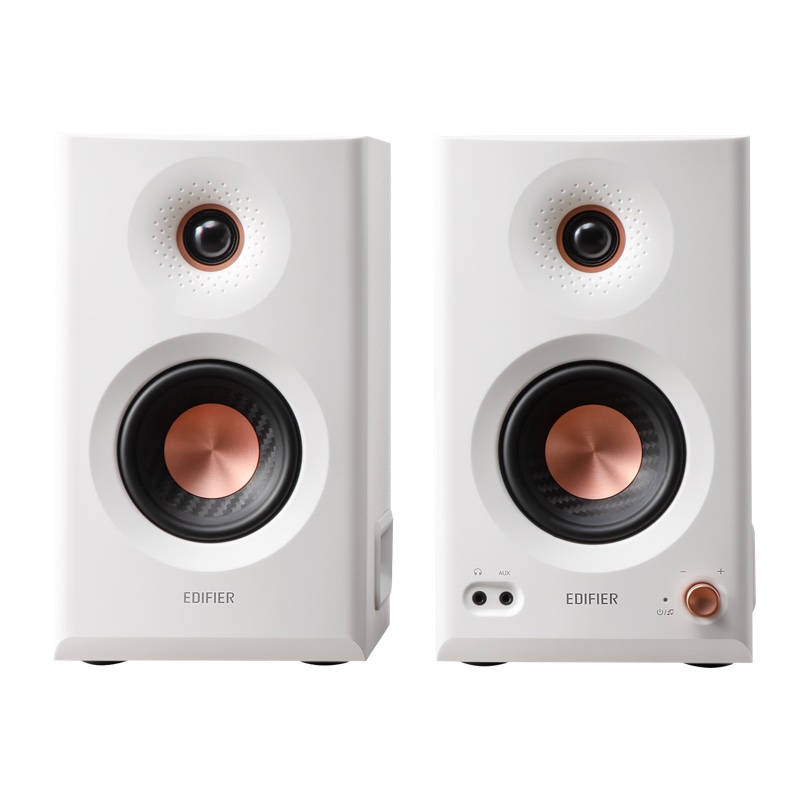
Most powered desktop speakers at this price are two-way designs: a tweeter, a mid-woofer, two amplifier channels, done. The Edifier MR5 is a genuine three-way. Each cabinet carries a 1-inch silk dome tweeter and a 3.75-inch midrange driver on the front baffle, plus a 5-inch long-throw woofer mounted inside the cabinet firing downwards into a chamber that vents through slots on the sides. Three amplifier channels per speaker feed them through a real crossover at 155 Hz and 2.6 kHz. Edifier quote 110 W RMS in total across the pair - 30 W + 30 W for the bass, 15 W + 15 W for the mids and 10 W + 10 W for the treble. The reason this arrangement matters is that the midrange driver never has to move any air below 155 Hz, so it is not doing two jobs at once, which is the usual compromise in a small two-way.
I would like to thank Edifier for providing the MR5 for the purposes of this review.
If you are interested in finding more information about this product, you can find it at the official Edifier product page.
The MR5 is sold as a pair. Edifier’s US store lists it at $349.99 (checked 9 September 2026); in Europe, German price comparison listings on Geizhals start at around €210 for the same date, so the euro price is well below a straight conversion of the dollar figure. It comes in matte black or white - the unit reviewed here is the white version.
I have had the MR5 for four months, and it has been excellent. It has almost entirely taken over from my Edifier M90 as the speaker of choice in my kitchen setup, where it sits close to the wall with the bass pulled back a little on the rear tuning dials.
The surprise came earlier than the listening. When I first opened the box, the two front drivers looked a little odd and small for a speaker this size. They grew on me, and that is a fair summary of the MR5 as a whole: the interesting part of the design is the part you cannot see. That starts with the box.
Unboxing and Packaging
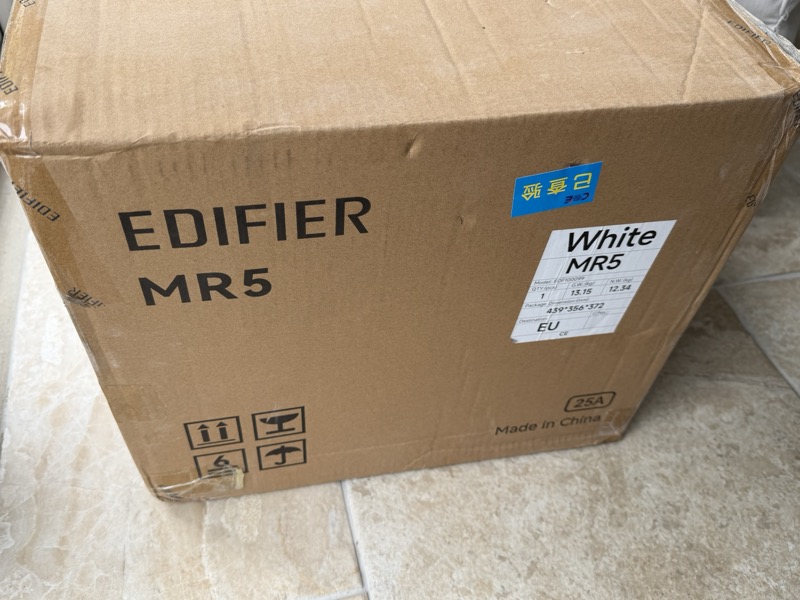
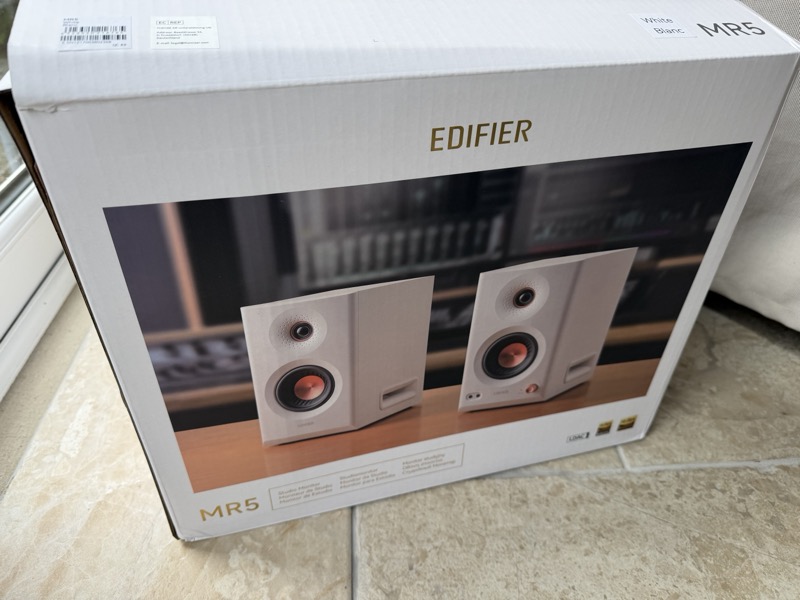
The MR5 arrives double-boxed. The outer shipping carton is plain brown card with the model and colour printed on the side, and the shipping label on my unit reads 15.15 kg gross against 12.34 kg net for the pair, which is worth knowing before you order - this is not a speaker you casually carry upstairs one-handed. Inside it is the retail box, with a photograph of the pair on a studio desk and the Hi-Res Audio and Hi-Res Audio Wireless logos in the corner:
 |
 |
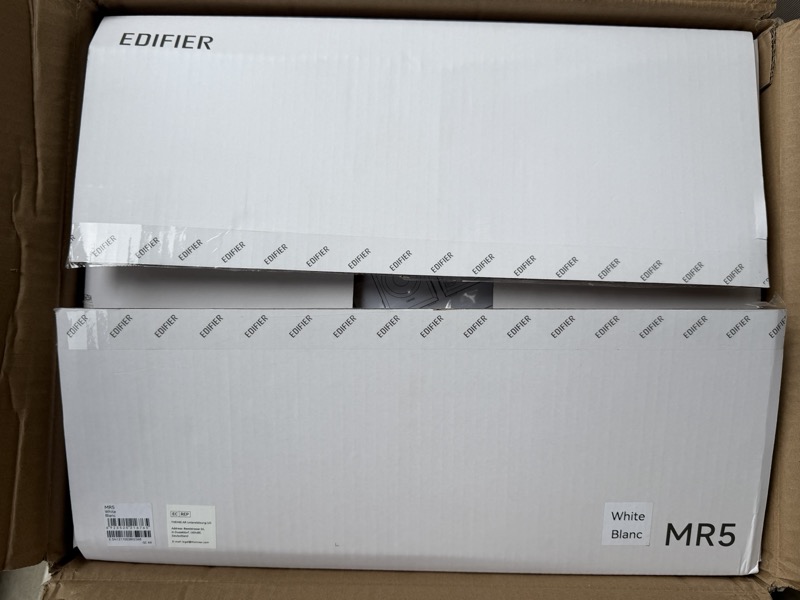
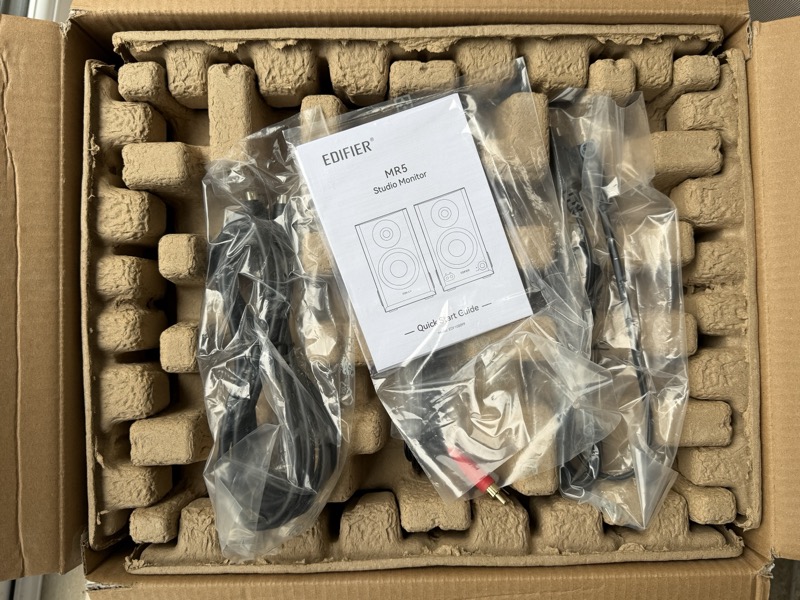
Open the retail box and the two speakers sit in separate sleeves side by side, with the accessory tray in moulded pulp above them. The packing is all card and moulded paper pulp rather than foam, which is the direction most of the industry has moved in and is easier to dispose of:
 |
 |
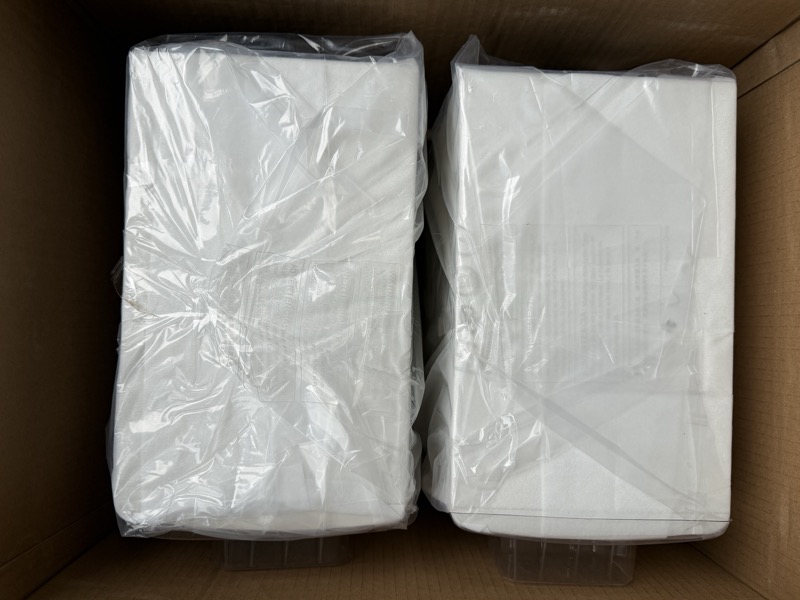
Each speaker is bagged and wrapped in a foam sheet under a clear plastic outer, so the white finish arrives unmarked:
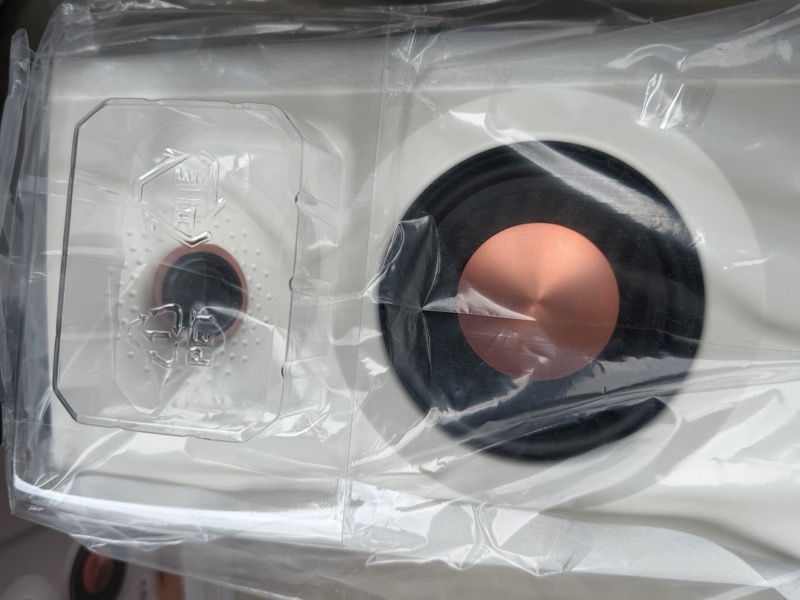
Peeling the wrap back on the first one gives the earliest look at the front baffle, with the copper-capped midrange cone and the recessed tweeter still under plastic:
The accessories are functional rather than generous. In the box you get a 3.5 mm-to-3.5 mm cable, a 3.5 mm-to-RCA cable, the interconnect cable that links the passive speaker to the active one, a mains lead - mine came with an EU plug, matching the “EU” marking on the carton - and a folded quick start guide:
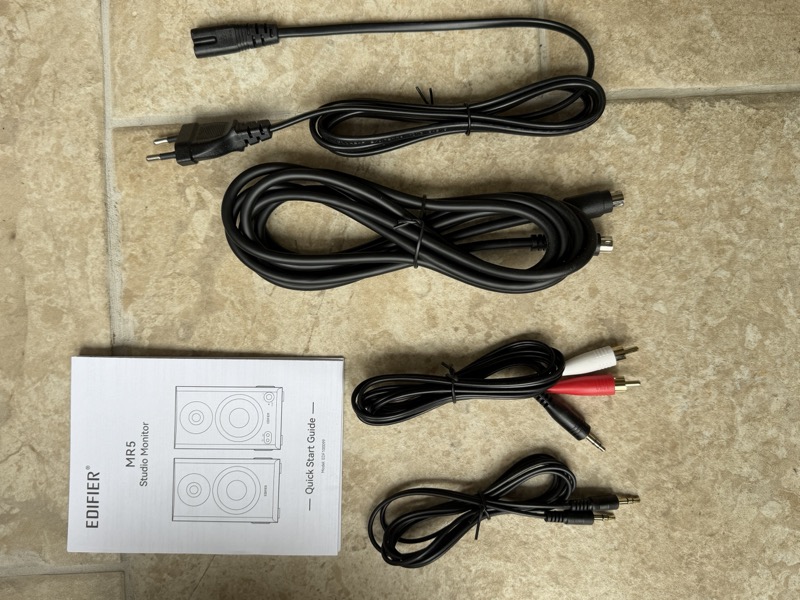
There is no XLR or TRS cable included, which is fair enough at this price but worth budgeting for if you plan to use the balanced inputs - those are the connections that make the MR5 interesting to anyone with an audio interface, and they are the ones you have to supply cables for yourself.
Design and Build
The cabinets are a straightforward rectangular MDF box with a slightly curved front baffle, finished in matte white with a light texture. The visible driver arrangement is a copper-capped cone below and a small dome tweeter above, each recessed into a shallow white surround, with the tweeter sitting in a dimpled plate that acts as a shallow waveguide. The right-hand speaker is the active one and carries the front-panel controls:
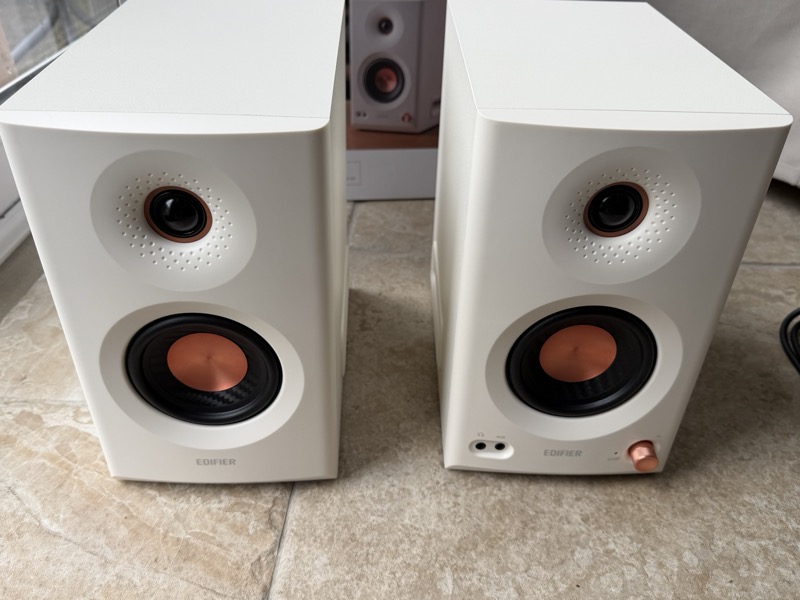
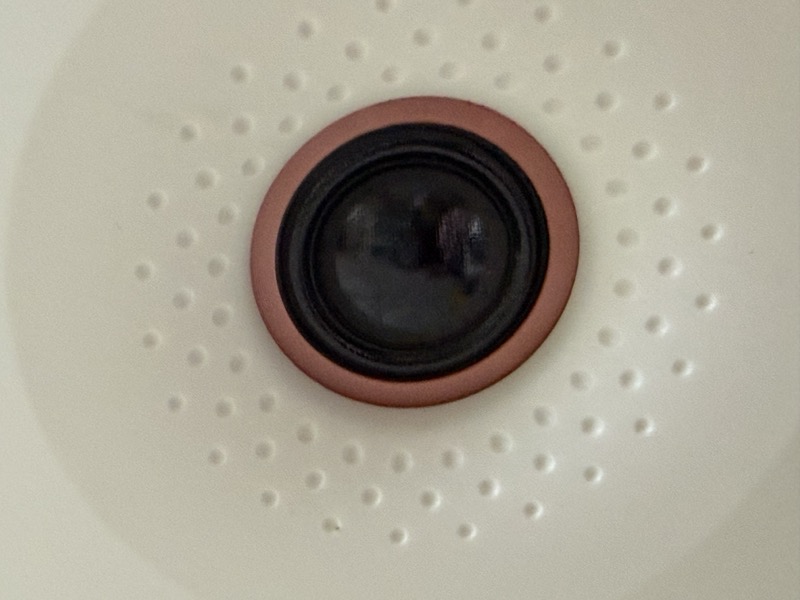
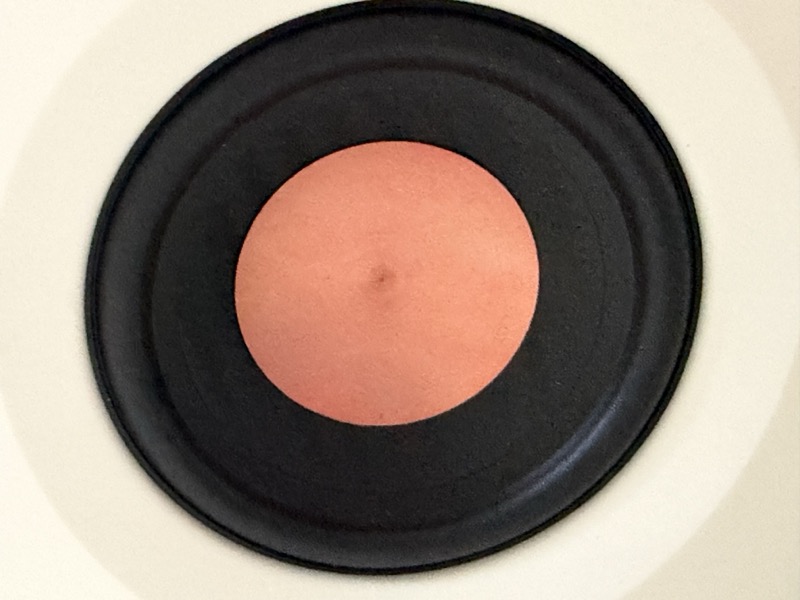
Close up, the tweeter is a small black silk dome in a copper-coloured trim ring, surrounded by the dimpled baffle insert. The cone below it is the 3.75-inch midrange driver, not a mid-woofer - it has a copper-finished dust cap over a black woven cone:
 |
 |
The 5-inch woofer is the part you cannot see. It is mounted inside the cabinet firing downwards, and its output leaves through a horizontal slot moulded into each side panel near the bottom and towards the rear. This is the vent:
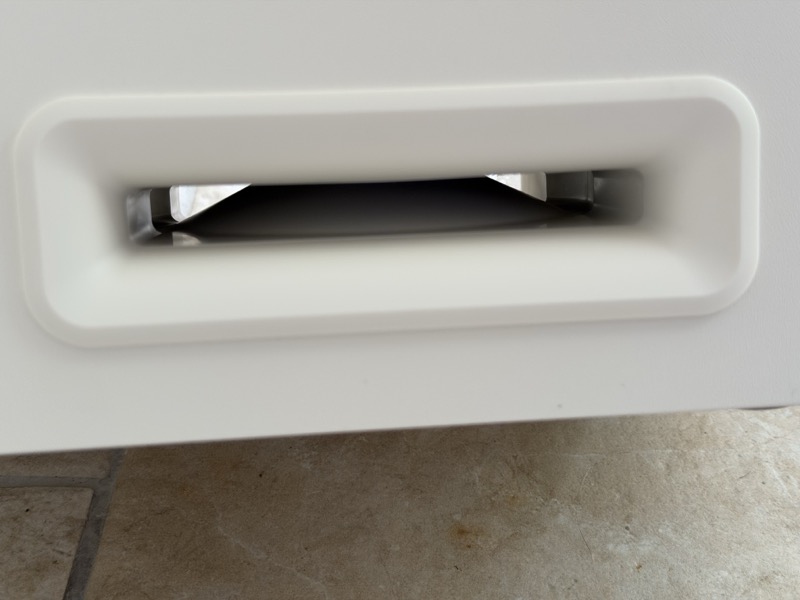
Seen from the side, the slot is the only interruption in an otherwise plain panel. I have a Polk ES10 in the house that uses a visually similar side slot, and putting the two next to each other makes the point that this shape of vent is not unique to Edifier - the Polk is the wood-grain one on the left:
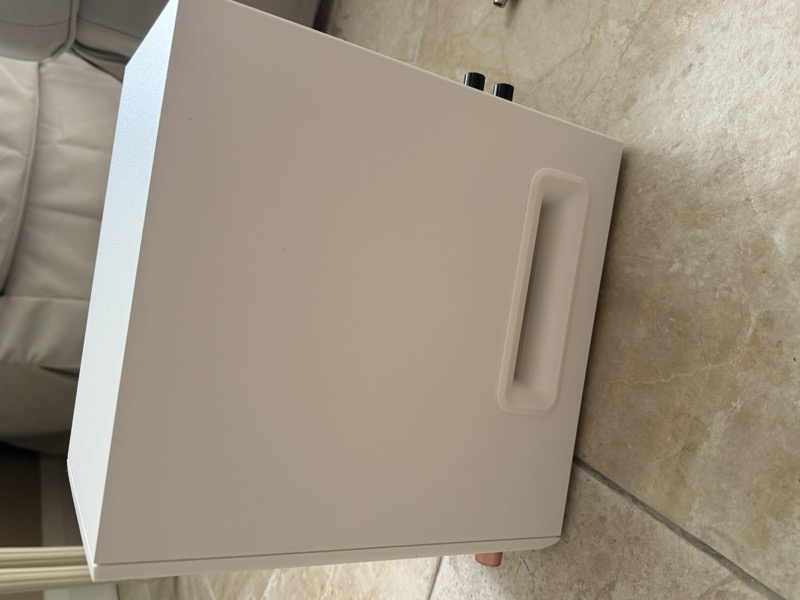 |
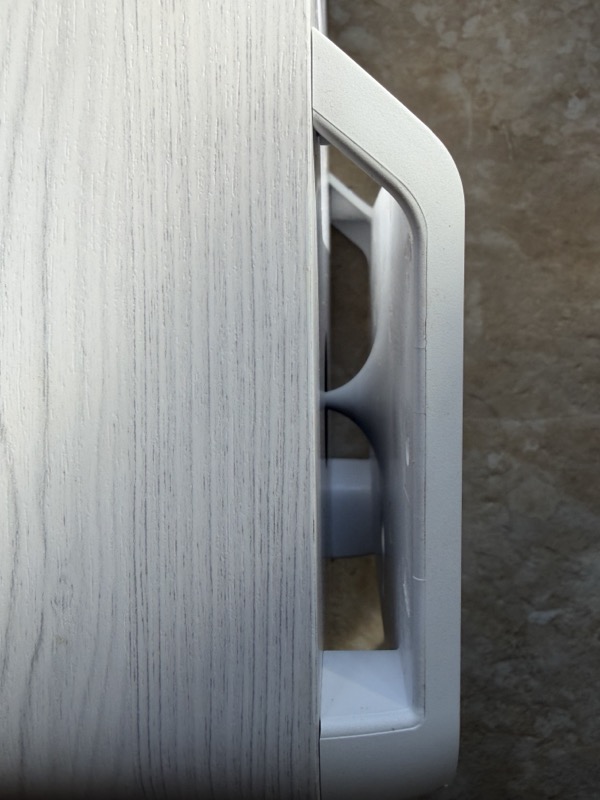 |
What the Polk reminded me of is how cleverly Polk handle bass so their speakers can sit near a wall, and the MR5’s side venting is aimed at the same practical problem. In my kitchen, close to the wall, it worked: a small cut on the rear bass dial was all the correction it needed.
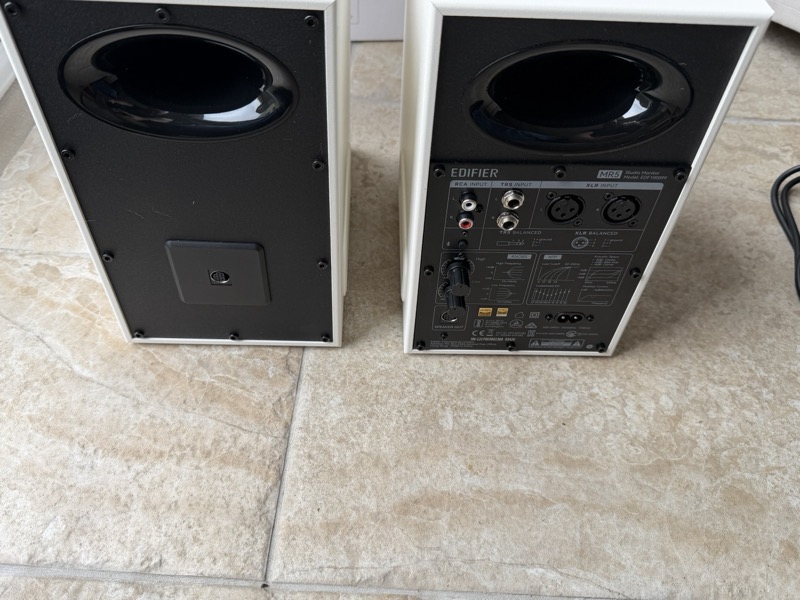
Round the back there is a second opening: a large flared oval port in the upper half of the rear baffle. The passive speaker’s rear is otherwise blank apart from the connector plate for the interconnect cable, while the active speaker’s rear carries the whole electronics panel:
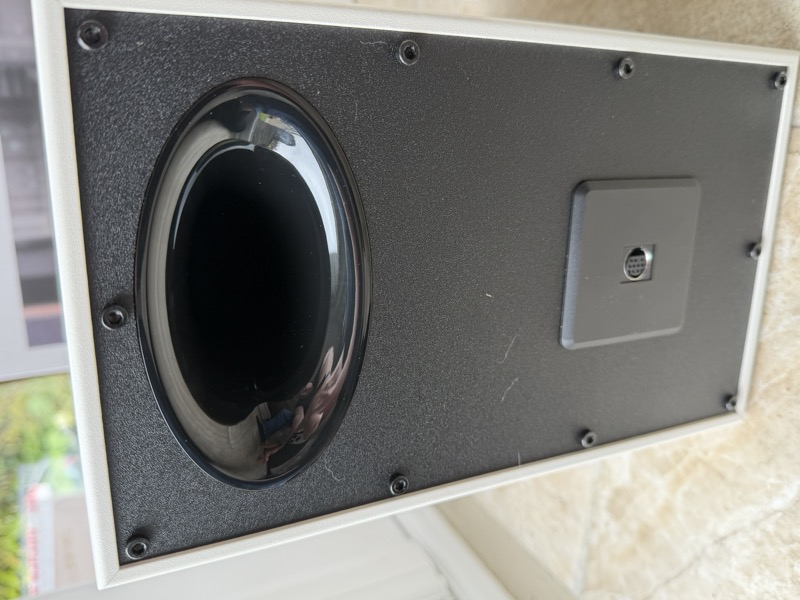 |
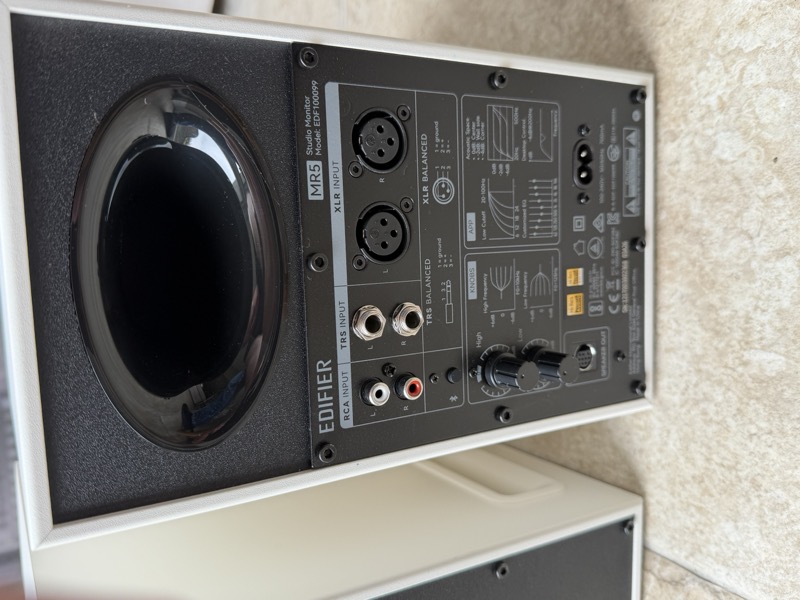 |
Standing the pair side by side from behind shows how the two cabinets differ - same box, same port, entirely different amount of hardware on the lower half:
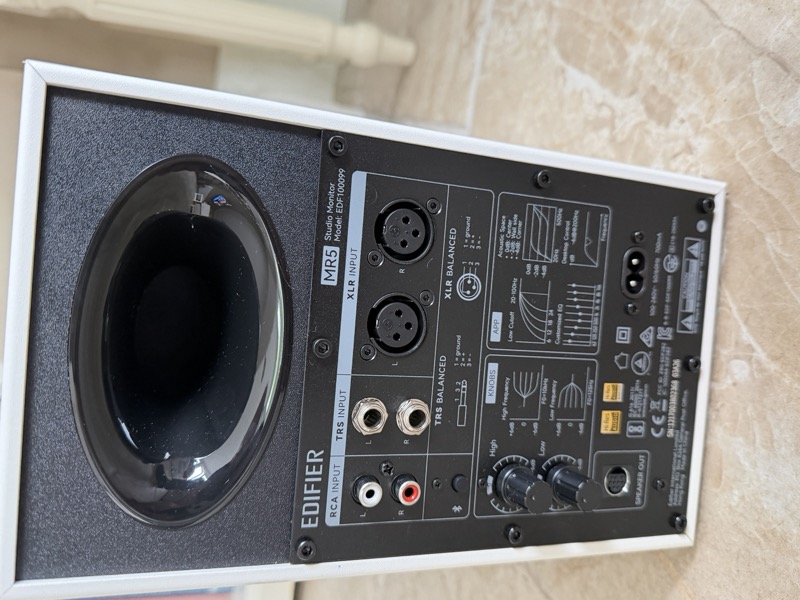
The connection plate itself is densely printed but logical. Along the top row are the RCA inputs, a pair of ¼-inch TRS jacks and two XLR inputs, with the wiring convention for both balanced connectors silk-screened underneath so you do not have to find the manual. Below that sit the two tone knobs and a printed summary of what the app can do, then the speaker output socket for the passive cabinet and the IEC mains inlet:
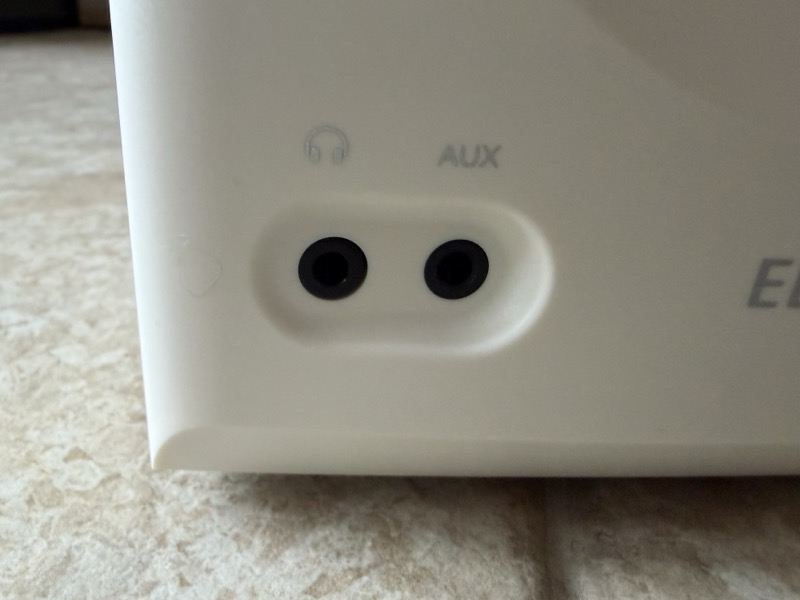
On the front of the active speaker, the bottom edge carries a 3.5 mm headphone output and a 3.5 mm AUX input, which is a practical place for both - you can plug a laptop or a pair of headphones in without reaching behind the cabinet:
At the other end of the same edge is the copper volume knob, which also acts as the power and input control, with a status LED beside it that changes colour by input:
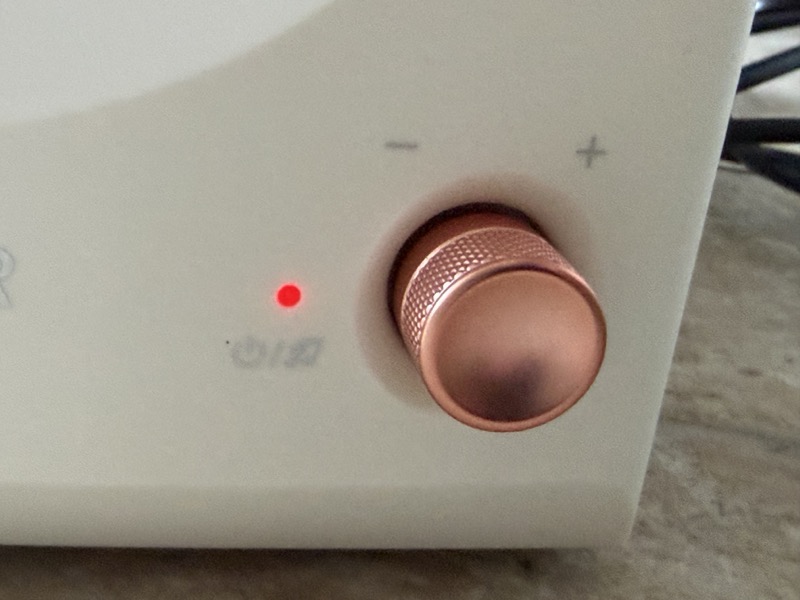
In use the knob is good: the volume moves in smooth, fine steps and I have nothing to complain about. Most of the time I set it once to taste and then controlled the volume from the connected WiiM Amp instead.
Features and Performance
Inputs and what is missing
Between the rear panel and the front edge the MR5 takes RCA, balanced ¼-inch TRS, balanced XLR, 3.5 mm AUX and Bluetooth, and gives you a 3.5 mm headphone output. That covers a turntable phono stage, an audio interface, a mixer, a laptop headphone jack and a phone without an adapter in sight. The conspicuous omission is USB: there is no USB audio input, so a computer has to reach the MR5 either over Bluetooth or through its analogue output or an external DAC. For a speaker aimed partly at desktop users that is a real limitation rather than a footnote, and it is the one feature the FiiO SP5 and the Kanto ORA4 both have and the MR5 does not.
Edifier specify Bluetooth 6.0 with LDAC and SBC, and the panel carries both the Hi-Res Audio and Hi-Res Audio Wireless marks. LDAC covers Android and anything that can send it; there is no AAC or aptX in the codec list, so an iPhone falls back to SBC. Some retailer listings state Bluetooth 5.3 rather than 6.0, so the version number is worth confirming against the firmware on a unit in hand.
The rear panel tone controls
The two knobs on the rear plate are shelving tone controls, not parametric filters: High Frequency gives ±6 dB from about 10 kHz upwards and Low Frequency gives ±6 dB from about 125 Hz downwards, both with a centre-detented flat position. This is the pro-monitor approach - coarse, permanent, and available whether or not a phone is paired, which matters because these are the only corrections that work on the XLR, TRS and RCA inputs if you never install the app.
Setting up in the app
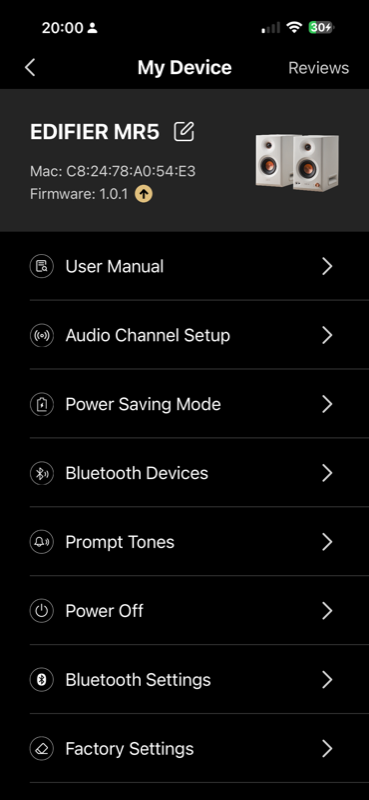
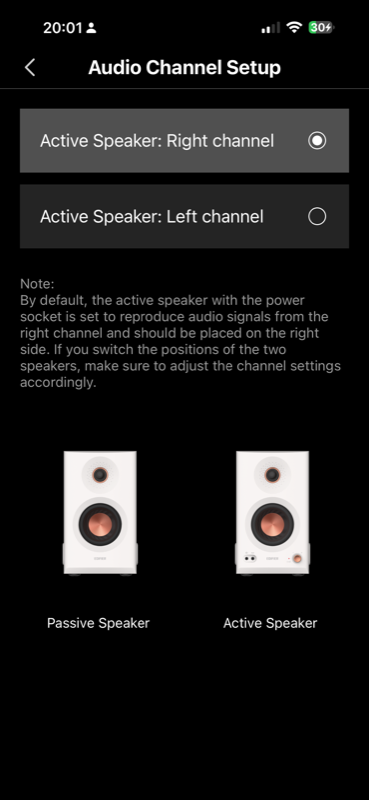
The Edifier ConneX app finds the MR5 over Bluetooth and gives it a device page with the MAC address and firmware version - mine shipped on 1.0.1 - plus the settings that are configuration rather than tuning. Audio Channel Setup is the one to check first: by default the active speaker with the mains socket is assigned to the right channel, so if your desk layout puts the powered cabinet on the left you have to swap the assignment here or your stereo image is reversed:
 |
 |
The Bluetooth Devices page lists paired phones with a toggle each, which is how the multipoint pairing is managed, and Power Saving Mode explains its own behaviour in plain language on screen: with a Bluetooth device connected the speaker idles after 15 minutes and wakes in about a second, and with nothing connected it powers off after 15 minutes instead:
 |
 |
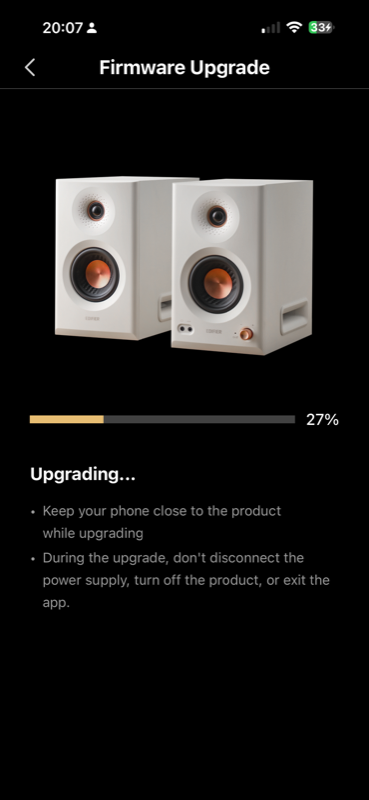
Firmware updates run over Bluetooth from the same app, with a progress bar and the usual warning not to disconnect power partway through:
Sound Effects modes and the nine-band EQ
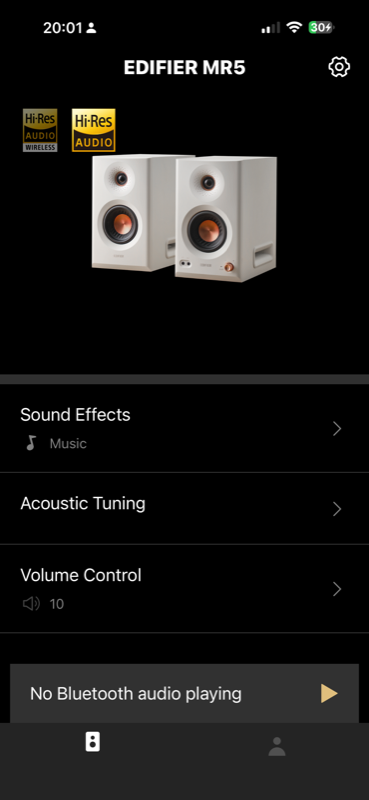
The app home screen is short: Sound Effects, Acoustic Tuning and Volume Control, over an image of the speakers and the Hi-Res badges. Sound Effects is the DSP preset selector and offers Monitor, Music and Customized:
 |
 |
Customized opens a nine-band graphic equaliser at 62 Hz, 125 Hz, 250 Hz, 500 Hz, 1 kHz, 2 kHz, 4 kHz, 8 kHz and 16 kHz, with a Mode Selection toggle underneath that decides whether your curve is applied on top of the Monitor or the Music voicing. Fixed centre frequencies and fixed Q make this a graphic EQ rather than the parametric EQ the FiiO SP5 offers, so it is fine for broad tonal shaping and not much use for correcting a narrow room mode:
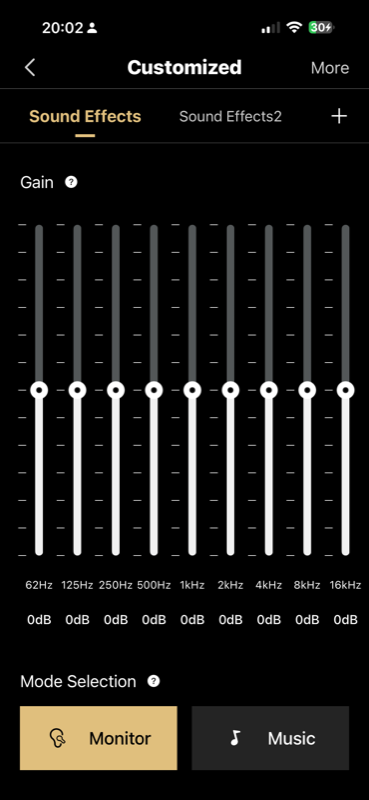
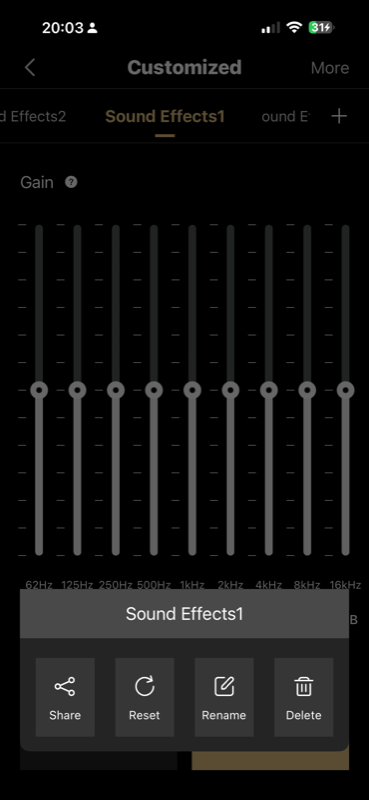
You can hold more than one curve, and each saved profile has a management sheet with Share, Reset, Rename and Delete - sharing a curve as a code is genuinely useful if someone publishes a set of corrections for this speaker:
Acoustic Tuning
Acoustic Tuning is the part of the app that reaches settings the rear knobs cannot. Low Cutoff sets a high-pass from 20 Hz to 100 Hz with a selectable slope up to −24 dB per octave, which exists to hand the bottom end over to a subwoofer or simply to stop the woofer wasting excursion on content it cannot reproduce. Acoustic Space applies a broad low-frequency cut in 1 dB steps to 4 dB, and the rear panel legend spells out the intended use: 0 dB free-standing, −2 dB against a wall, −4 dB in a corner. Desktop Control is a single switch that applies roughly −4 dB around 200 Hz, aimed at the reflection off a desk surface:
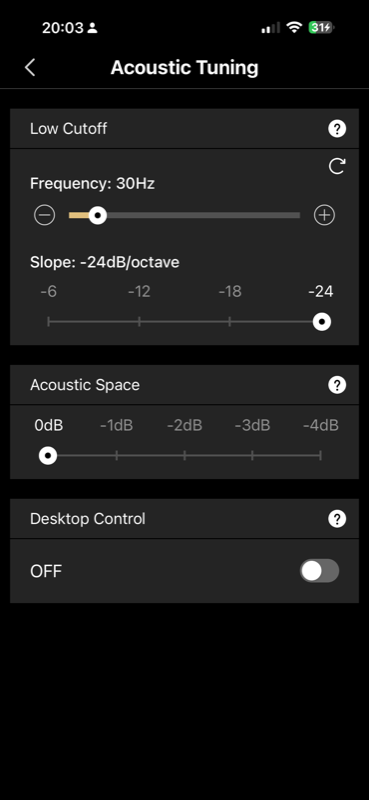
Taken together these are the corrections that matter most on a desk, and it is worth noting that they live only in the app - the rear knobs cannot reach them. That is a reasonable trade-off, but it means a studio user who wants the boundary compensation has to pair a phone at least once.
On the desk
The MR5 is a bigger speaker than its price suggests, at 159 mm wide by 264 mm tall by 280 mm deep for the active cabinet. On a normal desk with a monitor and a laptop it takes real space, and because the woofer vents from the sides it wants some clearance to either side rather than being wedged against a monitor arm or a wall:
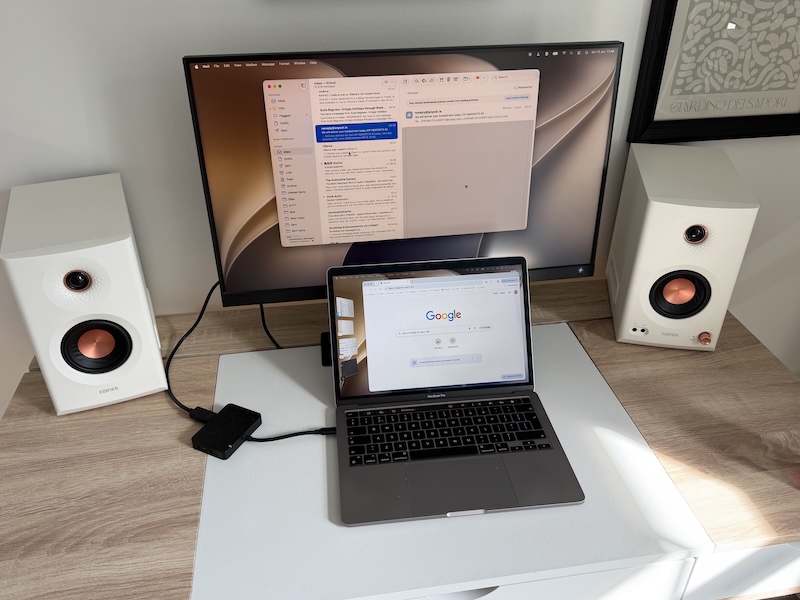
The front-edge headphone output means the pair also works as a desktop headphone source without any extra box, which is the same convenience the Kanto UKI offers and the ORA4 does not:
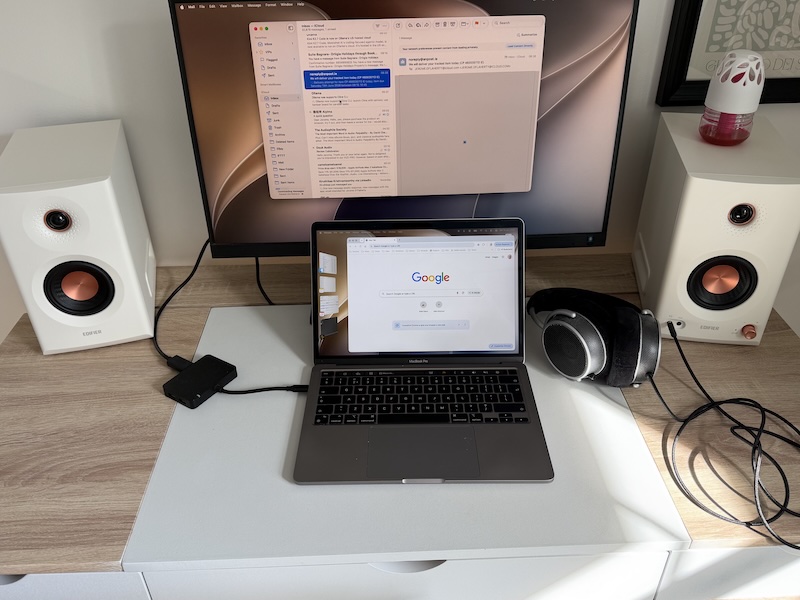
The headphone output itself was a little disappointing. It is fine for IEMs and very easy-to-drive headphones, and even the new FiiO Jade Audio JT9 planar was OK on it. It could not drive anything harder than that, though: with more demanding headphones the bass mostly sounded weak. Treat it as a convenience output for easy loads, not as a replacement for a dedicated headphone amplifier.
Sound Impressions
Four months in, the MR5 is the speaker I reach for, and the reasons are tonal rather than technical: an excellent midrange, bass that is exceptional for the cabinet size when it is placed sensibly, and a treble that needed a small correction from the rear tone controls before it sat right for me.
Bass
For its size, the bass is exceptional. Placed correctly - in my case close to a wall with the bass dial pulled back a little - it does not boom. It is also not a full replacement for a subwoofer. Think of it as decent extension rather than a standalone answer to all your sub-bass needs: the in-room measurements below show it holding up to about 50-55 Hz and then falling away steeply. If you want the bottom octave too, the Low Cutoff setting in the app is there to hand it over to a sub.
Midrange
The midrange is excellent and I have no complaints. I particularly liked its tonality on folk and female vocals, which is where a dedicated 3.75-inch mid driver that never has to handle anything below 155 Hz should pay off, and here it does.
Treble
Out of the box the treble is a little bright. The tone controls on the back fixed that: turning the High Frequency knob down smoothed the treble to my liking, without me having to open the app. If you are sensitive to brightness, expect to use that knob rather than leave it at zero.
Soundstage and Imaging
Soundstage and imaging are crisp and clear. The stage has decent width and good directionality, and the accuracy of instrument placement is great at this price point.
The app presets make complete sense depending on your personal setup. I typically used Desktop Control when I ran the MR5 in my home office, to tone down the midbass that often happens in a nearfield setup with a ‘desk bounce’.
Comparisons
The Edifier M90 is the nearest comparison and is arguably the better value, but it doesn’t quite have the deep bass response of the MR5. The M90 is a compact active desktop speaker with HDMI eARC, Bluetooth with LDAC and 100 W RMS, while the MR5 has no HDMI and no USB but adds XLR and TRS inputs, a three-way crossover and a much larger cabinet.
The FiiO SP5 is considerably more expensive and has a ‘split personality’, where it is either an analog studio monitor (with excellent deep bass) or an active ‘consumer’ speaker, but it is 3x the price of the MR5.
The Kanto ORA4 is a good comparison. It probably has a cleaner look, and with a subwoofer it will sound better, but without that subwoofer the MR5 will sound better. At $450 the ORA4 does have the USB-C audio input the MR5 lacks.
The Kanto UKI is smaller again at $269, with a 3-inch cabinet, a headphone output and subwoofer integration, so it is the one to consider if desk space is the main constraint.
Finally the HEDD Type 05 MK2 is at another level, but at €849 per speaker a pair is around 5 times the price of the MR5.
If you are starting out, I would suggest starting with the MR5 or the M90, as they are good enough without a subwoofer.
Specifications and Measurements
Specifications
These are the manufacturer’s published specifications, taken from Edifier’s product page rather than measured here:
| Specification | Value |
|---|---|
| Configuration | Three-way active, tri-amped, sold as a pair |
| Tweeter | 1" silk dome (front baffle) |
| Midrange | 3.75" (front baffle) |
| Woofer | 5" long-throw, internal, down-firing into a side-vented chamber |
| Amplifier power | 110 W RMS total - 10 W + 10 W treble, 15 W + 15 W mid, 30 W + 30 W bass |
| Crossover points | 155 Hz and 2,600 Hz |
| Frequency response | 46 Hz - 40 kHz |
| Maximum SPL | 101 dB at 1 m |
| Signal-to-noise ratio | ≥ 85 dB (A) |
| Inputs | XLR (balanced), ¼" TRS (balanced), RCA, 3.5 mm AUX, Bluetooth |
| Outputs | 3.5 mm headphone (front edge), speaker link to passive cabinet |
| Bluetooth | 6.0, LDAC and SBC, multipoint for two devices |
| Resolution | 24-bit/96 kHz wired and wireless |
| Tone controls | High Frequency ±6 dB from 10 kHz, Low Frequency ±6 dB from 125 Hz |
| App controls | Nine-band EQ, Low Cutoff 20-100 Hz, Acoustic Space 0 to −4 dB, Desktop Control |
| Dimensions | 159 × 264 × 280 mm active, 159 × 264 × 257 mm passive |
| Weight | 10.38 kg (manufacturer figure; the shipping carton on my pair is marked 12.34 kg net, 15.15 kg gross) |
| Finishes | Matte black, matte white |
Third-Party Measurements
The graphs in this sub-section are third-party measurements from Erin’s Audio Corner, and full credit to Erin for them. They were made on a Klippel Near-Field Scanner, and they are presented here as somebody else’s independent data rather than as confirmation of anything Edifier claim. My own in-room measurements follow in the next sub-section, and they answer a different question: not how the speaker behaves in an anechoic sense, but what it does in a real room with its own controls engaged.
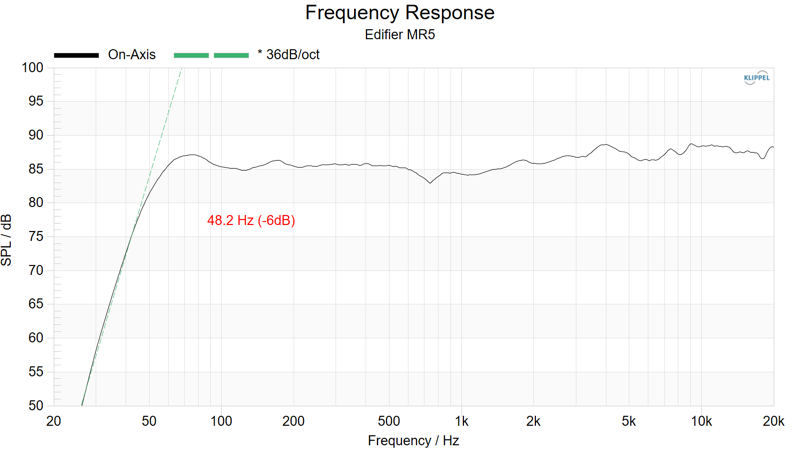
The on-axis frequency response shows a broadly flat trace from roughly 70 Hz to 20 kHz sitting around 85-88 dB, with a dip near 700-800 Hz, some ripple through the top octave, and a −6 dB point marked at 48.2 Hz - close to Edifier’s 46 Hz claim, and a reminder that a specification quoted without a tolerance is not the same as an extension figure:
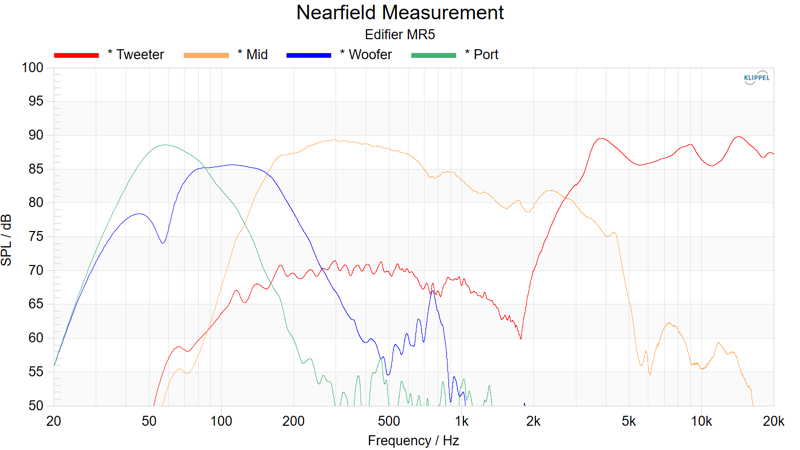
The nearfield measurement is the more interesting one, because it separates the four sources and shows what the hidden woofer is actually doing. The woofer trace runs out around 700 Hz, the mid driver covers roughly 150 Hz to 2 kHz, the tweeter takes over above about 2.5 kHz, and the port contributes a narrow peak centred near 55 Hz - the tuning frequency of the vented chamber, and the reason the response holds up as far down as it does:
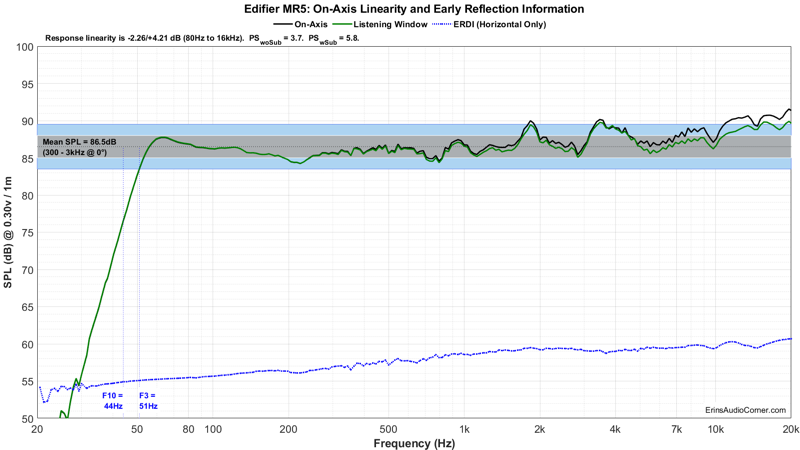
The linearity and early reflection plot puts numbers on it: response linearity of −2.26/+4.21 dB from 80 Hz to 16 kHz, a mean SPL of 86.5 dB over 300 Hz to 3 kHz, F3 at 51 Hz and F10 at 44 Hz, and preference scores of 3.7 without a subwoofer and 5.8 with one. The gap between those two scores is the practical finding - this measures as a speaker that improves substantially once something else takes the bottom end, which is exactly what the app’s Low Cutoff control exists to enable:
My Own In-Room Measurements
Everything below was measured in my own room with a calibrated microphone, which means room modes are part of what you are looking at rather than something subtracted out. That is deliberate. A studio monitor with onboard room controls should be judged on what those controls do in a room, and an anechoic curve cannot tell you that. All traces are 1/6-octave smoothed.
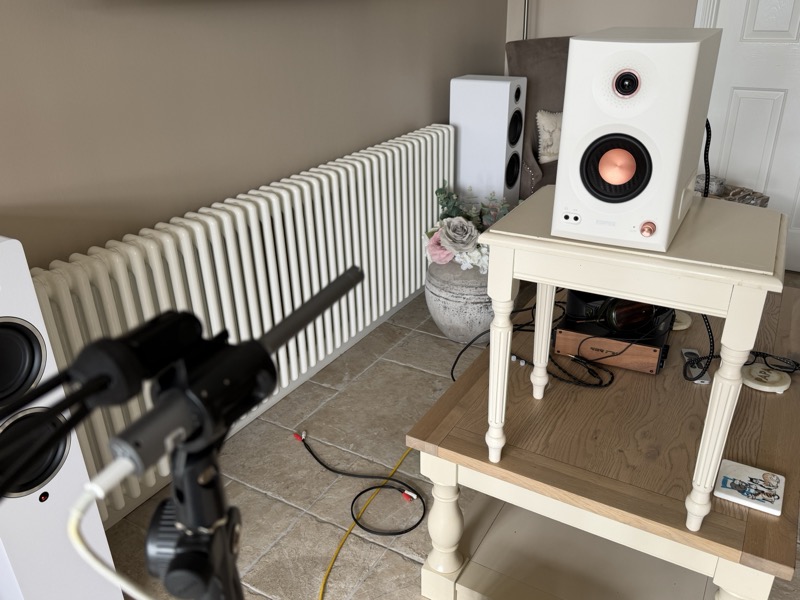
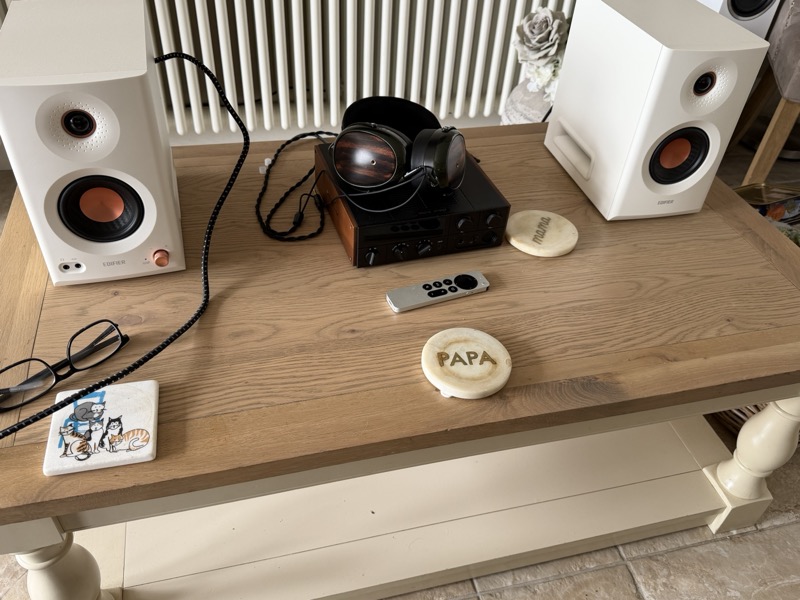
For scale, and because it is how I actually listened to them for much of the review, here is the pair either side of a desk with the FiiO K17 R2R between them:
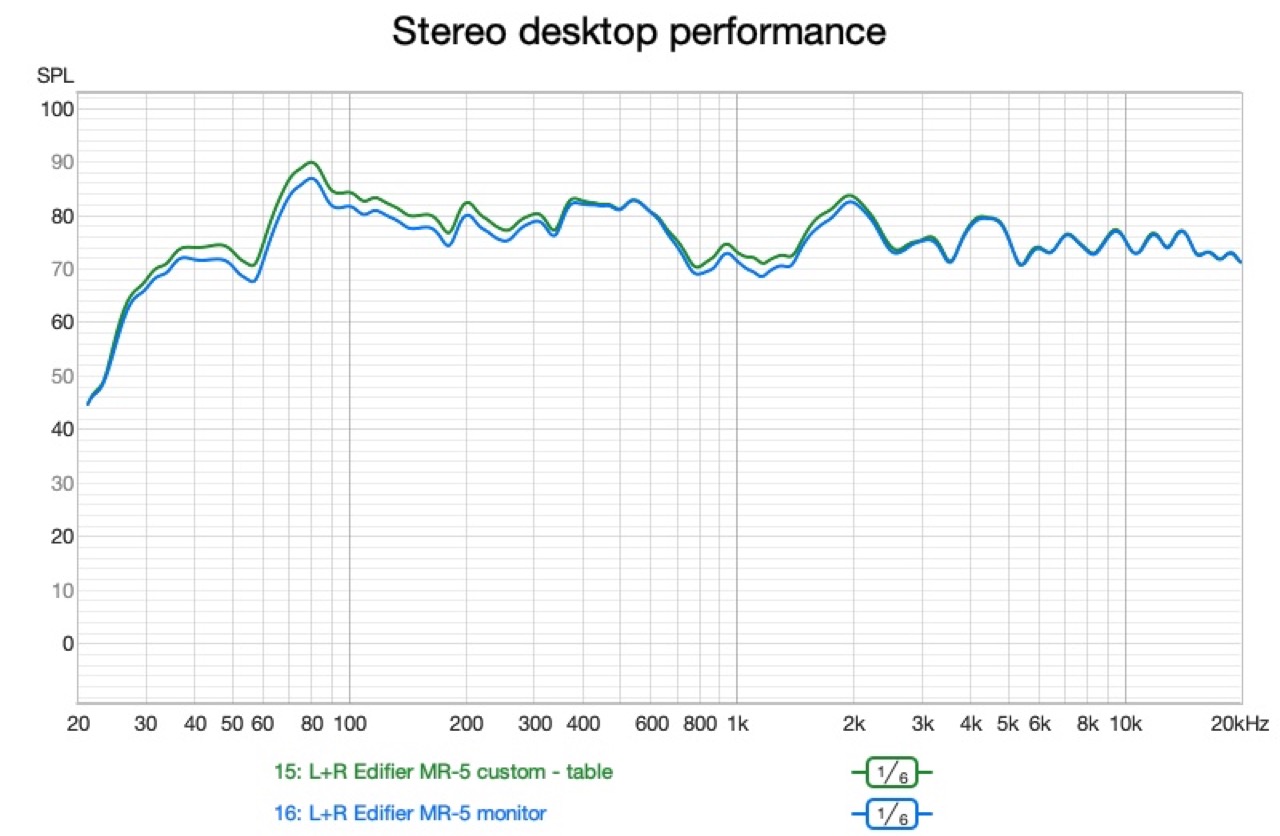
Monitor and Custom presets compared
On the desk in stereo, with both channels running, the room is the dominant feature - an 87 to 90 dB peak at 75 to 80 Hz that belongs to the room rather than the speaker, and which is worth knowing about before blaming anything on the MR5. The custom profile sits 2 to 3 dB above the monitor preset from 30 Hz to 700 Hz:
The baseline: on a stand, off axis
Moving to a stand and away from the desk removes most of that, which is the cleaner place to judge the speaker itself. On a stand, 25 degrees off axis, in monitor mode:
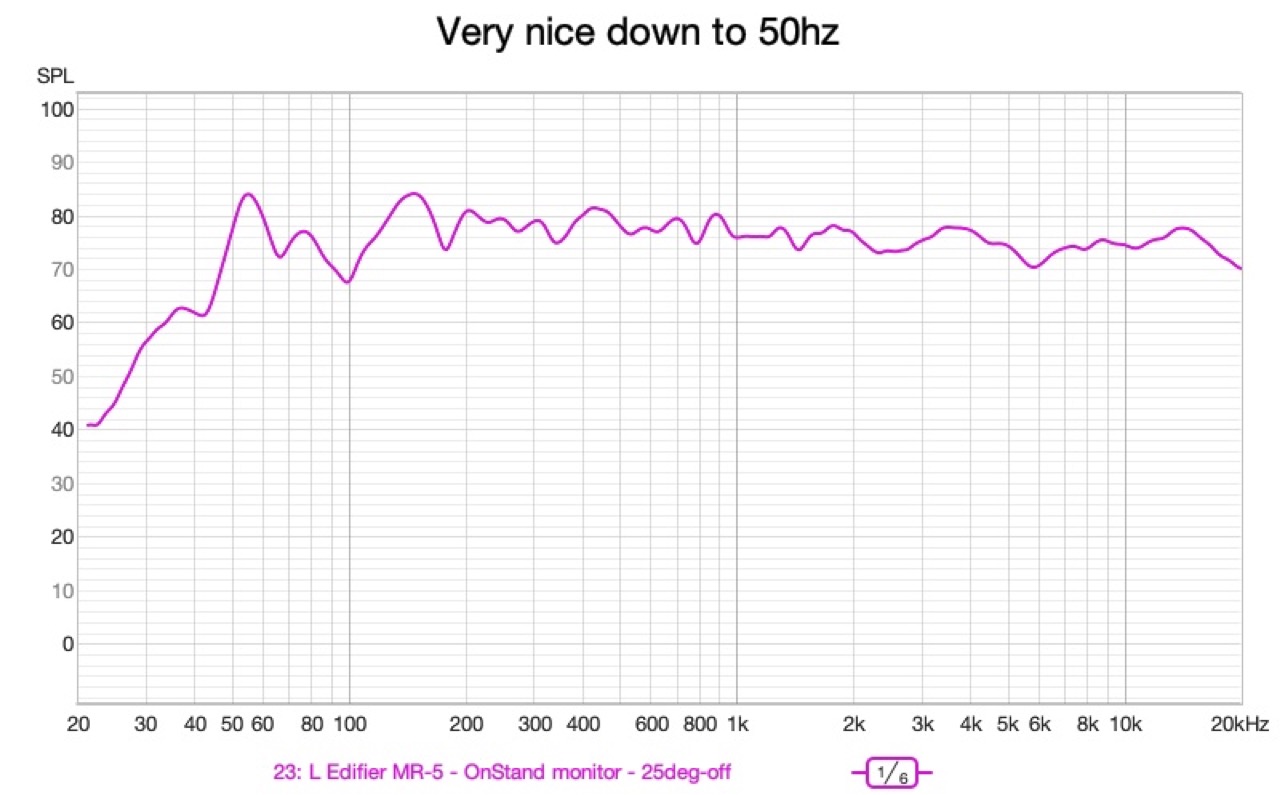
It holds above 80 dB down to about 50 to 55 Hz and then drops away steeply, which matches the −6 dB point of 48.2 Hz in the Klippel data above rather better than most in-room and anechoic pairs agree. The 84 dB peak at 55 Hz and the null at 100 Hz are my room, not the speaker, and the even 74 to 81 dB band from 200 Hz to 10 kHz is the part that is the speaker.
Toe-in and off-axis behaviour
Three captures at zero, 15 and 25 degrees off axis:
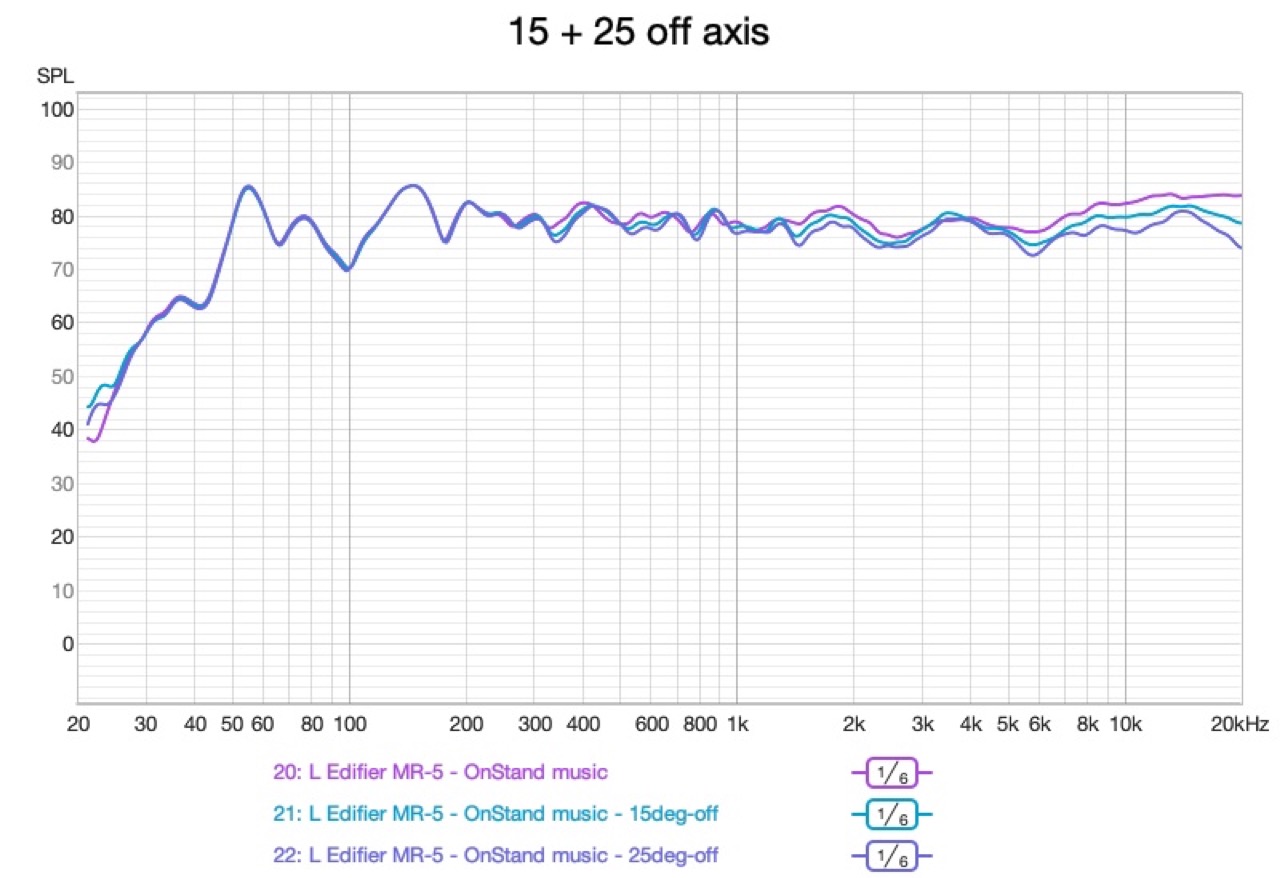
From 20 Hz to 2 kHz the three traces overlay within about a decibel - the room modes dominate and they do not care which way the speaker points. Everything at stake in toe-in is above 2 kHz, and it grows with frequency: about 2 dB down at 5 to 6 kHz at 15 degrees, about 4 dB at 25 degrees, widening to roughly 5 dB and 10 dB respectively by 20 kHz. If the MR5 sounds bright pointed straight at you, the fix is free.
What Each Onboard Control Does
This is the part I most wanted to measure, because Edifier give you four separate ways to shape the response and the documentation does not say what any of them actually do. Each is measured below on its own, with everything else held constant.
Desktop Control
Desktop Control turns out to be the most precisely aimed of them. Toggling it changes nothing below about 110 Hz and nothing at all above 600 Hz. What it does is cut 3 to 4 dB centred near 200 to 220 Hz:
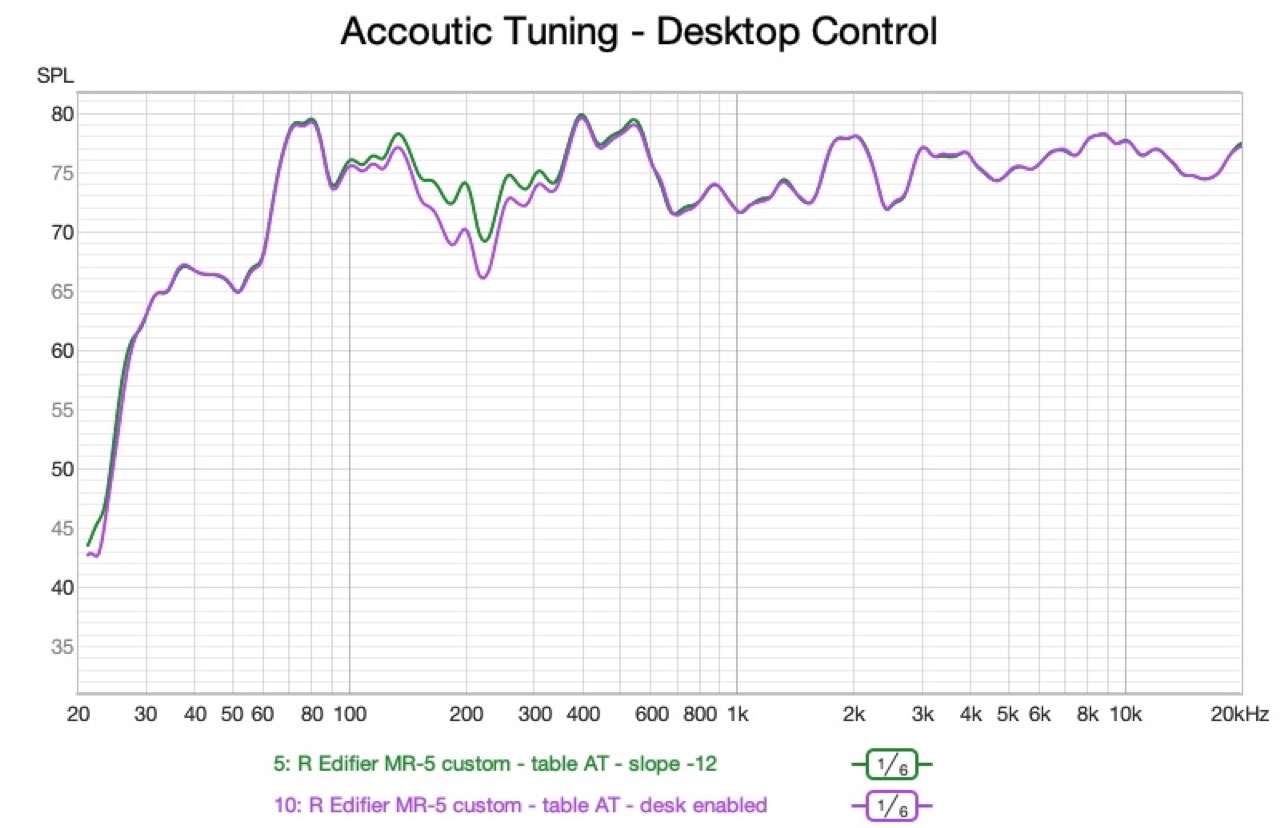
That is exactly the right shape for what it claims to fix. Boundary reinforcement from a desk surface piles up in the lower midrange, and a narrow cut there is the correct answer. It is not a bass control and should not be used as one.
Acoustic Space
Acoustic Space is the blunt instrument beside it, a broadband level cut below roughly 700 Hz of about 2 dB on one setting and 3.5 to 4 dB on the other, with everything above 800 Hz untouched:
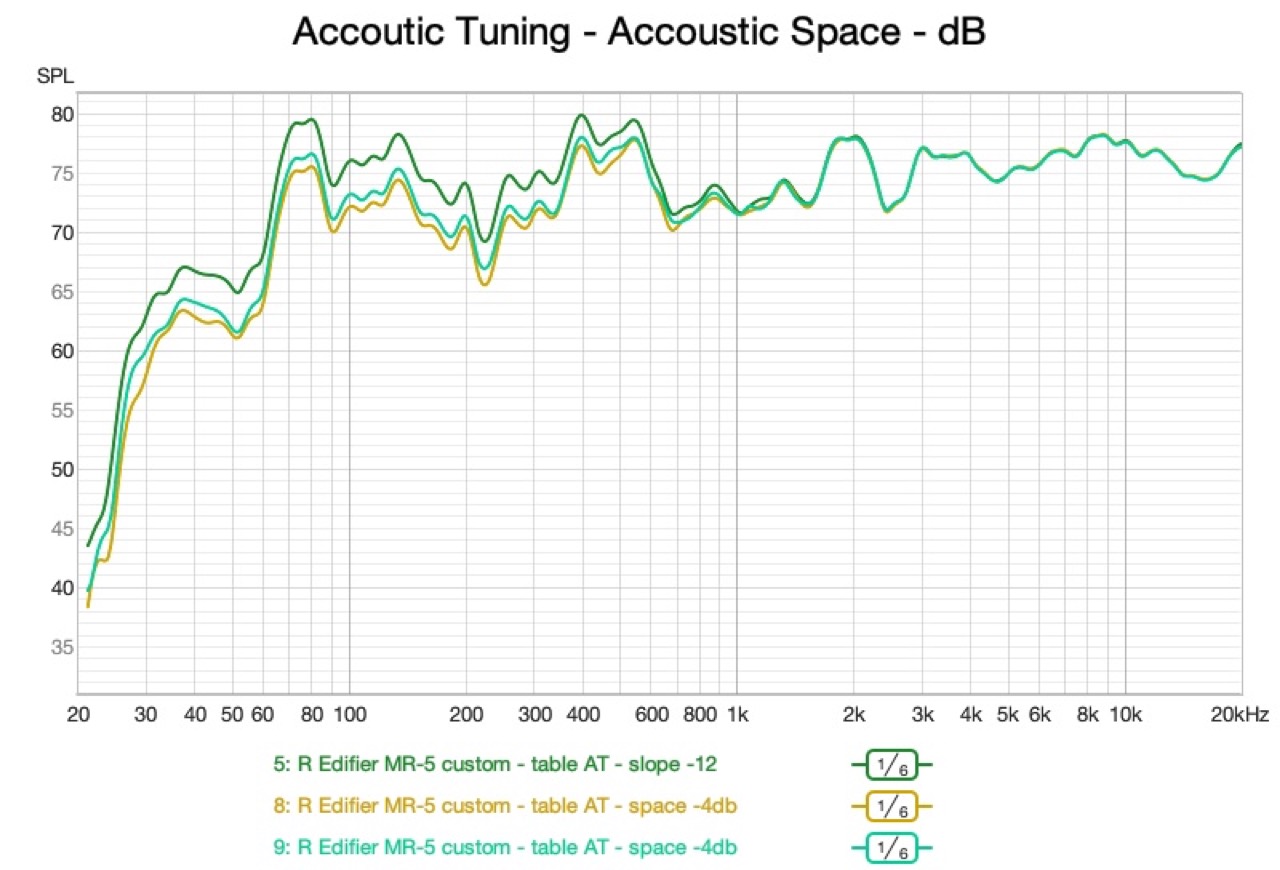
One oddity worth reporting: two of the traces in that capture carry the same label and plot about 2 dB apart, so I cannot tell you from this what distinguished them. Treat the shape as reliable and the exact step sizes as approximate.
Low-frequency slope
The low-frequency slope settings are the narrowest in effect of the lot. The four options merge completely above about 35 Hz and only separate below it, spreading around 9 dB by 22 Hz:
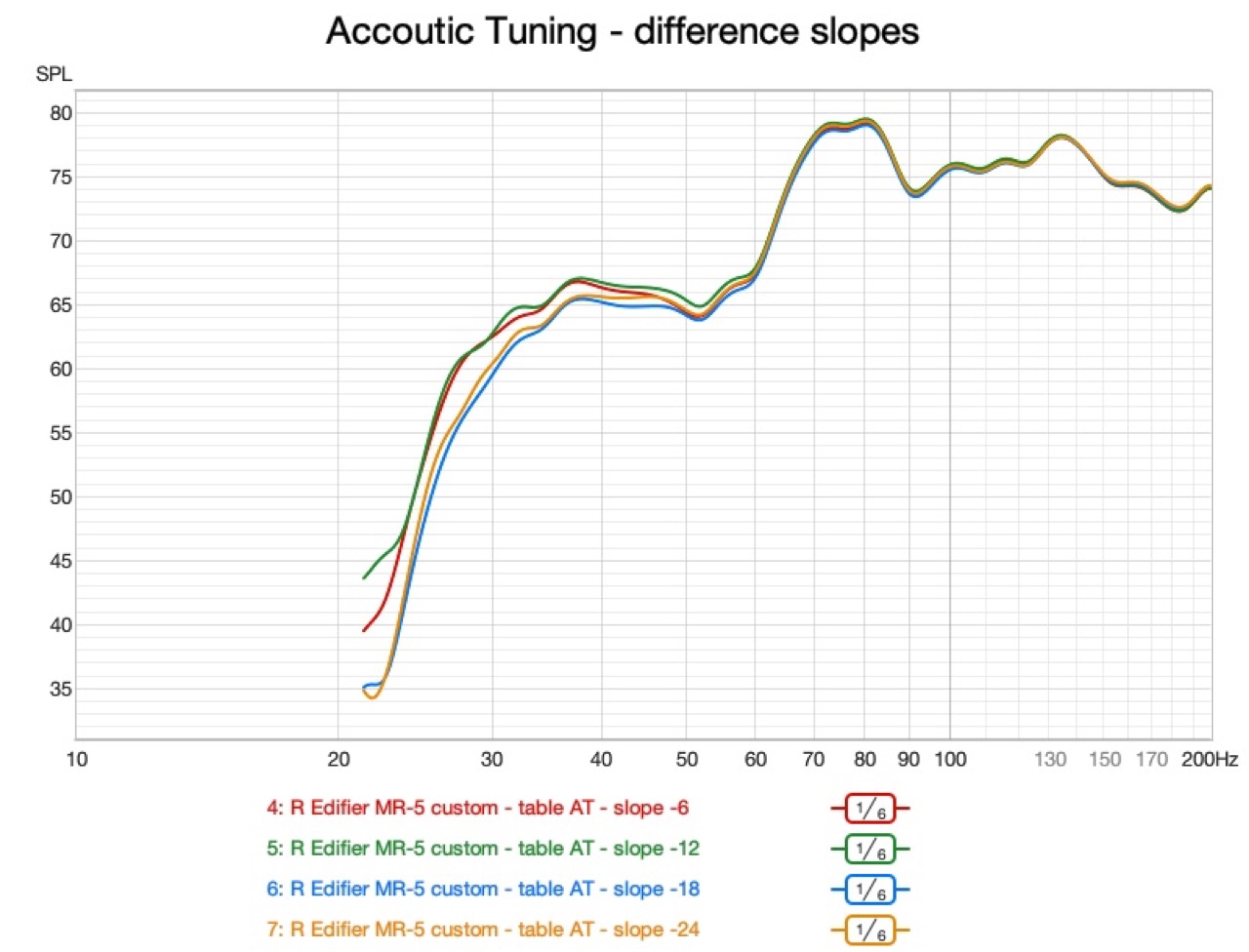
Two things follow. First, this control does nothing you will hear on most material, because it operates almost entirely below the speaker’s own useful output. Second, the ordering of the four settings is not monotonic with their labels in my measurements, which either means the labels do not mean what they appear to or that I am at the noise floor down there. I would not build anything on it.
Low Cutoff
Low Cutoff is the one that behaves like a proper high-pass. Set to 60 Hz it leaves everything above 65 Hz untouched and takes roughly 6 dB out at 40 to 50 Hz and 9 dB by 30 Hz:
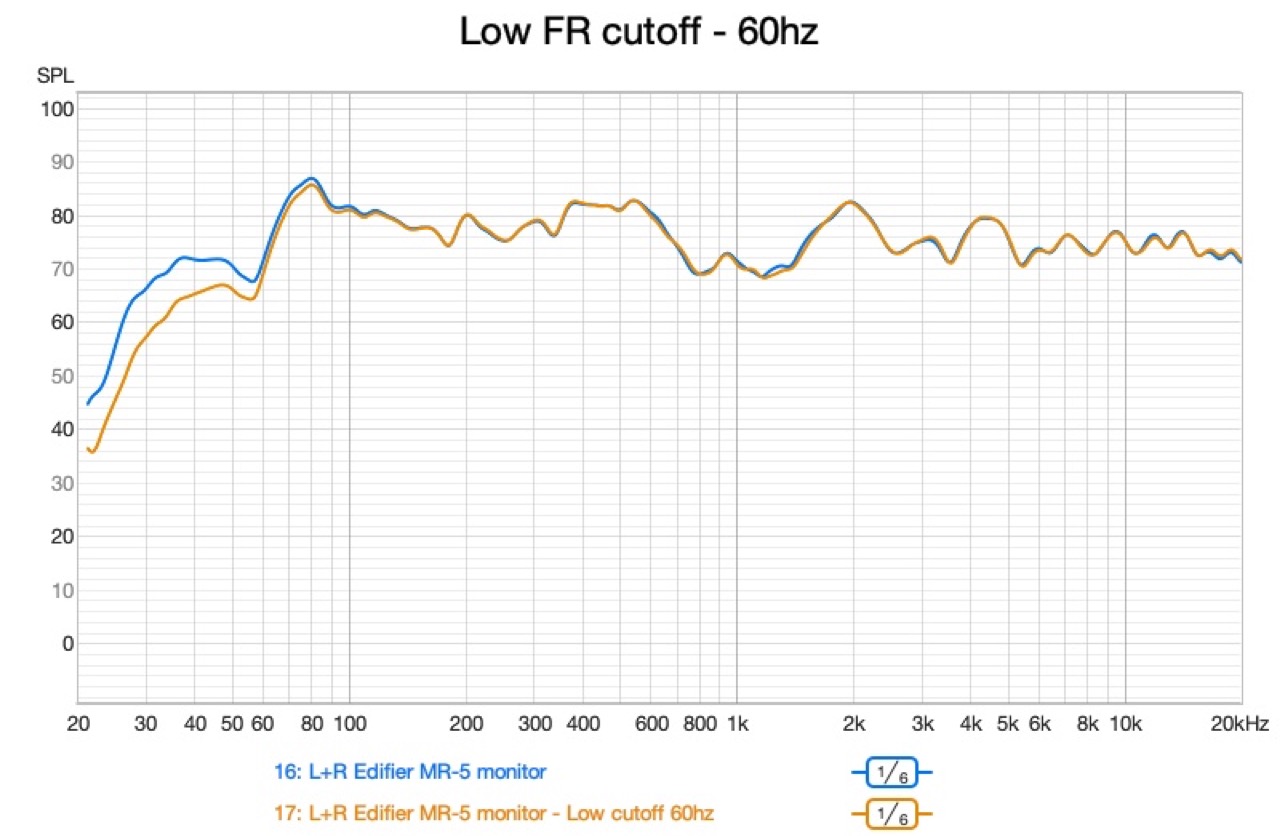
That is genuinely useful, and it is the control to reach for if you add a subwoofer - it hands the bottom octave over cleanly instead of letting the two overlap.
The nine-band custom EQ
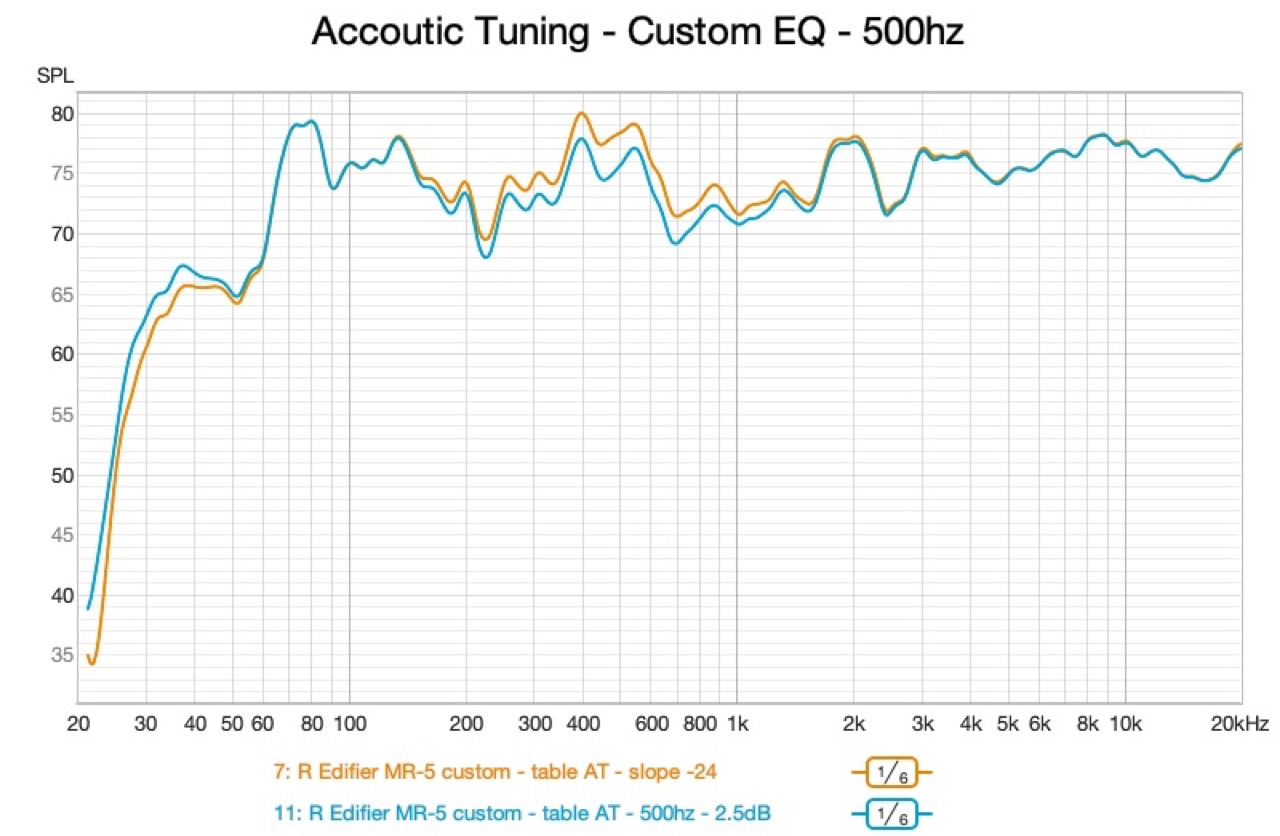
Three captures, each adding one filter to the one before:
 |
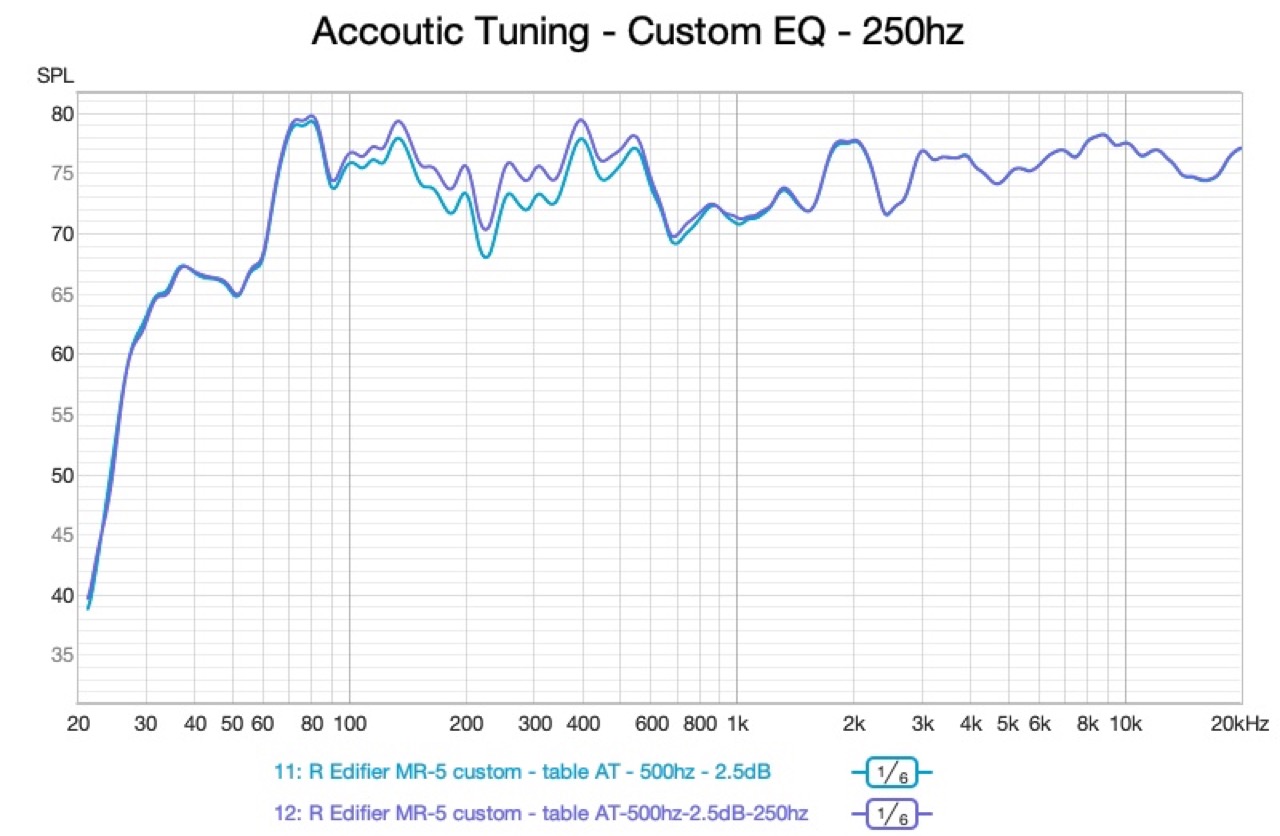 |
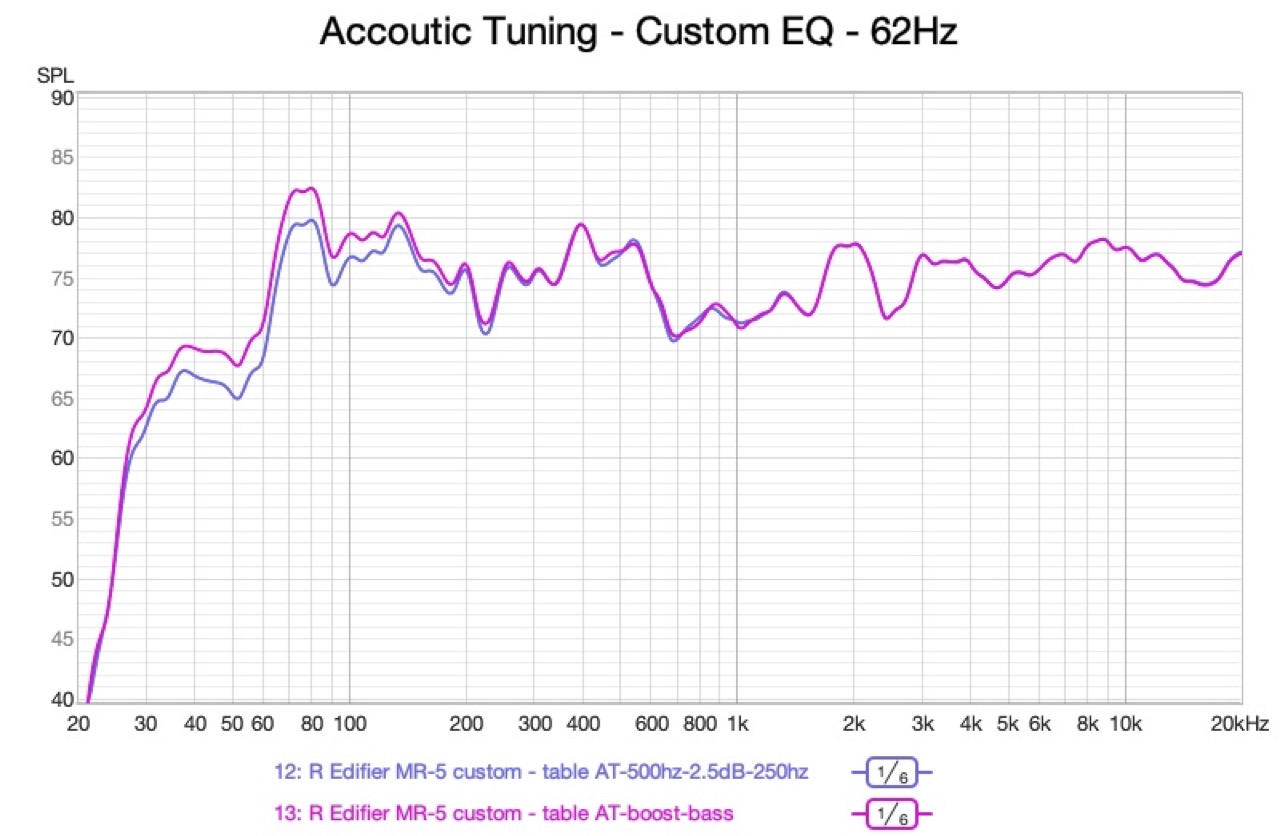
All three do what the app says, at close to the magnitude set, and all three are broader than a single narrow band. The 500 Hz cut of 2.5 dB shows up as 2.5 to 3 dB across roughly 180 to 650 Hz. The 250 Hz filter lifts 1.5 to 3 dB over 130 to 620 Hz, widest near 200 to 300 Hz. The 62 Hz boost gives about 3 dB at 75 Hz, effective from 30 to 150 Hz and gone by 160 Hz. That is a nine-band EQ behaving honestly, which is more than can be said for some.
The practical conclusion is the one that decides the rating: with these controls the MR5 becomes an exceptional speaker for its size. Out of the box it is not the most linear thing on the desk. With Desktop Control on, a little taken out around 500 Hz and the low end managed, it measures and sounds considerably better than its price suggests.
Compared with the Edifier M90 and the Kanto Uki
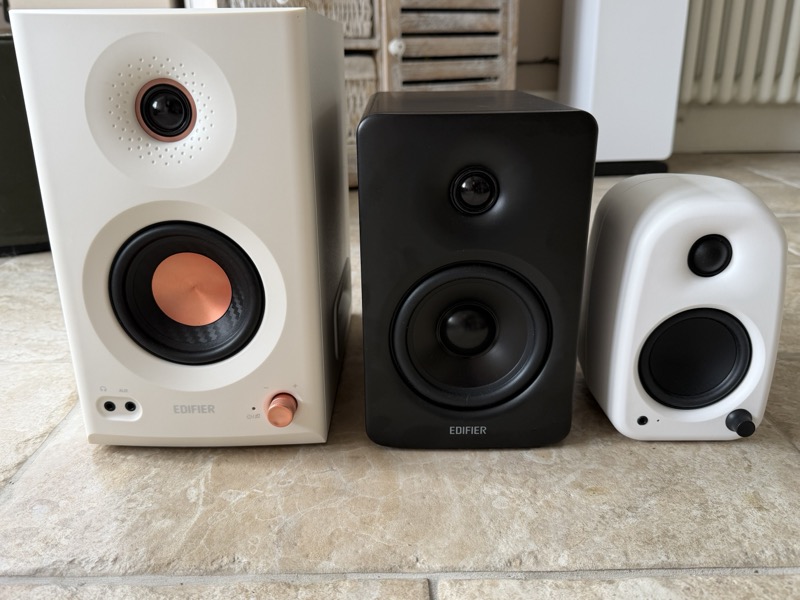
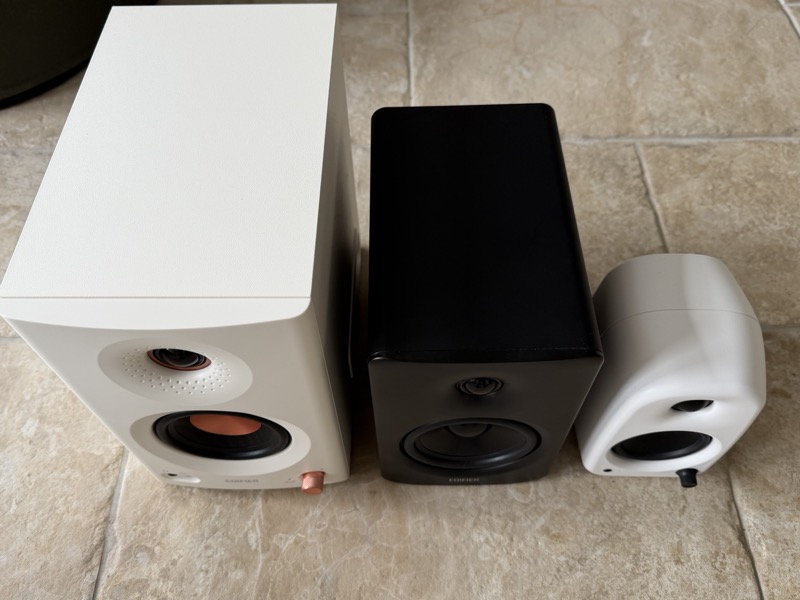
This is the comparison that matters most, because all three are answers to the same question - what do you put on a desk - at three different sizes:
 |
 |
Against the Edifier M90
Measured against the Edifier M90 under identical conditions - same stand, same 25 degrees off axis, same monitor preset - the result is closer than the size difference suggests:
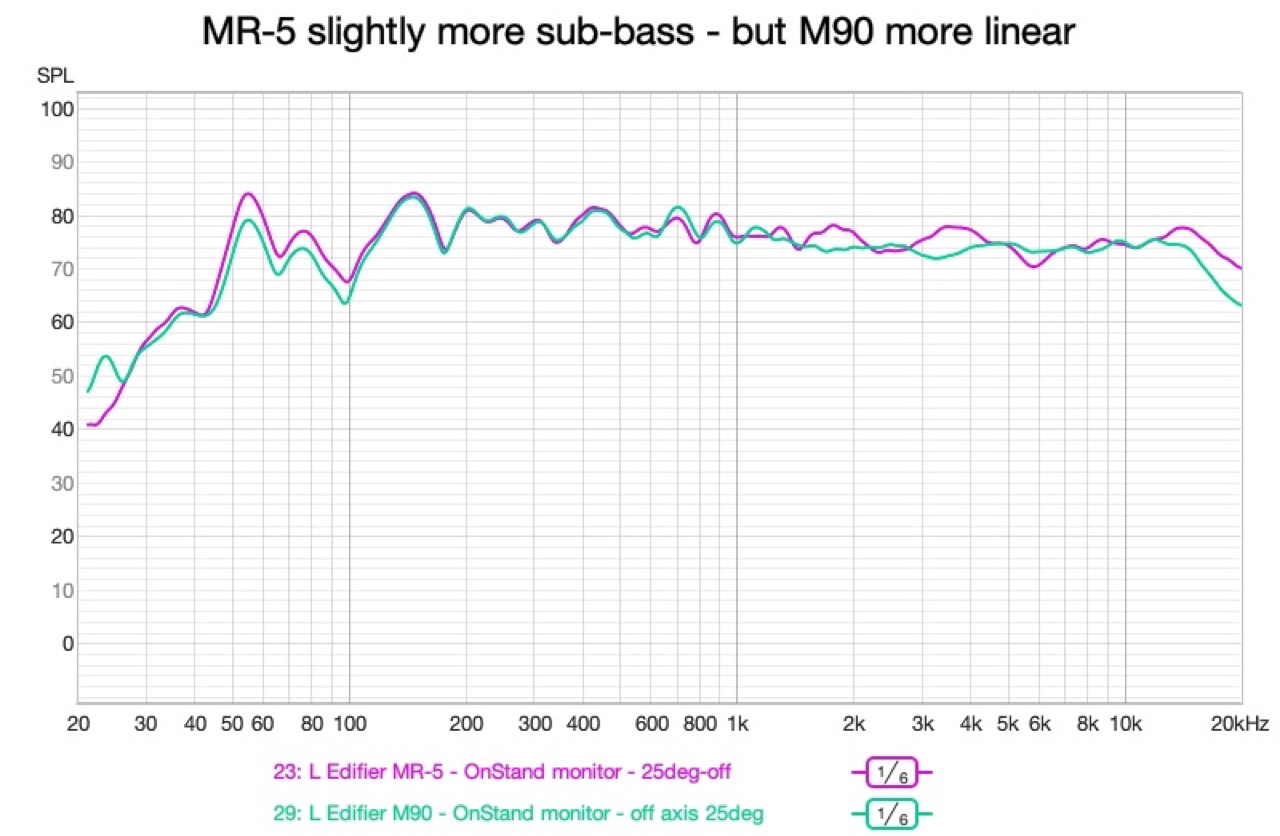
The MR5 has roughly 4 dB more output through 50 to 100 Hz. What it does not have is more extension: below about 45 Hz the two are essentially identical and both roll away together. So the MR5 buys upper-bass weight rather than depth, and the M90 gets almost as low from a much smaller cabinet. Above that the M90 is the more linear of the two, holding flatter through 2 to 5 kHz where the MR5 has a lift. That is the trade in one graph, and it points somewhere specific: if desk space is any kind of constraint, the M90 is the better buy, and you are giving up less than the size difference implies.
Against the Kanto Uki
The Kanto Uki is the third option and a different proposition again. It is the one to pick when desk area is at an absolute premium, and it does something neither Edifier does by including a headphone output. What it cannot do is bass: plan on a subwoofer under the desk if you want a full-range result from it.
None of these three is simply better than the others. The MR5 is the most capable once you use its controls, the M90 is the most sensible if the cabinet has to be small, and the Uki is the one that fits where nothing else will.
Rating Explanation
I rate the MR5 4 overall, 4 for features, 4 for price and 4 for measurements. Features get a 4 because I think I got spoilt by the M90, and measurements get a 4 because it is bigger and goes deeper than the M90. Overall my preference would still be for the M90, unless you have a little more space on your desk.
Conclusion
The MR5 is another exceptionally good desktop speaker. It is perfect for someone starting out and wanting fairly deep bass (for its size) with some great features. If space is a concern the M90 should also be considered, and I also personally prefer the look of the M90.
But I feel we are in the golden age of DSP enabled small desktop speakers. 20 years ago you would have needed something double the size to get decent performance. We live in amazing times for quality ‘pragmatically priced’ audio.